Disclosure: Jotter is ours.
Short answer
Our pick is Jotter: typed notes, checklists, handwriting, scans and voice notes, free with nothing locked, no account, and a Markdown export of everything. Already on your phone and genuinely good: Apple Notes. Read the fine print on Evernote (50 notes, one device) and Bear (no sync without a subscription) before you commit.
Almost every notes app on the App Store is listed as free, and almost none of them mean the same thing by it. Some are free until your fifty-first note. Some are free on one device, and syncing to your iPad is the subscription. Some are free because they come with an account you already have at Google or Microsoft, and your notes live on that company’s servers.
So this list is sorted by what the free version really gets you. For each app we read the App Store listing and the developer’s own pricing page in September 2026, and noted four things: what the free version caps, whether it needs an account, where your notes are stored, and whether you can get them back out in a format another app can open.
That last one is the question people skip. A notes app is where years of small things end up — door codes, gift ideas, the name of that wine. The best free notes app is also one you can leave.
At a glance
| App | Best for | Free version |
|---|---|---|
| Jotter (ours) | Opening the app and typing, with checklists, handwriting, scans and voice notes in the same note | Free, nothing locked |
| Apple Notes | Anyone who wants something good that is already installed | Free, built in |
| Google Keep | Quick lists and reminders shared between iPhone and Android | Free (Google account) |
| Microsoft OneNote | Ring-binder notebooks with sections and pages, shared with a Windows PC | Free (Microsoft account) |
| Obsidian | Building a long-term knowledge base out of linked notes | Free; paid sync optional |
| Simplenote | Fast, plain-text notes on every platform you own | Free (account) |
| Bear | Writers who want the nicest editor on Apple devices | Free; sync needs Pro |
| Evernote | People with an existing Evernote library | Free up to 50 notes |
The apps in detail
Jotter
Ours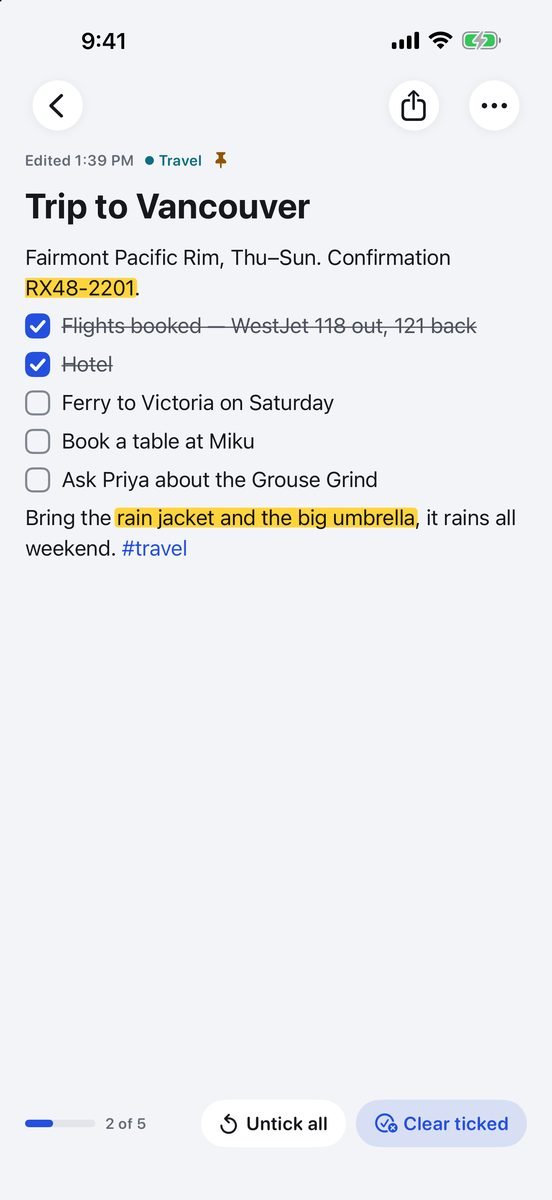
- Best for
- Opening the app and typing, with checklists, handwriting, scans and voice notes in the same note
- Highlights
- No title to invent, no folder to pick, no save button: the first line names the note, and it saves as you type
- Type
[]and a space for a checklist; write with Apple Pencil on iPad, or a finger on iPhone, on lined, grid or dotted paper - Handwriting, the text in photos and voice notes are read on the device, so search finds all of them
- No account and no server of ours: notes sync through your own iCloud, and the whole library exports as Markdown files
- Pricing
- Free, no subscription — an optional tip in Settings unlocks nothing
- Watch out
- iPhone and iPad only, on iOS 18 or later: no Mac app yet, no Android or web version, and no shared notes.
Apple Notes
- Best for
- Anyone who wants something good that is already installed
- Highlights
- Checklists, tables, document scanning, sketches and locked notes, with nothing to install
- Records audio with a live transcript on iPhone 12 and later
- Share a note or a whole folder so other people can edit it with you
- Since iOS 26, notes import and export as Markdown
- Pricing
- Free, built in — syncs through iCloud, which includes 5 GB free
- Watch out
- Apple devices, plus iCloud.com in a browser, and nothing native for Android or Windows. Markdown export is one note at a time; there is no button that hands you the whole library.
Google Keep
- Best for
- Quick lists and reminders shared between iPhone and Android
- Highlights
- Notes as coloured cards, with checklists, labels and reminders
- The same notes on iPhone, Android and any web browser
- Share a list with anyone who has a Google account
- No paid tier inside the app
- Pricing
- Free, with a Google account
- Watch out
- Needs a Google account, and your notes live on Google’s servers. Cards suit lists and short notes more than long writing, and the full export runs through Google Takeout rather than the app.
Microsoft OneNote
- Best for
- Ring-binder notebooks with sections and pages, shared with a Windows PC
- Highlights
- Notebooks, sections and pages, like a ring binder
- Type, draw or handwrite anywhere on the page
- Apps for iPhone, iPad, Mac, Windows, Android and the web
- Free with a Microsoft account
- Pricing
- Free with a Microsoft account (5 GB of OneDrive storage); Microsoft 365 adds more
- Watch out
- Built around notebooks and pages, which is a lot of structure for a two-line note, and everything syncs through OneDrive under your Microsoft account.
Obsidian
- Best for
- Building a long-term knowledge base out of linked notes
- Highlights
- Notes are ordinary Markdown files in a folder, readable by any app
- Links between notes, backlinks and a graph of how they connect
- Keep the vault in iCloud Drive and it reaches your Mac for free
- No account needed
- Pricing
- Free; Obsidian Sync is $4 a month billed yearly, or $5 monthly
- Watch out
- Built for building a knowledge base rather than catching a thought: it asks more of you than a quick notes app, and much of its power lives in plugins.
Simplenote
- Best for
- Fast, plain-text notes on every platform you own
- Highlights
- Text, tags and search, and very little else to learn
- Apps for iPhone, Android, Mac, Windows, Linux and the web
- Markdown preview and version history
- No paid tier
- Pricing
- Free, with a Simplenote account
- Watch out
- Text only: no photos, attachments or handwriting. The iPhone app has not been updated since November 2024.
Bear
- Best for
- Writers who want the nicest editor on Apple devices
- Highlights
- The best-looking editor on this list, with themes and nested tags
- Markdown underneath, so your formatting is plain text
- iPhone, iPad and Mac
- No Bear account: Pro syncs through your own iCloud
- Pricing
- Free on one device; Bear Pro is $2.99 a month or $29.99 a year
- Watch out
- The free version does not sync, so your iPhone and Mac stay separate until you pay. Apple devices only.
Evernote
- Best for
- People with an existing Evernote library
- Highlights
- Strong search, including the text inside images
- Web clipper, tasks and a calendar alongside your notes
- Apps on every major platform
- Pricing
- Free up to 50 notes and one notebook, syncing on one device; paid plans after that
- Watch out
- The free plan stops at 50 notes, one notebook and one device, which makes it a trial rather than a free app, and its paid plans cost more than anything else on this list.
The question to ask before you commit
How would you leave? It sounds pessimistic, but it is the quickest way to tell a free app from a free trial.
- Jotter writes every note as a Markdown file, with its photos and recordings beside it, from Settings → Export all notes.
- Obsidian never needs exporting: the notes already are Markdown files.
- Apple Notes has exported Markdown since iOS 26, one note at a time — fine for ten notes, slow for a thousand.
- Simplenote and Bear both export plain text or Markdown.
- Google Keep, OneNote and Evernote hand you their own formats, through their own tools.
Then look at where the notes sit while you use them. Jotter, Apple Notes and Bear keep them in your own iCloud. Obsidian keeps them in files you choose. Keep, OneNote, Simplenote and Evernote keep them on their own company’s servers, under an account with that company. None of that makes an app bad; it just decides who else is part of your notes.
Common questions
What are the best iPhone apps for notes?
Our pick is Jotter: typed notes, checklists, handwriting, scans and voice notes, free with nothing locked and no account. Apple Notes is already on your phone and genuinely good. Evernote’s free plan is 50 notes on one device, and Bear needs a subscription to sync.
What is the best free notes app for iPhone?
Apple Notes is the best one already on your phone, and it costs nothing. Jotter, ours, is our pick if you want typing, checklists and handwriting in one place with nothing locked, no account and a full Markdown export.
Is Apple Notes free?
Yes. It is built into iOS and syncs through iCloud, which includes 5 GB of free storage shared with your photos and backups. Photos and scans in your notes count toward that 5 GB.
Which free notes apps work without an account?
Jotter and Obsidian need no account at all, and Apple Notes and Bear use the Apple Account you already have. Google Keep, OneNote, Simplenote and Evernote each need an account with their company.
Does Evernote still have a free plan?
Yes, but it now stops at 50 notes and one notebook, and it syncs on one device. Beyond that it is a subscription.
Can I export all my notes from Apple Notes?
Not in one go on iPhone. Since iOS 26 you can export a note as Markdown from the Share menu, one note at a time.
Published · Updated · No affiliate links











 MMA.
MMA. Trending
 Bold
Bold Top
Top