Disclosure: Jotter is ours, and it is listed first. It gets the same four fields as every other app, including its drawbacks.
Short answer
If you like Apple Notes but want it faster and easier to leave, our pick is Jotter — no title, no folder, saves as you type, exports as Markdown, free. For Markdown power, Obsidian.
Apple Notes is genuinely good and costs nothing. The complaints people have are specific: notes pile up untitled in folders, searching handwriting is hit and miss, and getting a thousand notes out is painful.
If none of those bother you, stay. If one does, these are the apps that fix it.
Switch to Jotter if
- You want every note to export cleanly
- You want search to read your handwriting and photos
- You want to type without choosing a folder
Stay with Apple Notes if
- You share notes with other iPhone users
- You use tables and Quick Note on Mac
- It already works for you
At a glance
| App | Best for | Pricing |
|---|---|---|
| Jotter (ours) | Opening the app and typing — with checklists, handwriting, scans and voice notes in the same note | Free, no subscription — an optional tip unlocks nothing |
| Apple Notes | Apple users who want free notes with sharing | Included with Apple devices at no extra cost |
| Obsidian | People who want notes as files they own | Free app; optional paid Sync |
| Bear | Writers who want tags and Markdown | Free on one device; Bear Pro for sync |
| UpNote | People who want pretty notebooks and a lock | Free tier plus Premium |
| Simplenote | People who need notes on Android and Windows too | Free |
The apps in detail
Jotter
Ours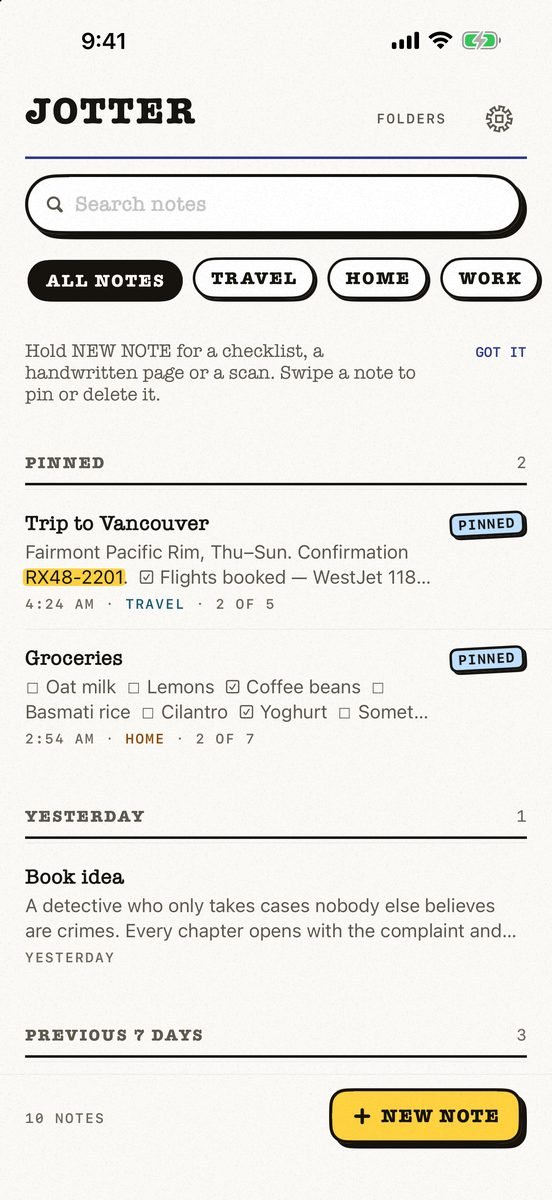
- Best for
- Opening the app and typing — with checklists, handwriting, scans and voice notes in the same note
- Highlights
- No title, no folder, no save button — the first line names the note
- Checklists, Apple Pencil handwriting, scans and voice notes
- Search reads handwriting and text in photos, on the device
- Syncs through your own iCloud; exports as Markdown
- Pricing
- Free, no subscription — an optional tip unlocks nothing
- Watch out
- iPhone and iPad only, on iOS 18 or later: no Mac app yet, no Android or web version, and no shared notes.
Apple Notes
- Best for
- Apple users who want free notes with sharing
- Highlights
- Folders, tags and smart folders
- Checklists, tables, scans and Pencil
- Shared notes and iCloud sync
- Pricing
- Included with Apple devices at no extra cost
- Watch out
- Exporting in bulk is awkward.
Obsidian
- Best for
- People who want notes as files they own
- Highlights
- Plain Markdown files
- Links and graph view
- iCloud vaults
- Pricing
- Free app; optional paid Sync
- Watch out
- More setup.
Bear
- Best for
- Writers who want tags and Markdown
- Highlights
- No account
- Tags and links
- Themes (Pro)
- Pricing
- Free on one device; Bear Pro for sync
- Watch out
- Sync is Pro.
UpNote
- Best for
- People who want pretty notebooks and a lock
- Highlights
- Notebooks and tags
- Face ID lock
- Offline
- Pricing
- Free tier plus Premium
- Watch out
- Most features Premium.
Simplenote
- Best for
- People who need notes on Android and Windows too
- Highlights
- Free sync everywhere
- Tags and pins
- Publish to the web
- Pricing
- Free
- Watch out
- Plain text only.
The honest verdict
For most people, Apple Notes is enough. The reasons to switch are narrow: owning your notes as files, faster capture, or search that reads everything.
Jotter is built on those three: it saves as you type, reads handwriting and photo text on the device, and exports your whole library as Markdown.
Common questions
Is there anything better than Apple Notes?
For most people Apple Notes is enough; Jotter, Obsidian and Bear are better at specific things like export and Markdown.
Can I export Apple Notes?
One at a time easily; in bulk it takes a workaround. Jotter exports its whole library as Markdown.
Which notes app searches handwriting?
Jotter reads handwriting on the device so search finds it.
App Store listings checked on 27 September 2026. Prices change — each entry describes how an app is paid for rather than a number that goes stale.
Published · No affiliate links










 MMA.socialUFC fan ratings
 TrendingPunjabiPunjabi music charts
 BoldOpinionAnonymous hot takes