Disclosure: Jotter is ours, and it is listed first. It gets the same four fields as every other app, including its drawbacks.
Short answer
For handwriting mixed with typed notes, checklists and scans — free — our pick is Jotter. For heavy PDF study and annotation, Notability (it brought back a one-time Classic plan) or Noteshelf.
Goodnotes is the default handwriting app on iPad, now with AI transcription, text documents and summaries. The free version limits how many notebooks you can keep; the full app is paid.
If you write whole lecture notebooks and mark up PDFs, stay in the Goodnotes/Notability world. If you jot, sketch and list, a lighter app may suit you better.
Switch to Jotter if
- You write quick notes, not whole notebooks
- You want handwriting and typing in the same note
- You hit the free notebook limit
Stay with Goodnotes if
- You annotate PDFs and slides for class
- You rely on its AI meeting notes
- You use its paper templates and planners
At a glance
| App | Best for | Pricing |
|---|---|---|
| Jotter (ours) | Opening the app and typing — with checklists, handwriting, scans and voice notes in the same note | Free, no subscription — an optional tip unlocks nothing |
| Goodnotes | Students and professionals who fill notebooks and annotate PDFs | Free version with a notebook limit; paid plans for unlimited |
| Notability | Students who record lectures while they write | Free; subscription or one-time Classic plan |
| Noteshelf 3 | People who want realistic pens and custom notebooks | Free tier plus Premium |
| Apple Notes | People who want free handwriting inside ordinary notes | Included with Apple devices at no extra cost |
| Apple Freeform | People who think on an endless canvas | Included with Apple devices at no extra cost |
The apps in detail
Jotter
Ours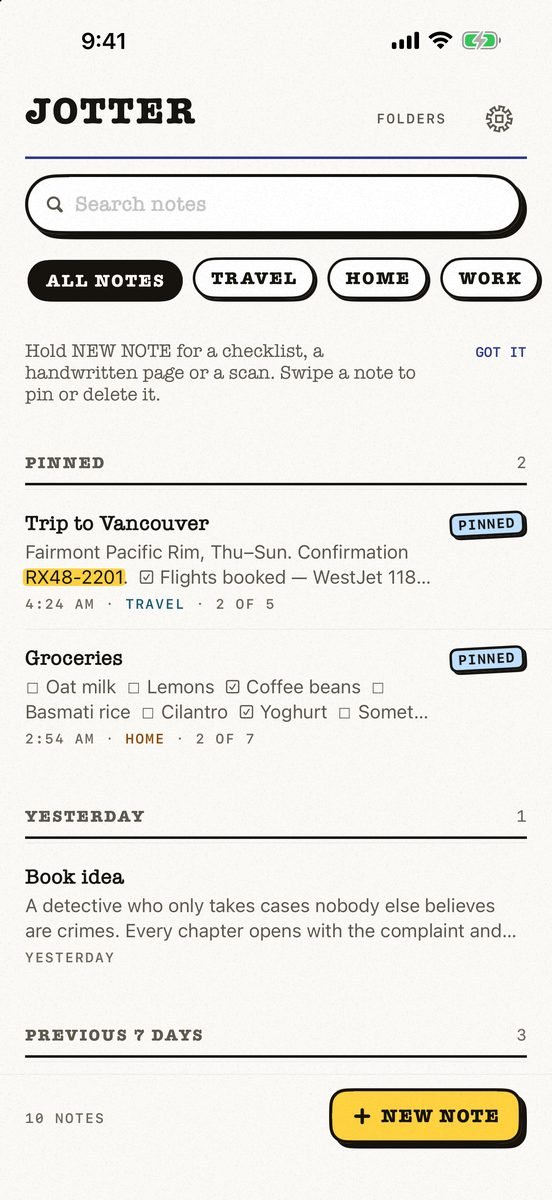
- Best for
- Opening the app and typing — with checklists, handwriting, scans and voice notes in the same note
- Highlights
- No title, no folder, no save button — the first line names the note
- Checklists, Apple Pencil handwriting, scans and voice notes
- Search reads handwriting and text in photos, on the device
- Syncs through your own iCloud; exports as Markdown
- Pricing
- Free, no subscription — an optional tip unlocks nothing
- Watch out
- iPhone and iPad only, on iOS 18 or later: no Mac app yet, no Android or web version, and no shared notes.
Goodnotes
- Best for
- Students and professionals who fill notebooks and annotate PDFs
- Highlights
- Handwritten notebooks with templates
- AI transcription, summaries and meeting notes
- iCloud sync across iPad, iPhone and Mac
- Pricing
- Free version with a notebook limit; paid plans for unlimited
- Watch out
- The free version holds only a few notebooks.
Notability
- Best for
- Students who record lectures while they write
- Highlights
- Audio synced to the moment you write
- iPad, iPhone, Mac and the web
- A one-time Classic plan, per the listing
- Pricing
- Free; subscription or one-time Classic plan
- Watch out
- Auto-backup, iCloud sync and AI tools are in the upgrade.
Noteshelf 3
- Best for
- People who want realistic pens and custom notebooks
- Highlights
- Realistic pens, highlighters and covers
- PDF markup and audio
- iCloud sync across iPad, iPhone and Mac
- Pricing
- Free tier plus Premium
- Watch out
- Unlimited notebooks and handwriting recognition are Premium.
Apple Notes
- Best for
- People who want free handwriting inside ordinary notes
- Highlights
- Apple Pencil handwriting and sketches
- Scans, checklists and tables
- iCloud sync
- Pricing
- Included with Apple devices at no extra cost
- Watch out
- No notebook pages, templates or PDF study tools.
Apple Freeform
- Best for
- People who think on an endless canvas
- Highlights
- Infinite whiteboard with pen, shapes and images
- Share a board to collaborate
- iCloud sync
- Pricing
- Included with Apple devices at no extra cost
- Watch out
- A whiteboard, not a notebook.
Notebook app or notes app?
Goodnotes, Notability and Noteshelf are notebook apps: pages, covers, PDFs. Jotter and Apple Notes are notes apps where handwriting is one thing a note can hold.
In Jotter you write with Apple Pencil on iPad or a finger on iPhone on lined, grid or dotted paper, and search reads your handwriting on the device.
Common questions
Is Goodnotes free?
Goodnotes has a free version with a limited number of notebooks; the full app is paid.
What is a free alternative to Goodnotes?
Jotter or Apple Notes for handwriting in everyday notes; Notability’s and Noteshelf’s free tiers for notebook-style study.
Does Jotter work with Apple Pencil?
Yes — on iPad with Apple Pencil, and with a finger on iPhone.
App Store listings checked on 27 September 2026. Prices change — each entry describes how an app is paid for rather than a number that goes stale.
Published · No affiliate links









 MMA.socialUFC fan ratings
 TrendingPunjabiPunjabi music charts
 BoldOpinionAnonymous hot takes