Disclosure: Jotter is ours, and it is listed first. It gets the same four fields as every other app, including its drawbacks.
Short answer
Our pick is Jotter — free notes, checklists, handwriting and scans that sync through your own iCloud, with no account. If you need Windows, Android or the web, Simplenote is the free cross-platform choice.
Evernote is still a capable app — it clips web pages, scans documents, transcribes meetings with AI and syncs to Windows and the web. But most people searching for an alternative have hit the same wall: the free plan no longer holds a real notes library.
This guide is for moving your everyday notes somewhere that stays free. Each app below is judged on three things: is there a usable free tier, where do your notes live, and can you get them back out.
Switch to Jotter if
- You mostly write quick notes and checklists
- You don’t need your notes on a Windows PC
- You want your notes out of yet another company account
Stay with Evernote if
- You depend on the web clipper and Windows app
- You search years of scanned receipts and PDFs
- You use Evernote’s AI transcription for meetings
At a glance
| App | Best for | Pricing |
|---|---|---|
| Jotter (ours) | Opening the app and typing — with checklists, handwriting, scans and voice notes in the same note | Free, no subscription — an optional tip unlocks nothing |
| Evernote | People who clip, scan and search a large archive across iPhone, Mac, Windows and the web | Free plan with tight limits; paid plans by subscription |
| Apple Notes | People who only use Apple devices and want free notes with no setup | Included with Apple devices at no extra cost |
| Simplenote | People who want plain, fast notes that sync free to every platform | Free |
| Obsidian | People who want notes as plain Markdown files they fully own, linked like a wiki | Free app; optional paid add-ons such as Obsidian Sync |
| UpNote | People who want a pretty, Evernote-style notebook app with a lock for private notes | Free tier plus a Premium subscription |
| Notion | People who want notes, tasks and databases in one shared workspace | Free plan plus paid plans and AI add-ons |
The apps in detail
Jotter
Ours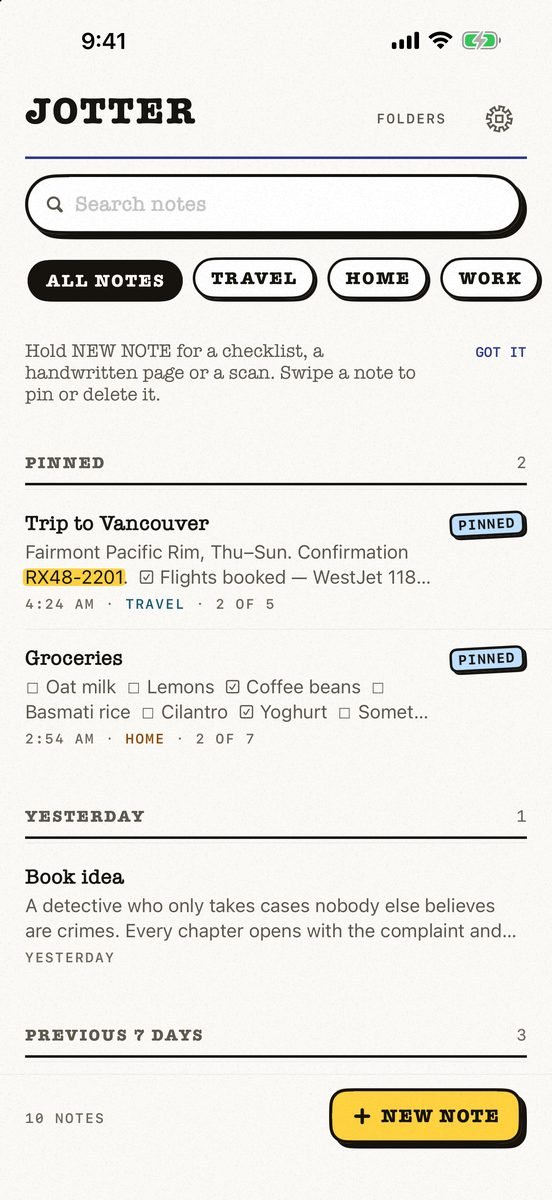
- Best for
- Opening the app and typing — with checklists, handwriting, scans and voice notes in the same note
- Highlights
- No title, no folder, no save button — the first line names the note
- Checklists, Apple Pencil handwriting, scans and voice notes
- Search reads handwriting and text in photos, on the device
- Syncs through your own iCloud; exports as Markdown
- Pricing
- Free, no subscription — an optional tip unlocks nothing
- Watch out
- iPhone and iPad only, on iOS 18 or later: no Mac app yet, no Android or web version, and no shared notes.
Evernote
- Best for
- People who clip, scan and search a large archive across iPhone, Mac, Windows and the web
- Highlights
- Web clipping, PDFs, scans and emails in one searchable place
- AI transcription and summaries of recordings
- Syncs across iPhone, iPad, Mac, Windows and the web, and works offline
- Pricing
- Free plan with tight limits; paid plans by subscription
- Watch out
- The free plan is small by today’s standards, so a real library pushes you onto a subscription.
Apple Notes
- Best for
- People who only use Apple devices and want free notes with no setup
- Highlights
- Folders, tags, checklists, tables and document scanning
- Handwriting and sketches with Apple Pencil
- iCloud sync with no extra account
- Pricing
- Included with Apple devices at no extra cost
- Watch out
- Apple-only apart from a basic iCloud.com page, and export is clumsy if you ever leave.
Simplenote
- Best for
- People who want plain, fast notes that sync free to every platform
- Highlights
- Syncs across any computer, phone or tablet for free
- Tags, pins and instant search
- Share notes or publish one to the web
- Pricing
- Free
- Watch out
- Plain text only — no images, scans or handwriting, and you log in with an email or WordPress.com account.
Obsidian
- Best for
- People who want notes as plain Markdown files they fully own, linked like a wiki
- Highlights
- Works on a local folder of plain Markdown files
- Graph view, community plugins and themes
- iCloud vaults for syncing between Apple devices
- Pricing
- Free app; optional paid add-ons such as Obsidian Sync
- Watch out
- It takes setting up, and it is built for writing and linking, not scanning and clipping.
UpNote
- Best for
- People who want a pretty, Evernote-style notebook app with a lock for private notes
- Highlights
- Notebooks, tags and a clean editor with themes
- Face ID lock for private notes and journals
- Syncs across devices and works offline
- Pricing
- Free tier plus a Premium subscription
- Watch out
- The full feature set is behind Premium.
Notion
- Best for
- People who want notes, tasks and databases in one shared workspace
- Highlights
- Pages, databases, tasks and projects together
- Built for teams and shared workspaces
- Notion AI for writing, summaries and questions about your content
- Pricing
- Free plan plus paid plans and AI add-ons
- Watch out
- Much heavier than Evernote for quick notes, and it needs an account and a connection for most things.
Before you move a big Evernote library
Evernote exports notebooks as .enex files, and Apple Notes, Obsidian (through its importer plugin) and UpNote can read them. Move your active notebooks first and keep the old archive exported somewhere safe rather than migrating ten years at once.
And be honest about what you use. Most people use Evernote as a notes app; a few use it as a scanner, clipper and filing cabinet. Only the second group really needs Evernote.
Common questions
Is Evernote still free?
Evernote still has a free plan, but it is limited; most people with a real library need a paid plan.
What is the best free alternative to Evernote on iPhone?
Jotter or Apple Notes if you only use Apple devices; Simplenote if you need your notes on Windows, Android or the web as well.
Can I import my Evernote notes?
Export notebooks from Evernote as .enex files. Apple Notes, UpNote and Obsidian (with its importer) can read them.
App Store listings checked on 27 September 2026. Prices change — each entry describes how an app is paid for rather than a number that goes stale.
Published · No affiliate links









 MMA.socialUFC fan ratings
 TrendingPunjabiPunjabi music charts
 BoldOpinionAnonymous hot takes
 brolic.ioGym leaderboards