Disclosure: ScrollCop is ours, and it is listed first. It gets the same four fields as every other app, including its drawbacks.
Short answer
Our pick is ScrollCop — the same idea as Brick, but the key is a friend instead of a gadget, and it is free. If the physical tap is what works for you, Brick is worth buying once.
Brick is a clever idea: a small physical device paired with an app. Tap your phone on the Brick to lock distracting apps; tap again to unlock. Its listing is clear there is no subscription — you buy the Brick, and the app comes with it.
The magic is not the plastic. It is that unlocking needs something outside your own willpower. Here are other ways to get that on an iPhone.
Switch to ScrollCop if
- You don’t want to buy or carry a device
- A friend would happily hold your key
- You want it free
Stay with Brick if
- You love the ritual of a physical tap
- You live alone and want no one involved
- You already own a Brick
At a glance
| App | Best for | Pricing |
|---|---|---|
| ScrollCop (ours) | People who keep tapping through their own limits and want a friend to hold the key | Free, with no subscription and no in-app purchases |
| Brick | People who want a physical object to lock and unlock their phone | Buy the physical Brick once; no subscription |
| Opal | People who want deep-focus blocks on a schedule | Free core app; Opal Pro subscription |
| Jomo | People who want scheduled category blocks | Free tier plus subscriptions or a one-time purchase |
| ScreenZen | People who want free friction instead of a lock | Free |
| Apple Screen Time | People who can hand the passcode to someone else | Included with iOS at no extra cost |
The apps in detail
ScrollCop
Ours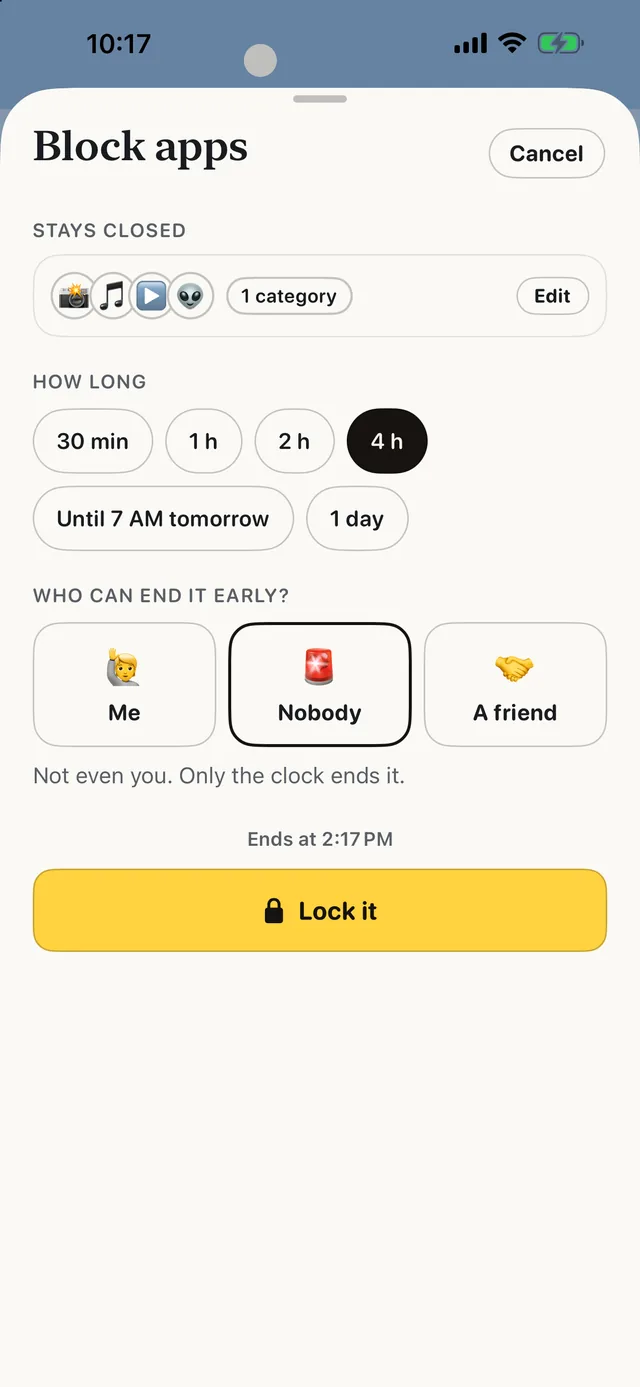
- Best for
- People who keep tapping through their own limits and want a friend to hold the key
- Highlights
- Real blocking built on Apple’s Screen Time
- The friend key: only a friend’s code ends a locked block early
- SOS for the urge, a Boredom Gym, and (from 3.0) 165 things to do instead
- No account, no server, no ads
- Pricing
- Free, with no subscription and no in-app purchases
- Watch out
- iPhone only, on iOS 18 or later — no Android, no Mac and no browser extension. It blocks whole apps and websites, not parts of them, so it can’t hide just Reels or Shorts.
Brick
- Best for
- People who want a physical object to lock and unlock their phone
- Highlights
- A physical Brick you tap to start and end focus
- Blocks any app (except the dialer) and chosen websites
- No subscription; the app comes with the device
- Pricing
- Buy the physical Brick once; no subscription
- Watch out
- You pay for the hardware, and leaving the Brick at home means no unlocking.
Opal
- Best for
- People who want deep-focus blocks on a schedule
- Highlights
- Scheduled blocks and limits
- Block screens with quotes
- Leaderboards
- Pricing
- Free core app; Opal Pro subscription
- Watch out
- The hardest modes are Pro.
Jomo
- Best for
- People who want scheduled category blocks
- Highlights
- Block whole categories
- Schedules and mindful breaks
- Insights
- Pricing
- Free tier plus subscriptions or a one-time purchase
- Watch out
- Most rules need a paid plan.
ScreenZen
- Best for
- People who want free friction instead of a lock
- Highlights
- Growing delay before opening
- Scrolling interruptions
- Per-app goals
- Pricing
- Free
- Watch out
- You can always wait it out.
Apple Screen Time
- Best for
- People who can hand the passcode to someone else
- Highlights
- App limits and Downtime
- A passcode only someone else knows
- Built in
- Pricing
- Included with iOS at no extra cost
- Watch out
- Resetting the passcode is possible if you are determined.
A friend is the free Brick
Brick works because the unlock lives outside your head. A person does that just as well — often better, because they can tell you to go to sleep.
In ScrollCop, a friend holds your key: scan each other’s phones, send a link, or let them set a passcode. Every new block is locked to them. An emergency unlock exists, and makes you wait.
Common questions
Does Brick need a subscription?
No. You buy the physical Brick, and the app is included with no subscription.
Is there a free alternative to Brick?
ScrollCop gives the unlock to a friend instead of a device, free with no subscription.
What if I don’t have anyone to hold the key?
Try a delay app like ScreenZen, or buy a Brick — a device you leave in another room works too.
App Store listings checked on 27 September 2026. Prices change — each entry describes how an app is paid for rather than a number that goes stale.
Published · No affiliate links









 MMA.socialUFC fan ratings
 TrendingPunjabiPunjabi music charts
 BoldOpinionAnonymous hot takes