Disclosure: Reset is ours, and it is listed first. It gets the same four fields as every other app, including its drawbacks.
Short answer
Our pick is Reset — Screen Time blocking where a friend holds the key, free with no subscription. If you want friction instead of a lock, ScreenZen and one sec are the free options.
Opal is the most popular screen-time app on the iPhone, with app blocks, limits, leaderboards and rewards. The free app gets you started; the harder blocks and extras are part of Opal Pro, a subscription.
All of these apps use Apple’s Screen Time system underneath, so they block equally well. What differs is how you get out: a timer, a pause, a breathing exercise — or another person.
Switch to Reset if
- You want strict blocks without paying monthly
- You keep tapping through your own blocks
- You don’t want leaderboards and gems
Stay with Opal if
- The gamification genuinely keeps you going
- You use Opal on your Mac too
- You like its reports and focus scores
At a glance
| App | Best for | Pricing |
|---|---|---|
| Reset (ours) | People who keep tapping through their own limits and want a friend to hold the key | Free, with no subscription and no in-app purchases |
| Opal | People who want a polished blocker with schedules, limits and a game layer | Free core app; Opal Pro subscription for more |
| ScreenZen | People who want free friction — a wait before an app opens — rather than a hard lock | Free |
| one sec | People who want a breathing pause before social apps, backed by research | Free for one app; one sec pro (annual, monthly or lifetime) for more |
| Jomo | People who want scheduled blocks and screen-time insights with a friendly tone | Free tier plus subscriptions or a one-time purchase |
| Freedom | People who want the same blocklist on phones and computers | Subscription after a 7-day free trial of Premium |
The apps in detail
Reset
Ours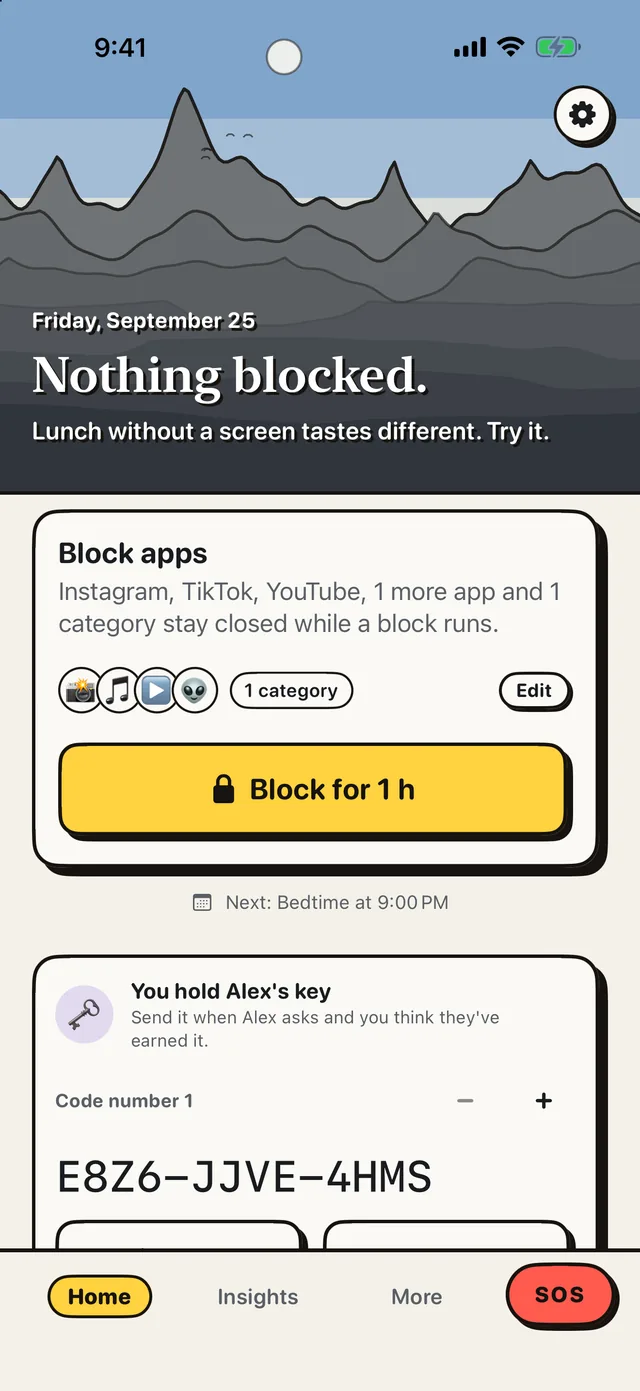
- Best for
- People who keep tapping through their own limits and want a friend to hold the key
- Highlights
- Real blocking built on Apple’s Screen Time
- The friend key: only a friend’s code ends a locked block early
- SOS for the urge and a 22-exercise Boredom Gym
- No account, no server, no ads
- Pricing
- Free, with no subscription and no in-app purchases
- Watch out
- iPhone only, on iOS 18 or later — no Android, no Mac and no browser extension. The friend key works best if you actually have someone to hold it; without one, a block ends only through the emergency unlock, which makes you wait.
Opal
- Best for
- People who want a polished blocker with schedules, limits and a game layer
- Highlights
- Scheduled blocks for apps and websites
- Daily app limits that block automatically
- Leaderboards, rewards and mindful block screens
- Pricing
- Free core app; Opal Pro subscription for more
- Watch out
- The strongest blocking modes and extras are Pro.
ScreenZen
- Best for
- People who want free friction — a wait before an app opens — rather than a hard lock
- Highlights
- A delay before a distracting app opens, growing each time
- Interrupts long scrolling sessions
- Per-app goals, optional blocks and day schedules
- Pricing
- Free
- Watch out
- It is friction, not a lock — a determined you can always wait it out.
one sec
- Best for
- People who want a breathing pause before social apps, backed by research
- Highlights
- A short pause every time you open a chosen app
- Research collaborations report app use dropping by 57% on average
- A free Safari extension for websites
- Pricing
- Free for one app; one sec pro (annual, monthly or lifetime) for more
- Watch out
- Only one app is free, and a pause is easy to skip when you really want in.
Jomo
- Best for
- People who want scheduled blocks and screen-time insights with a friendly tone
- Highlights
- Block apps and websites on a schedule
- Block whole categories — social, games, shopping
- Mindful breaks and usage insights
- Pricing
- Free tier plus subscriptions or a one-time purchase
- Watch out
- Many of the blocking rules need the paid plan.
Freedom
- Best for
- People who want the same blocklist on phones and computers
- Highlights
- Blocks apps and websites across all your devices
- Scheduled sessions that start automatically
- Focus sounds included
- Pricing
- Subscription after a 7-day free trial of Premium
- Watch out
- Not free beyond the trial.
Why a friend beats willpower
Every blocker on this list can be undone by the person who set it — at 11 p.m., that is the problem. The research-backed fix people keep reporting is commitment: someone else holds the key.
Reset builds on that. Your friend scans your phone or taps a link, and only their code ends a locked block early. Calls, Messages and Maps stay open, and an emergency unlock exists but makes you wait.
Common questions
Is Opal free?
Opal has a free app; its stronger blocking modes and extra features are part of the Opal Pro subscription.
What is the best free Opal alternative?
Reset for a hard block a friend holds the key to; ScreenZen for free friction without a lock.
Do these apps really block TikTok and Instagram?
Yes. They all use Apple’s Screen Time framework, so blocked apps show a shield instead of opening.
App Store listings checked on 27 September 2026. Prices change — each entry describes how an app is paid for rather than a number that goes stale.
Published · No affiliate links







 MMA.socialUFC fan ratings
 TrendingPunjabiPunjabi music charts
 BoldOpinionAnonymous hot takes
 brolic.ioGym leaderboards