Disclosure: ScrollCop is ours, and it is listed first. It gets the same four fields as every other app, including its drawbacks.
Short answer
If the pause is not enough, our pick is ScrollCop — a real block that only a friend can end early, free. If you like one sec’s pause but want it on every app for free, ScreenZen.
one sec has the best idea in the category: make opening a distracting app slightly annoying, and you open it far less. Its listing cites studies where app use dropped 57% on average. It is also free for one app only; more apps need one sec pro.
Some people find a pause is all they need. Others learn to breathe through it in two seconds. This guide sorts the alternatives by how much resistance they add.
Switch to ScrollCop if
- You want the pause on more than one app for free
- You have learned to skip the pause
- You want a hard stop at bedtime
Stay with one sec if
- One app is your only problem
- The pause genuinely works for you
- You use its Safari extension
At a glance
| App | Best for | Pricing |
|---|---|---|
| ScrollCop (ours) | People who keep tapping through their own limits and want a friend to hold the key | Free, with no subscription and no in-app purchases |
| one sec | People who want a gentle breathing pause before one problem app | Free for one app; one sec pro for more (annual, monthly or lifetime) |
| ScreenZen | People who want free delays on every distracting app | Free |
| Opal | People who want scheduled blocks with a game layer | Free core app; Opal Pro subscription for more |
| Jomo | People who want category blocks and gentle insights | Free tier plus subscriptions or a one-time purchase |
| Apple Screen Time | People who want built-in daily limits at no cost | Included with iOS at no extra cost |
The apps in detail
ScrollCop
Ours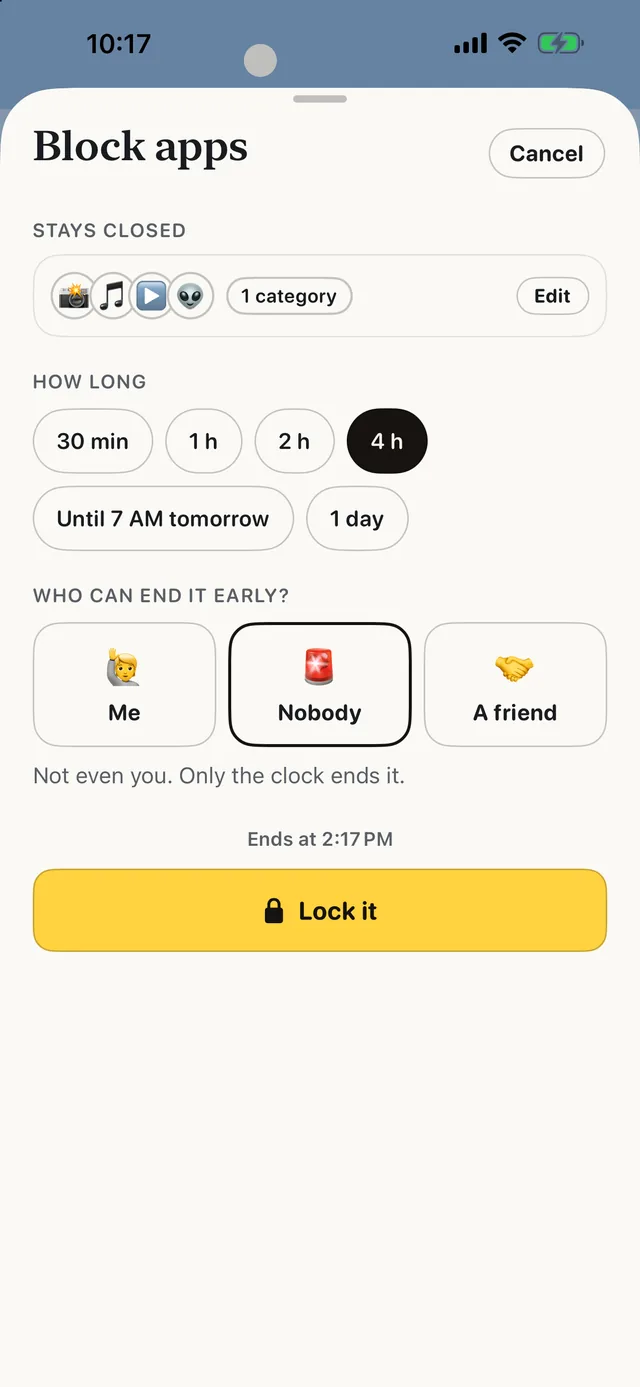
- Best for
- People who keep tapping through their own limits and want a friend to hold the key
- Highlights
- Real blocking built on Apple’s Screen Time
- The friend key: only a friend’s code ends a locked block early
- SOS for the urge, a Boredom Gym, and (from 3.0) 165 things to do instead
- No account, no server, no ads
- Pricing
- Free, with no subscription and no in-app purchases
- Watch out
- iPhone only, on iOS 18 or later — no Android, no Mac and no browser extension. It blocks whole apps and websites, not parts of them, so it can’t hide just Reels or Shorts.
one sec
- Best for
- People who want a gentle breathing pause before one problem app
- Highlights
- A pause each time you open a chosen app
- Backed by research collaborations
- A free Safari extension
- Pricing
- Free for one app; one sec pro for more (annual, monthly or lifetime)
- Watch out
- Only one app is free.
ScreenZen
- Best for
- People who want free delays on every distracting app
- Highlights
- Wait time before opening that grows each time
- Scrolling interruptions and per-app goals
- Different rules by day and time
- Pricing
- Free
- Watch out
- Friction only — it slows you down, it doesn’t stop you.
Opal
- Best for
- People who want scheduled blocks with a game layer
- Highlights
- App and website blocks on a schedule
- Daily limits that block when reached
- Leaderboards and rewards
- Pricing
- Free core app; Opal Pro subscription for more
- Watch out
- The harder modes are Pro.
Jomo
- Best for
- People who want category blocks and gentle insights
- Highlights
- Block whole categories of apps
- Schedules and mindful breaks
- Screen-time insights
- Pricing
- Free tier plus subscriptions or a one-time purchase
- Watch out
- Paid for most blocking rules.
Apple Screen Time
- Best for
- People who want built-in daily limits at no cost
- Highlights
- App limits and Downtime built into iOS
- A passcode can lock the limits
- Reports for every app
- Pricing
- Included with iOS at no extra cost
- Watch out
- “Ignore Limit” is one tap away unless someone else sets the passcode.
Pause, delay or lock?
There are three levels of friction. A pause (one sec) makes you notice. A delay (ScreenZen) makes you wait. A lock (ScrollCop, strict Opal modes) makes you ask someone.
Start with the lightest one that works. If you find yourself breathing through the pause on autopilot, move up a level.
Common questions
Is one sec free?
one sec is free for one app. Using it with more apps needs one sec pro, sold as an annual, monthly or lifetime unlock.
What app makes you wait before opening Instagram?
one sec (a breathing pause) and ScreenZen (a growing delay) both do, and ScreenZen is free for every app.
What if the pause stops working?
Try a lock someone else controls: ScrollCop lets a friend hold the code that ends a block early.
App Store listings checked on 27 September 2026. Prices change — each entry describes how an app is paid for rather than a number that goes stale.
Published · No affiliate links











 MMA.
MMA. Trending
 Bold
Bold Top
Top