Disclosure: ScrollCop is ours, and it is listed first. It gets the same four fields as every other app, including its drawbacks.
Short answer
Our pick is ScrollCop — it uses the same Screen Time system, but a friend holds the key, free. For free delays on every app, ScreenZen.
Apple’s Screen Time is free and built in. It also has the most famous button in digital wellbeing: Ignore Limit. Tap it, and the limit is gone for fifteen minutes or the day.
Every app below uses Apple’s Screen Time framework underneath, so the blocking itself is just as strong. What changes is how hard it is to get past.
Switch to ScrollCop if
- You keep tapping Ignore Limit
- You set your own passcode and know it
- You want blocks on a schedule that stick
Stay with Apple Screen Time if
- You only want usage reports
- A parent or partner already holds your passcode
- Limits work for you as they are
At a glance
| App | Best for | Pricing |
|---|---|---|
| ScrollCop (ours) | People who keep tapping through their own limits and want a friend to hold the key | Free, with no subscription and no in-app purchases |
| Apple Screen Time | People who want free built-in limits and reports | Included with iOS at no extra cost |
| ScreenZen | People who want free friction on every app | Free |
| one sec | People who want a breathing pause on one app | Free for one app; one sec pro for more |
| Opal | People who want schedules and a game layer | Free core app; Opal Pro subscription |
| Jomo | People who want category blocks | Free tier plus subscriptions or one-time purchase |
The apps in detail
ScrollCop
Ours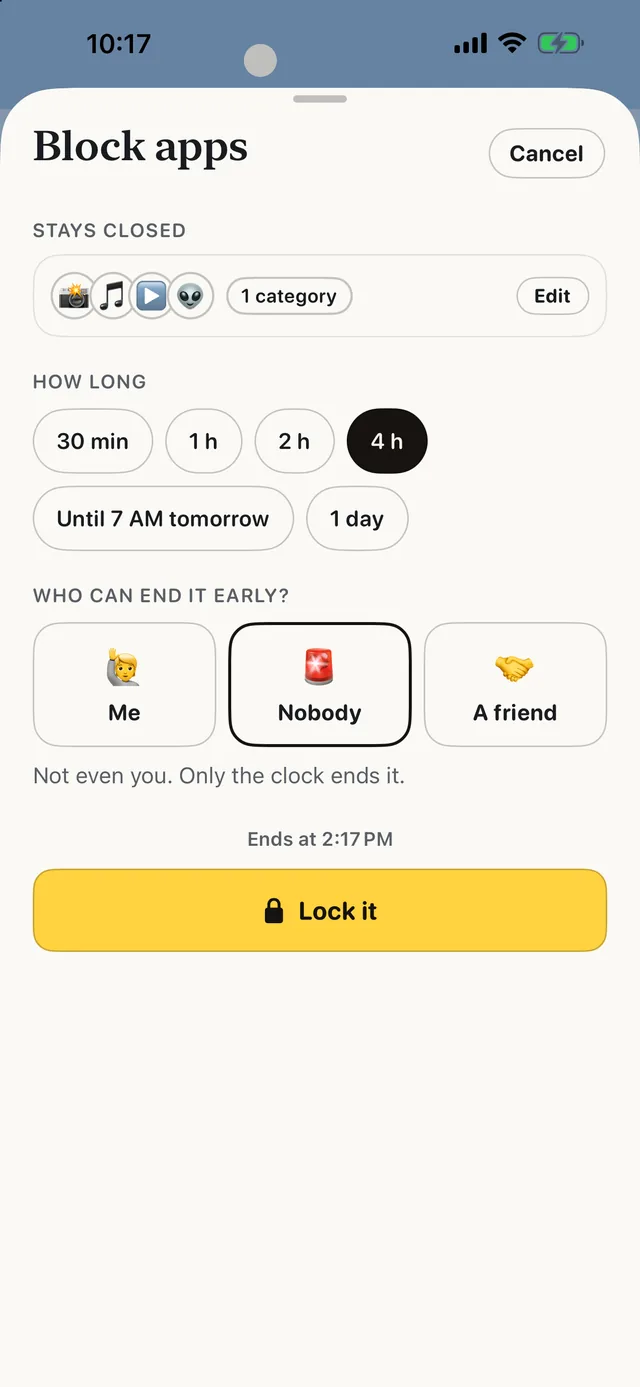
- Best for
- People who keep tapping through their own limits and want a friend to hold the key
- Highlights
- Real blocking built on Apple’s Screen Time
- The friend key: only a friend’s code ends a locked block early
- SOS for the urge, a Boredom Gym, and (from 3.0) 165 things to do instead
- No account, no server, no ads
- Pricing
- Free, with no subscription and no in-app purchases
- Watch out
- iPhone only, on iOS 18 or later — no Android, no Mac and no browser extension. It blocks whole apps and websites, not parts of them, so it can’t hide just Reels or Shorts.
Apple Screen Time
- Best for
- People who want free built-in limits and reports
- Highlights
- App limits, Downtime and reports
- Passcode-protected limits
- Built into iOS
- Pricing
- Included with iOS at no extra cost
- Watch out
- Ignore Limit is one tap away if you know the passcode.
ScreenZen
- Best for
- People who want free friction on every app
- Highlights
- Growing delay before opening
- Scrolling interruptions
- Per-app goals
- Pricing
- Free
- Watch out
- You can wait it out.
one sec
- Best for
- People who want a breathing pause on one app
- Highlights
- A pause before opening
- Research-backed
- Safari extension
- Pricing
- Free for one app; one sec pro for more
- Watch out
- Only one app free.
Opal
- Best for
- People who want schedules and a game layer
- Highlights
- Scheduled blocks and limits
- Block screens
- Leaderboards
- Pricing
- Free core app; Opal Pro subscription
- Watch out
- Harder modes are Pro.
Jomo
- Best for
- People who want category blocks
- Highlights
- Whole categories
- Schedules
- Insights
- Pricing
- Free tier plus subscriptions or one-time purchase
- Watch out
- Most rules paid.
The passcode problem
Screen Time works best when someone else sets the passcode — parents know this. Adults usually set their own, which is why it fails at 11 p.m.
ScrollCop turns that trick into an app: a friend scans your phone or taps a link, and only their code ends a locked block early.
Common questions
Why doesn’t Screen Time work for me?
Usually because you know the passcode, so Ignore Limit is always available.
Is there something stronger than Screen Time?
Apps like ScrollCop use Screen Time underneath but hand the unlock to a friend.
Are these apps safe?
They use Apple’s Screen Time framework, which keeps app usage data on the device.
App Store listings checked on 27 September 2026. Prices change — each entry describes how an app is paid for rather than a number that goes stale.
Published · No affiliate links









 MMA.socialUFC fan ratings
 TrendingPunjabiPunjabi music charts
 BoldOpinionAnonymous hot takes