Disclosure: Jotter is ours. The advice works with any app, or with pen and paper.
In short
Don’t file everything. Pin the few notes you use daily, add a #tag when something belongs to a group, make a folder only when a set of notes asks for a name, and rely on search for the rest. Jotter is built this way: everything is always in All Notes.
- Pin what you open every day.
- Tags beat folders — a note can have several.
- Search should find it anyway, even in photos and handwriting.
Stop organising before you write
The fastest way to lose a thought is to decide where it goes first. Write it down, then organise later — or never. A good notes app makes “never” fine.
Pins for the daily few
Groceries, the running to-do, the Wi-Fi password for guests: pin them. Five pinned notes cover most of what you open every day.
Tags instead of folders
A folder forces a note to live in one place. A tag lets it belong to several: a recipe can be #dinner and #mum. Use a handful of tags you actually reuse; if you forget one, search still works.
A few folders — only when needed
Folders earn their place when a group of notes needs a name: a trip, a renovation, a course. Three to five is plenty.
Let search do the rest
The best system is one you never think about. Search should forgive typos and word order, and look inside photos, scans and handwriting too.
Clean up once a month
Unpin what you stopped using, delete what’s done, merge duplicates. Ten minutes a month keeps it light.
How to do it in Jotter
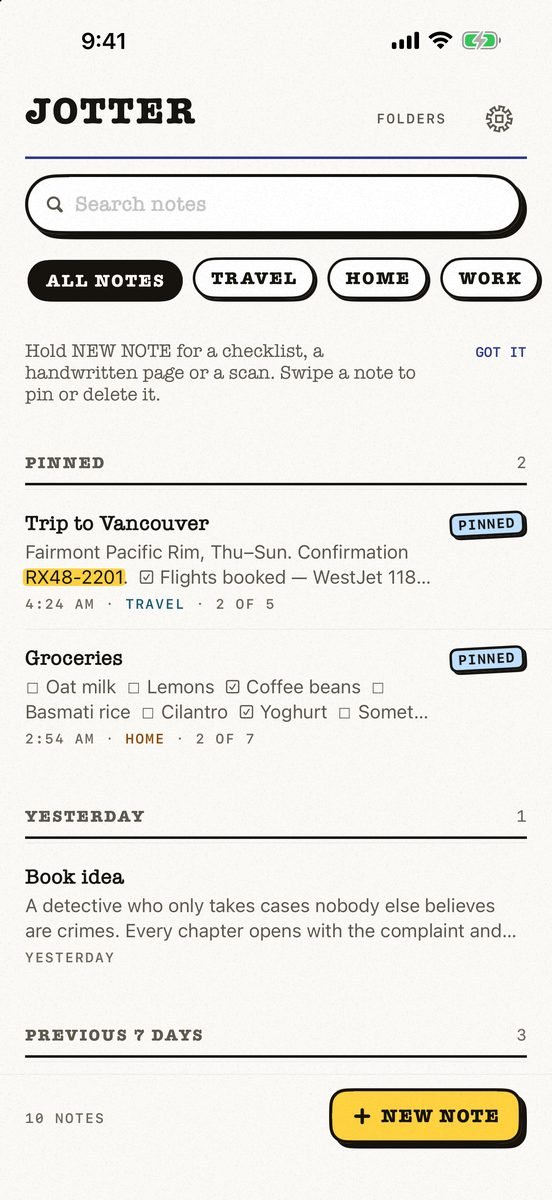
- Just write. No title, no folder, no save button — the first line names the note.
- Pin and tag. Pin what matters. Write a #tag and it becomes a filter.
- Add a folder when a set of notes wants a name. Or don’t: everything is always in All Notes.
- Search anything. A word or two, in any order, through titles, text, tags and the words inside your pictures and handwriting — read on your device.
Deleted notes wait 30 days in Recently Deleted, private notes can be locked with Face ID, and you can export everything as Markdown. Jotter is free, with no account and no ads.
Common questions
What is the best way to organize notes on iPhone?
Pin the few you use daily, use #tags for groups, add folders only when needed, and rely on search.
Are tags better than folders?
Usually. A note can have several tags but live in only one folder.
Can I search handwritten notes on iPhone?
In Jotter, yes — handwriting and text in photos are read on the device and turn up in search.
Can I lock a note?
Yes, Jotter can lock a note behind Face ID.
Published · No affiliate links










 MMA.socialUFC fan ratings
 TrendingPunjabiPunjabi music charts
 BoldOpinionAnonymous hot takes
 TopRankedAppsApp rankings