Disclosure: Neighbr is ours. Nextdoor is not, and we have no deal with its makers. Both get the same four fields below, including their drawbacks.
Short answer
For local news, safety alerts, events and recommendations, Nextdoor is the neighbourhood network. If all you want is to ask neighbours for a hand — or earn a little helping them — pick Neighbr.
Nextdoor is a neighbourhood network: real-time safety alerts, local news, events, groups, free and for-sale items, and neighbours recommending babysitters, dog walkers and handypeople. It says it has over 100 million verified neighbours.
Neighbr does one thing. You post what you need and what it’s worth, neighbours nearby offer to help, and you pick who — no feed, no news, no arguments in the comments.
Pick Neighbr if
- You only want help with a task, not a feed
- You want offers you can compare side by side
- You want your address kept private
Pick Nextdoor if
- You want local news and safety alerts
- You want recommendations for businesses
- You like groups, events and free items
Side by side
| Neighbr (ours) | Nextdoor | |
|---|---|---|
| Price | Free — no fees and no commissions | Free |
| What it is | Only help requests: ask, get offers, pick one | A neighbourhood network: alerts, news, events, groups, recommendations |
| Asking for help | Ask in a few taps with your price or a free favour; neighbours offer, you pick one | Post and ask; neighbours reply and recommend |
| Privacy | Your address is never shown; the exact spot goes only to the helper you pick | Neighbourhood-based, with verified neighbours |
| Where | iPhone (iOS 18 or later) | iPhone, Android and web |
The two apps in detail
Neighbr
Ours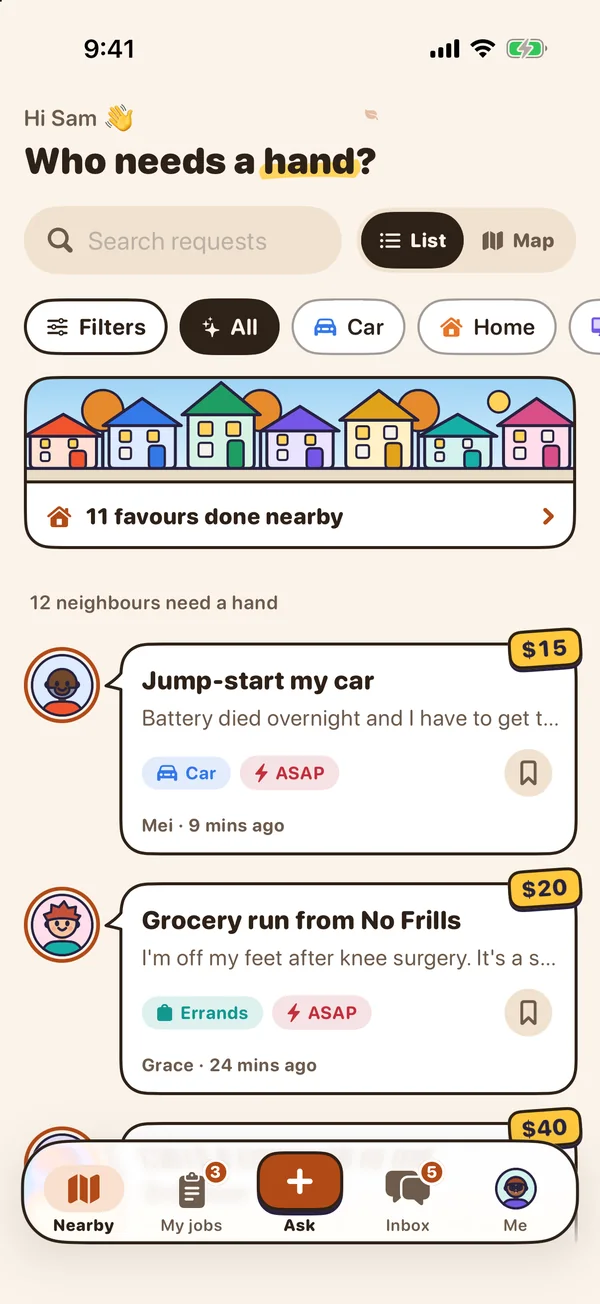
- Best for
- Small everyday jobs — a jump-start, a couch to lift, a dog walk — done by neighbours nearby, with no fees
- Highlights
- Ask in a few taps: a ready-made ask, your price, or a free favour
- Compare offers with ratings, notes and Top rated badges, then pick one
- Your address is never shown; chat opens only after you pick
- Free, with no fees or commissions — you settle up directly
- Pricing
- Free — no fees and no commissions
- Watch out
- Helpers are neighbours, not vetted or insured pros, and Neighbr doesn’t hold payment — you settle up directly. It is a young app, so how many helpers you see depends on your area. It needs an account to ask or help for real (you can look around a sample neighbourhood first) and iOS 18 or later.
Nextdoor
- Best for
- People who want local news, alerts and recommendations in one feed
- Highlights
- Real-time safety, weather and power-outage alerts
- Local news, events, groups and free items
- Neighbours recommend babysitters, dog walkers and handypeople
- Pricing
- Free
- Watch out
- Asking for help is one post among news, alerts and debates, and there is no way to compare offers.
The real difference: a whole neighbourhood feed, or one job at a time
Nextdoor is where a neighbourhood talks. It is great for knowing what is going on and who people recommend.
Neighbr is where a neighbourhood helps. Each ask gets offers with prices, ratings and notes; you pick one and a private chat opens. Nothing else competes for your attention.
Other options
Every app of this kind we have compared is in the best neighbourhood help apps.
Common questions
Is there another app like Nextdoor?
For asking neighbours for help, Neighbr is one: post what you need, neighbours offer, you pick. It doesn’t have Nextdoor’s news, alerts or groups.
Is Nextdoor in Canada?
Yes — the Nextdoor app is in the Canadian App Store.
Is Neighbr free?
Yes. There are no fees for asking, offering or messaging, and Neighbr never handles money.
Does Neighbr show my address?
No. Requests appear in a rough area only; the exact spot goes only to the helper you pick.
App Store listings checked on 30 September 2026. Prices change — each entry describes how an app is paid for rather than a number that goes stale.
Published · No affiliate links










 MMA.socialUFC fan ratings
 Trending
 Bold
Bold Top
Top