Disclosure: Clinch is ours. The advice works with any app, or with pen and paper.
In short
Start with one app that holds your leads and reminds you to call. We make Clinch, a free one for a single rep, so it’s first here. Then add an app only for a job you do every week: Badger Maps to route your visits, Covve for business cards, Docusign for signatures. If your company already runs Pipedrive, HubSpot or a dealer CRM, use that app for leads instead of keeping two lists.
- One app for leads and follow-ups — everything else is optional.
- Add an app only for a job you do every week.
- Log the call before you start the car.
The jobs, and one app for each
A rep on the road does the same jobs every week: chase leads, log calls, drive to appointments, collect cards, send quotes, keep a calendar, take notes and work out what they’ve earned. This list gives each job one app, with alternatives only where the right choice depends on how you sell.
Three apps are ours — Clinch, Kalend and Jotter — and they’re marked. Every other app is described from its App Store listing, checked on 21 October 2026, by how it’s paid for rather than a price that goes stale. Every app, ours included, gets a “Watch out”.
| Job | App | Price model |
|---|---|---|
| Leads and follow-ups | Clinch (ours) | Free, no paid tier |
| Leads, team CRM | Pipedrive | Free app; needs a Pipedrive account |
| Leads, team CRM | HubSpot | Free app, no in-app purchases |
| Leads, team CRM | Bigin by Zoho CRM | Free, plus a subscription tier |
| Counting calls | Calltracker | Free, plus Pro (subscription or one-off) |
| Routes between visits | Badger Maps | Free download; paid plan after a trial |
| Business cards | Covve | Free, plus Premium (yearly or one-off) |
| Quotes | Clinch (ours) | Free |
| E-signatures | Docusign | Free to sign; sending needs a subscription |
| Your day and calendar | Kalend (ours) | Free, no subscription |
| Notes and voice notes | Jotter (ours) | Free, no subscription |
| Commission | Clinch (ours) | Free |
1. Leads and follow-ups: the one app you need
Everything else here is optional; this isn’t. A lead with no next date is a lead you’ll forget. The app for this job has to hold the customer and what they want, remind you on the right day, and be quick enough to update straight after the call — not on Friday, from memory.
If your company already pays for a CRM, use its iPhone app; two lists means one is always wrong. If you sell on your own, a simple CRM for one person beats a team system you have to set up. We compared a dozen in our best CRM app for iPhone guide, and the ones with no monthly fee in our free CRM app roundup.
Clinch (ours)
For: one salesperson who wants leads, call reminders and what they earn on every sale, on their phone. A lead is the customer’s name, what they want and the price. Pick a call date — today, tomorrow, in 3 days or next week — and late calls rise to the top; tick a call done and Clinch asks “when next?”. Tap Sold and it sets a check-in call for a month later; mark one Not sold and choose to try again in 1, 3 or 6 months. A widget shows who to call today. See Clinch.
Price model: free, with no paid tier, no account and no ads. Your customers stay on your phone, with optional backup to your own iCloud and a spreadsheet export · Clinch on the App Store
Watch out: it’s single-user and runs on iPhone and iPad only — no shared lead lists, no manager view, no web app, and no sync with your company’s CRM. There’s no AI, on purpose, so nothing writes your notes for you.
Pipedrive – Sales CRM
For: reps whose team already runs Pipedrive. The app gives you contacts, deal history and to-dos; you can log phone calls, record or type call notes, see accounts on a map and plan in an agenda view, offline too.
Price model: free app; a Pipedrive account is required · Pipedrive on the App Store
Watch out: it’s a companion to Pipedrive on the web, made for teams, and needs iOS 18.6 or later.
HubSpot
For: reps at companies that already use HubSpot: every contact, deal and email on your phone, and since version 5.0 a meeting notetaker.
Price model: free download, with no in-app purchases · HubSpot on the App Store
Watch out: it sells itself as “The AI-Powered CRM” for sales and marketing teams, and its listing is a few sentences long — check what your company’s account includes before you rely on a feature.
Bigin by Zoho CRM
For: a small business that wants a shared CRM simpler than the big ones: calls, email, SMS and WhatsApp from the app, a calendar view, a built-in card scanner and caller identification.
Price model: free, with a Bigin Express subscription (monthly or yearly) for more records, custom fields, tags and dashboards · Bigin on the App Store
Watch out: it needs iOS 26 or later, so older iPhones are out.
2. Logging and counting calls
A “sales call log app” can mean two jobs. One is remembering what was said, so the next call picks up where the last one stopped. The other is counting: dials, answers, appointments booked.
For the first, keep the log on the customer, not in a separate app. In Clinch, every call you tick done and every note you add sits on the lead’s history with the date, so before the next call you read one screen. Pipedrive’s app logs calls and call notes the same way. The habit matters more than the app: write the note before you start the car.
Calltracker – Sales Calls
For: cold callers who want their numbers. Three big buttons — attempted, connected, appointment booked — with live connect rates, timestamped notes, a weekly streak and a Sunday recap. Its listing says plainly it isn’t a CRM: it tracks activity, not leads.
Price model: free, plus Calltracker Pro as a subscription or a one-off lifetime purchase · Calltracker on the App Store
Watch out: it’s brand new, with no ratings yet on the Canadian App Store, it’s iPhone only, and CSV export, call-back reminders and full history are Pro features.
3. Route planning between appointments
With two customers a day, your maps app is enough. With six or eight stops, the order you drive them in decides whether you make the last one.
Badger Maps
For: outside reps who work a territory. It plans routes of up to 120 stops and hands each leg to Waze, Google Maps, Apple Maps or CarPlay. Customers sit on a map you can colour and filter; you can push stops to your calendar, spot accounts near your route that need a visit, talk notes into your phone and pull route reports for mileage. It connects to Salesforce, HubSpot, Pipedrive, Zoho and other CRMs.
Price model: free download, with a paid Business plan in the app after a free trial · Badger Maps on the App Store
Watch out: it’s a full territory system priced like one — more than you need if you only want today’s stops in order — and it has only a few dozen ratings on the Canadian App Store.
4. Scanning business cards
A card in your pocket is a lead you haven’t written down yet. Scan it before you leave the event.
Covve – Business Card Scanner
For: trade shows and anyone who collects a lot of cards. It scans cards, QR codes and event badges, even offline, in over 60 languages, and exports to your phone’s address book, Excel, Outlook, Google Contacts or CSV — or straight to Salesforce, HubSpot, Pipedrive or Zoho.
Price model: free, plus Premium as a yearly subscription or a one-off purchase · Covve on the App Store
Watch out: the listing doesn’t say which features stay free, and it offers AI background reports on the people you meet, which not everyone will want.
If you use Clinch, save the scanned card to Contacts, then tap Pick from my contacts: Clinch adds several people at once with their company and birthday, and skips anyone already there.
5. Quotes, invoices and e-signatures
A quote sent the same day beats a better one sent next week. What to write with it is in how to send a quote to a client.
Clinch quotes (ours)
For: a clean quote from a lead you already have. Clinch turns the lead’s items and total into a PDF with your logo and business name, sent on WhatsApp or email in one tap. Once the lead is sold, the same page prints as a receipt. Your commission never appears on it.
Price model: free, like the rest of Clinch · Clinch on the App Store
Watch out: it’s a quote, not an invoicing system: no tax lines, no e-signatures, no online payments. For a one-off invoice with Canadian sales tax by province, our free invoice generator makes a PDF in your browser, with no account.
Docusign
For: contracts that need a signature. Signing is free and unlimited; with a paid plan you can send your own documents, place “Sign Here” tags, set the signing order, sign in person or remotely, and get a notification when it’s signed.
Price model: free to sign; sending for signature needs a subscription · Docusign on the App Store
Watch out: the free part is for signing what other people send you. Sending your own contract is the paid part, and the Personal plan limits how many you can send each month.
6. Your day and calendar
Your CRM tells you who to call. Your calendar tells you when you’re free to see them, and holds everything that isn’t a sale.
Kalend (ours)
For: one place for your day: to-dos, a calendar, habits and a journal. Add appointments with reminders and repeats, see tasks by the hour, and show your iPhone’s calendars beside them if you switch that on. Type “call Dave tomorrow 9am” and it picks out the date and time. See Kalend.
Price model: free, with no subscription and no account; it syncs through your own iCloud · Kalend on the App Store
Watch out: there’s no sharing — you can’t share a calendar with your manager or send a customer a booking link — and it’s Apple-only, on iOS 18 or later. Call reminders for leads live in Clinch, not Kalend.
7. Notes in the car park
The two minutes after a meeting are when you remember everything: the budget, the boss who signs off, the kid’s name. By the next stop it’s gone.
Jotter (ours)
For: catching a thought before it goes. Jotter opens straight to a blank note — no title, no folder, no save button. Voice notes are transcribed on your iPhone, and the text in scans and photos becomes searchable. There’s a New note widget for the Home and Lock Screen, and Siri: “Jot down in Jotter”. See Jotter.
Price model: free, with no subscription and no account; notes sync through your own iCloud · Jotter on the App Store
Watch out: notes aren’t tied to a customer, so anything about a lead belongs on the lead in your CRM. It’s iPhone and iPad only, on iOS 18 or later.
8. Knowing your commission
Plenty of reps can’t say what they’ve earned this month until the pay stub arrives. If you’re paid on commission, that number should be on your phone.
Clinch (ours)
Clinch shows what you’ll earn on every lead, as a percentage or a fixed amount, and what you’ve earned this month on Home against a target — with how many more sales get you there. Mark a sale’s commission as paid and it shows what you’re still owed. If a price changes after the sale, edit it and the numbers follow.
Watch out: it keeps the maths simple — a rate or a flat amount per sale. Tiers, splits and holdbacks aren’t modelled, so enter your effective rate; how to calculate commission on sales has the formula and a calculator.
How to pick, and what to skip
- Start with leads. Get one list working before you add anything.
- Add an app only for a weekly job. A route planner pays off if you drive a territory every day, a card scanner if you work events.
- Know where your customer list lives — on your phone, your company’s server or an app maker’s — and how you’d get it out.
- Don’t keep two CRMs. If the company gives you one, use it.
Car dealerships often choose the CRM for you: apps such as DriveCentric, CRM by DealerSocket and VinSolutions are made for dealerships, and you’ll use whichever your store runs. Habits still matter more than software — see car sales tips for beginners and how to follow up with customers.
Set up Clinch for a day on the road
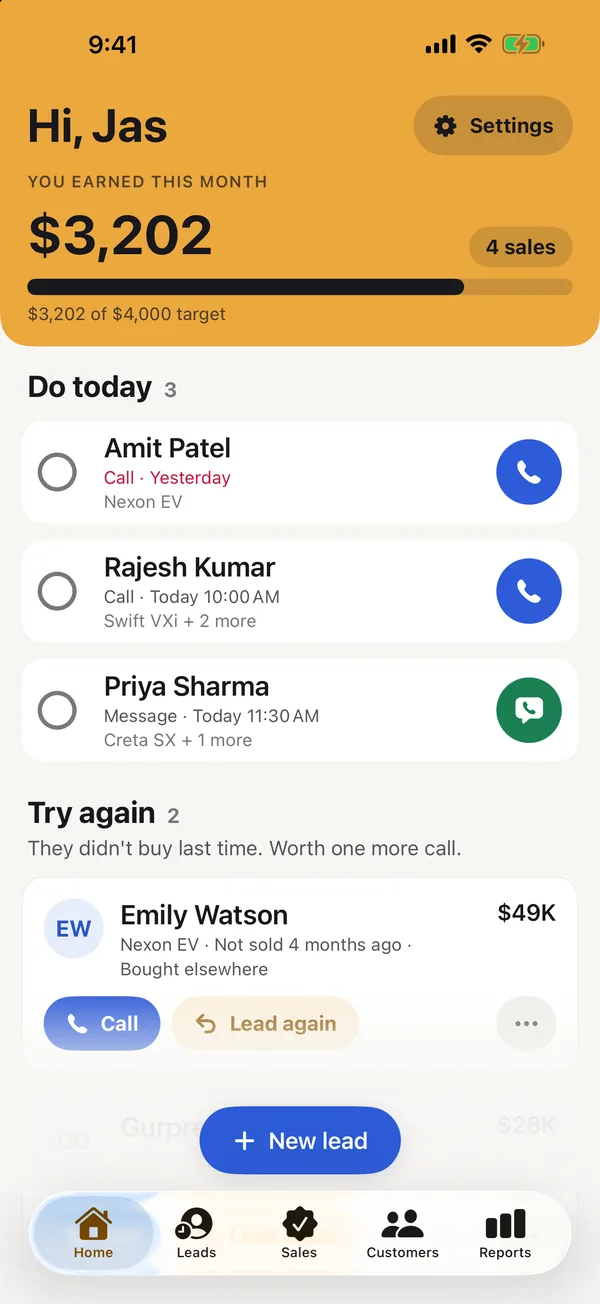
- Tell it what you sell. Car sales, real estate, insurance or anything else — Clinch suggests the right items, reasons and ready-made messages.
- Add customers from your contacts. Pick several people at once; their company and birthday come with them.
- Give every lead a call date. Late calls rise to the top, and ticking a call done asks “when next?”.
- Put today on your Home Screen. The widget shows who to call and opens the lead you tap. Or ask Siri: “Who do I call today in Clinch?”
Clinch is free, with no account, no ads and no AI. Your customers stay on your phone, and you can export them all as a spreadsheet whenever you like.
Common questions
What apps do sales reps use?
Usually a CRM for leads and follow-ups, plus the phone’s own calendar and maps. Reps on the road often add a route planner such as Badger Maps, a card scanner such as Covve and an e-signature app such as Docusign.
What is the best app for sales reps?
The one that holds your leads and reminds you to call. For a rep on their own, Clinch (ours) is free and made for exactly that. If your company runs Pipedrive, HubSpot or Zoho, use that CRM’s iPhone app.
Is there a free app for sales reps?
Yes. Clinch is free with no paid tier, no account and no ads: leads, call reminders, quotes and what you earn on every sale. Docusign is free for signing documents other people send you.
What is the best sales call log app for iPhone?
To remember what was said, log the call on the customer: Clinch keeps every finished call and note on the lead with the date, and Pipedrive’s app logs calls too. To count dials and connects, Calltracker – Sales Calls does it with one tap.
What app do car salespeople use to track leads?
Often the dealership’s own CRM, such as DriveCentric, DealerSocket or VinSolutions, each with an iPhone app. For your own follow-ups and commission, Clinch has a Car sales setup that suggests the right items, reasons and messages.
Published · No affiliate links










 MMA.socialUFC fan ratings
 Trending
 Bold
Bold Top
Top