Disclosure: Clinch is ours.
Short answer
Our pick is Clinch — one person who wants a simple list of leads, not a platform. Free, no subscription. The closest alternatives are Pipedrive, Streak and Folk. All 8 are compared below, each with a stated drawback.
Almost every CRM on the market is sold per seat, which tells you who it was designed for. That is fine if you have a team. If you are one person — a founder doing your own sales, a rep whose company CRM is a compliance tool rather than a working one, a consultant with thirty live conversations — you are being sold a collaboration platform to solve a memory problem.
The published research on why CRMs get abandoned points at the same thing every time, and it is not missing features. Around 55% of implementations fail to meet their objectives, only about 37% of sales professionals say their organisation uses its CRM fully, and the average rep loses roughly 17% of the working day to manual data entry. The tools are capable. Keeping them current is the part that breaks.
So this list is ordered by one question: how much work does the thing cost you to maintain? Everything below is real, downloadable today, and carries a stated drawback.
At a glance
| CRM | Best for | Pricing |
|---|---|---|
| Clinch (ours) | One person who wants a simple list of leads, not a platform | Free, no subscription |
| Pipedrive | A small team that wants a visual pipeline and fast setup | Per-user subscription |
| Streak | People who genuinely run their sales out of Gmail | Free tier plus subscription |
| Folk | Relationship-led selling where the network is the asset | Per-user subscription |
| Zoho CRM | The cheapest route to a genuinely full-featured CRM | Free edition plus paid tiers |
| HubSpot | Starting free and growing into marketing later | Free tier plus paid hubs |
| Attio | Teams that want to model their own data | Per-user subscription |
| Apple Contacts and Reminders | The honest baseline before you buy anything | Free, included with iOS |
The CRMs in detail
Clinch
Ours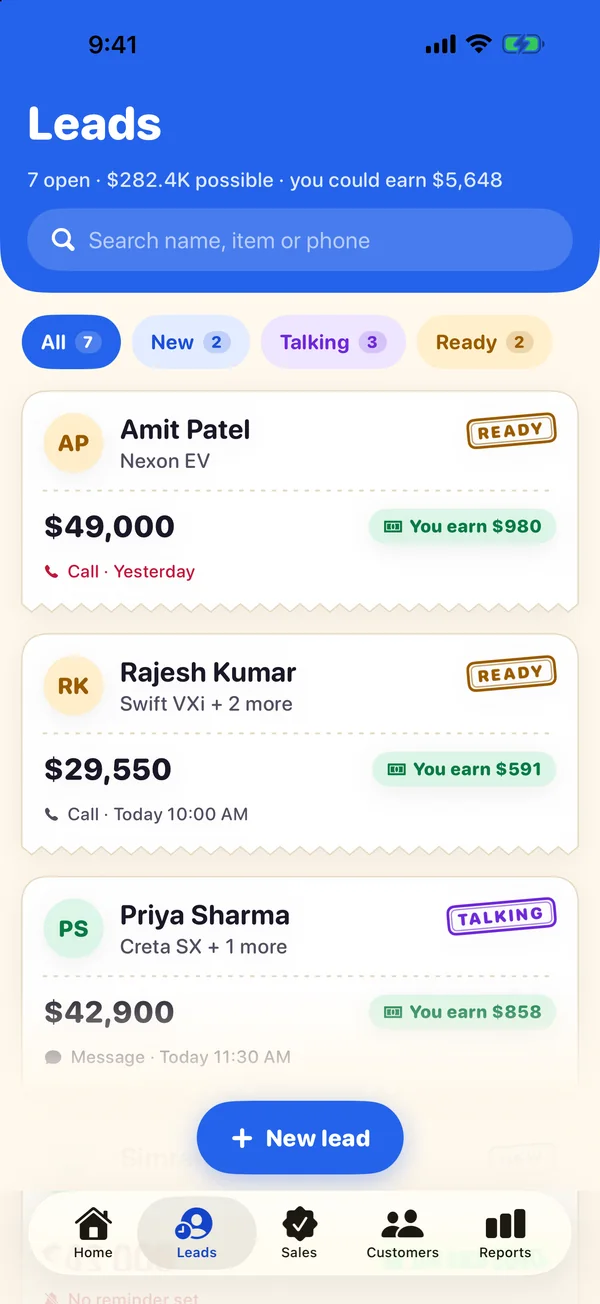
- Best for
- One person who wants a simple list of leads, not a platform
- Highlights
- A lead is a name, what they want and the price — no required fields to fight
- Reminds you to call, shows what you earn on every lead, and brings lost leads back later
- Works fully offline; syncs through your own iCloud if you want it to
- No account, no AI, no paid tier holding anything back
- Pricing
- Free, no subscription
- Watch out
- Single-user by design, and that is a real limit: no shared lead lists, no seats, no manager reporting, and iPhone and iPad only. If anyone else needs to see your leads, this is the wrong tool and one of the others below is the right one.
Pipedrive
- Best for
- A small team that wants a visual pipeline and fast setup
- Highlights
- Built around a drag-and-drop pipeline rather than a database
- Usable within hours because the structure ships already built
- Mature mobile apps with activity logging and caller ID
- The default recommendation for small sales teams for good reason
- Pricing
- Per-user subscription
- Watch out
- Priced per user per month whether you are two people or twenty, and the reporting and automation most reviews praise sit on the higher tiers.
Streak
- Best for
- People who genuinely run their sales out of Gmail
- Highlights
- Lives inside Gmail, so the pipeline is where the conversation already is
- No separate app to remember to open — the biggest cause of stale data
- Free tier aimed at individuals rather than a trial countdown
- Email tracking and mail merge built into the same place
- Pricing
- Free tier plus subscription
- Watch out
- It is Gmail or nothing. If your email moves to Outlook, or you want to work primarily from a phone, the whole premise stops applying.
Folk
- Best for
- Relationship-led selling where the network is the asset
- Highlights
- Contact-first rather than deal-first, which suits consultants and agencies
- Pulls people in from LinkedIn and email without much typing
- Clean, modern interface that does not feel like enterprise software
- Good at the "who do I know at this company" question
- Pricing
- Per-user subscription
- Watch out
- Weaker as a forecasting tool than a pipeline-first CRM, and still a per-seat subscription for what many solo users treat as a contact book.
Zoho CRM
- Best for
- The cheapest route to a genuinely full-featured CRM
- Highlights
- A free edition that is a real product, not a two-week trial
- Covers far more ground than its price suggests
- Slots into the wider Zoho suite if you already use it
- Extensive customisation for teams that need it
- Pricing
- Free edition plus paid tiers
- Watch out
- Breadth is the problem as much as the appeal — there is a lot of interface to get through, and a solo user will configure things they never use.
HubSpot
- Best for
- Starting free and growing into marketing later
- Highlights
- A free CRM tier with no seat limit on the basics
- Contacts, email and marketing sit in one system as you grow
- Enormous documentation and template library
- Easy to hand over to a team later without migrating
- Pricing
- Free tier plus paid hubs
- Watch out
- The free tier is the top of a funnel — the features you will eventually want are on paid hubs, and the price step up is steep.
Attio
- Best for
- Teams that want to model their own data
- Highlights
- Data-native — you shape the objects around your business
- Real-time, fast, and genuinely well designed
- Strong enrichment and reporting for an ops-minded team
- Modern alternative to configuring a legacy CRM
- Pricing
- Per-user subscription
- Watch out
- That flexibility is work you have to do. You are designing the system before you can use it, which is the opposite of what a solo seller needs.
Apple Contacts and Reminders
- Best for
- The honest baseline before you buy anything
- Highlights
- Already installed, already synced, nothing to learn
- Reminders handles follow-ups perfectly well on its own
- Siri and widgets work better than most third-party equivalents
- Genuinely enough below roughly a dozen live conversations
- Pricing
- Free, included with iOS
- Watch out
- There is no pipeline, no deal value, and no way to answer "what is my forecast" or "which deals have gone quiet". It scales to about a dozen deals and then falls apart.
What is still missing
The gap in this category is not capability — it is that almost every capable CRM is priced and shaped for a team, and almost every tool small enough for one person is either a contact list or a trial funnel.
That is the space Clinch was built for, and the trade is worth stating plainly: single-user only, iPhone and iPad only, no shared lead lists and no manager view. In exchange there is no account, no server holding your customer list, no paid tier, and nothing to keep current beyond the deals you actually care about.
If anyone else needs visibility of your pipeline, pick Pipedrive and do not look back. If you have been paying per seat for a system only you log into, the trade above is probably the right one.
Common questions
What is the easiest CRM app for new sales reps?
Clinch: a simple list of leads with follow-up reminders, not a platform to set up. Free, no subscription. Pipedrive, Streak and Folk are the closest alternatives.
Is there a lightweight CRM with a good iPhone app?
Clinch is built for the phone first. Pipedrive, Streak and Folk are lighter than the big suites; each one’s catch is listed above.
What is the best CRM for individuals?
It depends on whether anyone else needs to see your leads. If not, Clinch is built specifically for one person and has no subscription. If you want the option of adding colleagues later, Pipedrive is the usual answer, and HubSpot's free tier is the cheapest way to keep that door open.
Is there a CRM that works without an account?
Very few, because most are sold as a hosted service. Clinch works with no account at all — data lives on the device and syncs through your own iCloud if you switch it on. Everything else here expects you to register with the company first.
Do any CRM apps work offline?
Partially, mostly. Pipedrive and Zoho cache enough to keep working on a weak connection and sync afterwards. Clinch is offline-first rather than offline-tolerant: the database on the phone is the source of truth and the cloud is only a mirror, so there is no degraded mode.
Why do so many CRMs go unused?
Because keeping them current costs more than it returns for the person doing the typing. Published figures put the average rep at roughly 17% of the day on manual data entry and CRM failure rates around 55%. Any CRM you choose should be judged on how little work it asks for, not how much it can do.
Can I move my data between these?
Usually via CSV, and usually imperfectly. Contacts and deal names travel fine; stage history, custom fields and attachments rarely do. Export a copy before committing to a switch — and check the tool you are moving to can export as well as import.
Published · Updated · No affiliate links











 MMA.
MMA. Trending
 Bold
Bold Top
Top