Disclosure: Clinch is ours, and it is listed first. It gets the same four fields as every other app, including its drawbacks.
Short answer
For one salesperson on an iPhone, our pick is Clinch — leads, reminders and commission with no paid tier and no account. For a small team that needs a shared CRM, HubSpot’s free CRM or Bigin.
Pipedrive is a strong sales CRM for teams, and its iPhone app is a companion to it: the listing says a Pipedrive account is required, and everything syncs to the Pipedrive web app. That account is a paid, per-seat subscription after the trial.
That is the right deal for a sales team. It is a heavy deal for one person selling cars, insurance, solar or real estate who just wants to know who to call today. This guide covers both.
Switch to Clinch if
- You sell on your own and live on your phone
- You pay for a seat mostly to get reminders
- You want what you earn on every sale, not a sales funnel report
Stay with Pipedrive if
- A manager needs to see the whole team’s deals
- You rely on email sync and automations
- Your company already pays for it
At a glance
| App | Best for | Pricing |
|---|---|---|
| Clinch (ours) | One salesperson who wants leads, reminders and what they earn on every sale, on their phone | Free, no paid tier at all |
| Pipedrive | Sales teams who want a visual deal board, call logging and a web app | Paid, per-seat subscription after a free trial |
| HubSpot | Small teams who want a free shared CRM that can grow into marketing tools | Free CRM tier; paid hubs for sales and marketing features |
| Bigin by Zoho CRM | Small businesses that want a simple CRM with calls, email and SMS | Free plan; Bigin Express and higher plans by subscription |
| Zoho CRM | Growing businesses that want a full CRM with offline access | Free edition for very small teams; paid plans per user |
| Salesforce | Companies already on Salesforce who need their CRM on the go | Paid, per-user licences |
The apps in detail
Clinch
Ours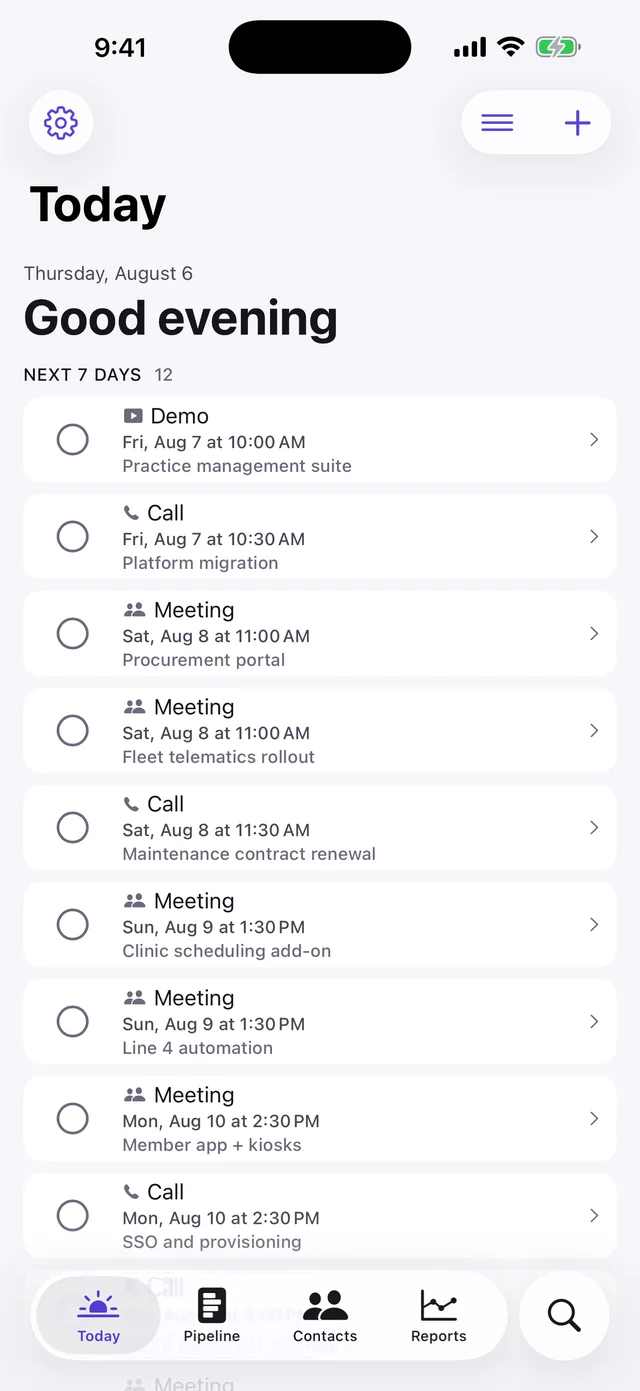
- Best for
- One salesperson who wants leads, reminders and what they earn on every sale, on their phone
- Highlights
- Every feature is in the free app — there is no upgrade
- Leads, reminders, notes and what you earn on every sale
- Press and hold any lead to call, WhatsApp or mark it sold
- CSV export, so leaving costs you nothing
- Pricing
- Free, no paid tier at all
- Watch out
- Single-user, iPhone and iPad only: no shared lead lists, no manager view and no web app. It is free because there is no server to pay for — which is also why it cannot offer team features.
Pipedrive
- Best for
- Sales teams who want a visual deal board, call logging and a web app
- Highlights
- Contacts, deal history and to-dos on your phone
- Call logging, meeting notes and a map view of customers
- Offline sync for flights and trains
- Pricing
- Paid, per-seat subscription after a free trial
- Watch out
- An account is required even to open the iPhone app, and there is no free plan.
HubSpot
- Best for
- Small teams who want a free shared CRM that can grow into marketing tools
- Highlights
- Contacts, deals and email in one place on your phone
- Act on new leads as they come in
- Part of a larger web platform
- Pricing
- Free CRM tier; paid hubs for sales and marketing features
- Watch out
- The free tier is a doorway to the paid hubs, and it is far more than one salesperson needs.
Bigin by Zoho CRM
- Best for
- Small businesses that want a simple CRM with calls, email and SMS
- Highlights
- Customisable pipelines for sales and support
- Calls, emails and SMS in one place
- Set up in under 30 minutes, according to the listing
- Pricing
- Free plan; Bigin Express and higher plans by subscription
- Watch out
- Most of the multi-channel features sit in the paid plans.
Zoho CRM
- Best for
- Growing businesses that want a full CRM with offline access
- Highlights
- Full CRM with mobile offline access and sync
- Used by over 300,000 businesses, per the listing
- Scales to large sales teams
- Pricing
- Free edition for very small teams; paid plans per user
- Watch out
- A lot of CRM to learn for a single seller.
Salesforce
- Best for
- Companies already on Salesforce who need their CRM on the go
- Highlights
- A personalised mobile home with reports, lists and tasks
- Works across Salesforce clouds and apps
- The most widely used CRM platform
- Pricing
- Paid, per-user licences
- Watch out
- Not a realistic option unless your company already runs Salesforce.
Team CRM or personal sales tracker?
Every alternative except Clinch is a team CRM with a free doorway. That is the right call if a manager needs to see your deals. If nobody else looks at your leads, a team CRM is a lot of software to carry around for one job: remembering who to call next.
Clinch does the one-person version — leads, reminders, notes, a sale stamped as won, and what you earned — and keeps it on your phone with CSV export when you want out.
Common questions
Does Pipedrive have a free plan?
No. Pipedrive offers a free trial, then a paid subscription per user. Its iPhone app needs a Pipedrive account to work.
What is the best free Pipedrive alternative?
For one salesperson on iPhone, Clinch — free with no paid tier. For a team, HubSpot’s free CRM or Bigin by Zoho.
Is there a CRM for iPhone with no subscription?
Clinch is free with no paid tier and no account; it is single-user by design.
App Store listings checked on 27 September 2026. Prices change — each entry describes how an app is paid for rather than a number that goes stale.
Published · No affiliate links









 MMA.socialUFC fan ratings
 TrendingPunjabiPunjabi music charts
 BoldOpinionAnonymous hot takes