Disclosure: Clinch is ours, and it is listed first. It gets the same four fields as every other app, including its drawbacks.
Short answer
For a salesperson working alone, our pick is Clinch, free with no account. For a small team, HubSpot’s free CRM or Bigin is where to start.
Salesforce calls itself the world’s #1 CRM platform, and for large companies it is. Its app is a window into a system your company pays per user for.
A small business rarely needs that. This guide goes from the free end upward.
Switch to Clinch if
- You are a small team or a solo seller
- You don’t have an admin to configure it
- Per-user licences are hard to justify
Stay with Salesforce if
- Your company already runs Salesforce
- You need enterprise reporting
- You use other Salesforce clouds
At a glance
| App | Best for | Pricing |
|---|---|---|
| Clinch (ours) | One salesperson who wants leads, reminders and what they earn on every sale, on their phone | Free, no paid tier at all |
| Salesforce | Companies that already run on Salesforce | Paid, per-user licences |
| HubSpot | Small teams who want a free shared CRM | Free CRM tier; paid hubs |
| Bigin by Zoho CRM | Small businesses that want a simple pipeline CRM | Free plan; paid plans by subscription |
| Pipedrive | Small sales teams who want a clean deal board | Paid, per-seat after a free trial |
| Zoho CRM | Businesses that want a full CRM without enterprise pricing | Free edition; paid plans per user |
The apps in detail
Clinch
Ours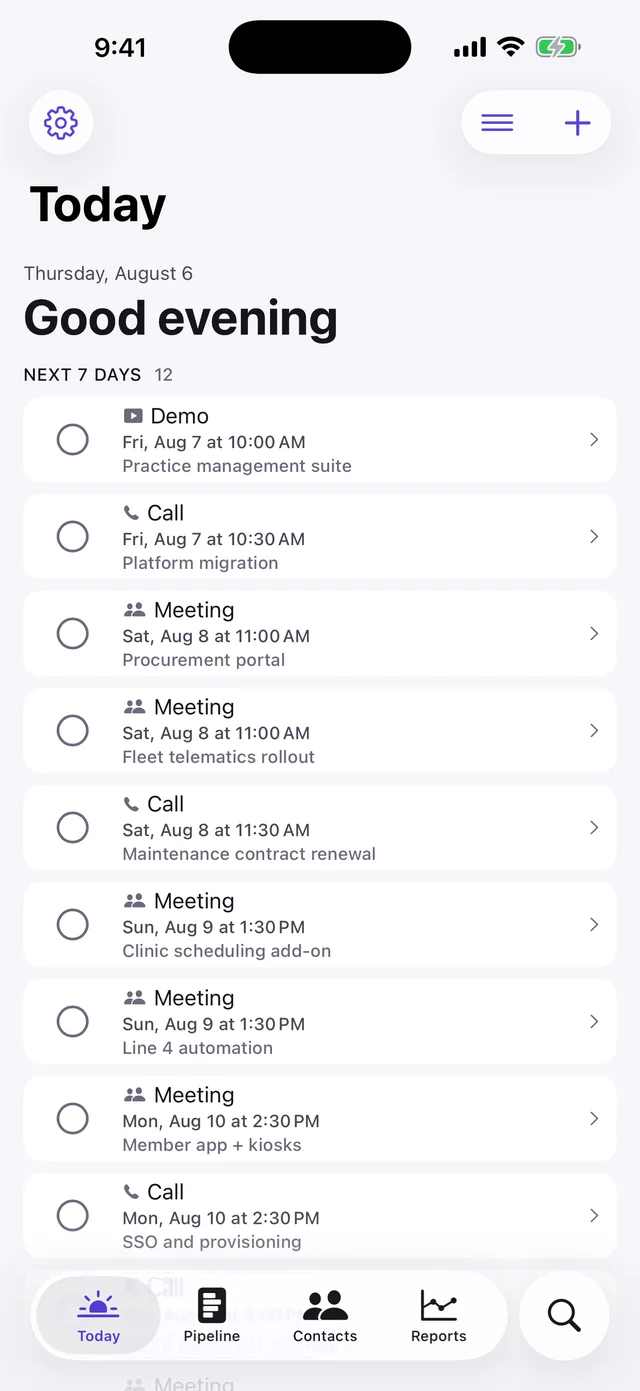
- Best for
- One salesperson who wants leads, reminders and what they earn on every sale, on their phone
- Highlights
- Every feature is in the free app — there is no upgrade
- Leads, reminders, notes and what you earn on every sale
- Press and hold any lead to call, WhatsApp or mark it sold
- CSV export, so leaving costs you nothing
- Pricing
- Free, no paid tier at all
- Watch out
- Single-user, iPhone and iPad only: no shared lead lists, no manager view and no web app. It is free because there is no server to pay for — which is also why it cannot offer team features.
Salesforce
- Best for
- Companies that already run on Salesforce
- Highlights
- Personalised mobile home with reports and tasks
- Works across Salesforce clouds
- The most widely used CRM
- Pricing
- Paid, per-user licences
- Watch out
- Not realistic for a small business starting from scratch.
HubSpot
- Best for
- Small teams who want a free shared CRM
- Highlights
- Free CRM tier
- Contacts, deals and email
- Grows into marketing tools
- Pricing
- Free CRM tier; paid hubs
- Watch out
- Upgrades add up as you grow.
Bigin by Zoho CRM
- Best for
- Small businesses that want a simple pipeline CRM
- Highlights
- Simple setup
- Calls, email and SMS
- Customisable stages
- Pricing
- Free plan; paid plans by subscription
- Watch out
- Advanced features are paid.
Pipedrive
- Best for
- Small sales teams who want a clean deal board
- Highlights
- Deals and to-dos on mobile
- Call and meeting notes
- Offline sync
- Pricing
- Paid, per-seat after a free trial
- Watch out
- No free plan.
Zoho CRM
- Best for
- Businesses that want a full CRM without enterprise pricing
- Highlights
- Full CRM with offline access
- Large app ecosystem
- Free edition for tiny teams
- Pricing
- Free edition; paid plans per user
- Watch out
- Complex once you grow into it.
Start smaller than you think
Most small businesses buy a CRM a size too big. If one person sells, a personal tracker with reminders gets you 90% of the value on day one.
Clinch is that tracker; when you hire a second seller, move to HubSpot’s free CRM or Bigin and export your leads as CSV.
Common questions
Is there a free version of Salesforce?
Salesforce is sold as paid per-user licences.
What is the best Salesforce alternative for a small business?
HubSpot’s free CRM or Bigin for a small team; Clinch for a solo seller.
Can I move from Clinch to a team CRM later?
Yes — Clinch exports your leads as CSV.
App Store listings checked on 27 September 2026. Prices change — each entry describes how an app is paid for rather than a number that goes stale.
Published · No affiliate links







 MMA.socialUFC fan ratings
 TrendingPunjabiPunjabi music charts
 BoldOpinionAnonymous hot takes
 brolic.ioGym leaderboards