Disclosure: Gathr is ours. The advice works with any app, or with pen and paper.
In short
For minutes or hours, start a timer in the Clock app — it counts down live on your Lock Screen. For days until a date, ask Siri (“How many days until December 25?”) or use a date calculator. The iPhone has no built-in days-left widget, so for a number on your Home Screen you need a Shortcuts reminder or a countdown app.
- Minutes or hours: Clock → Timers, shown live on the Lock Screen.
- Days until a date: Siri, a date calculator, or a daily Shortcuts reminder.
- A days-left widget needs a countdown app; check what’s free first.
A countdown timer on the Lock Screen (minutes or hours)
- Open Clock and tap Timers (Timer on older versions).
- Set the hours, minutes and seconds — up to 23 hours 59 minutes.
- Choose what plays under When Timer Ends, then tap Start.
The countdown shows live on your Lock Screen, and in the Dynamic Island on models that have one. Quicker still: “Siri, set a timer for 20 minutes.” On recent iOS versions you can run several labelled timers at once.
How many days until a date
Ask Siri: “How many days until Christmas?” or “How many days until March 14?”
Or use our Date Calculator: its Countdown: days until… box shows the days left to any date, with one-tap buttons for Christmas, New Year, Halloween, Canada Day and the first day of summer. The same page counts the days between two dates, and how many of them are weekdays, if you’re counting down the working days to a holiday.
Countdown widget on iPhone without an app
There’s no built-in widget that shows “24 days to go”, but two built-in tricks get close:
- Calendar: add the day as an all-day event. The Calendar widgets on your Home Screen and Lock Screen show it as your next event as the day gets close. They show the date, not the number of days.
- A daily countdown from Shortcuts: open Shortcuts → Automation, tap +, choose Time of Day, pick a morning time and Daily, and choose Run Immediately (on older versions, turn off Ask Before Running). Add the actions Date (type your date), Get Time Between Dates (from Current Date, in Days) and Show Notification with that result, like “days until the trip”. Each morning your iPhone tells you how many days are left.
Countdown widget with an app
For a big number on your Home Screen or Lock Screen, you need a countdown app from the App Store — search “countdown widget”. Before you pick one, check its listing for three things: what the free version includes, whether there are ads, and whether it needs an account.
Once it’s installed, touch and hold the Home Screen, tap Edit (or +), find the app and add its widget. For the Lock Screen, touch and hold the Lock Screen, tap Customize, then tap the widget area.
Countdown on the iPhone camera (self-timer)
In the Camera app, open the extra controls — tap the arrow at the top of the screen — then tap the timer icon and choose 3 or 10 seconds. The controls move around between iOS versions, but the timer icon still looks like a small stopwatch.
A countdown for a room, a class or a presentation
For a countdown everyone can see, open our Online Timer on a laptop or TV, set the time, and tap Full screen. It has one-tap buttons from 1 minute to an hour, beeps when time is up, and keeps time correctly even in a background tab. Space starts and pauses; R resets.
On Instagram: in a Story, tap the sticker button and choose Countdown, then give it a name and an end date and time. Followers can tap it to get a reminder.Counting down to a party or a wedding? Gathr counts with you
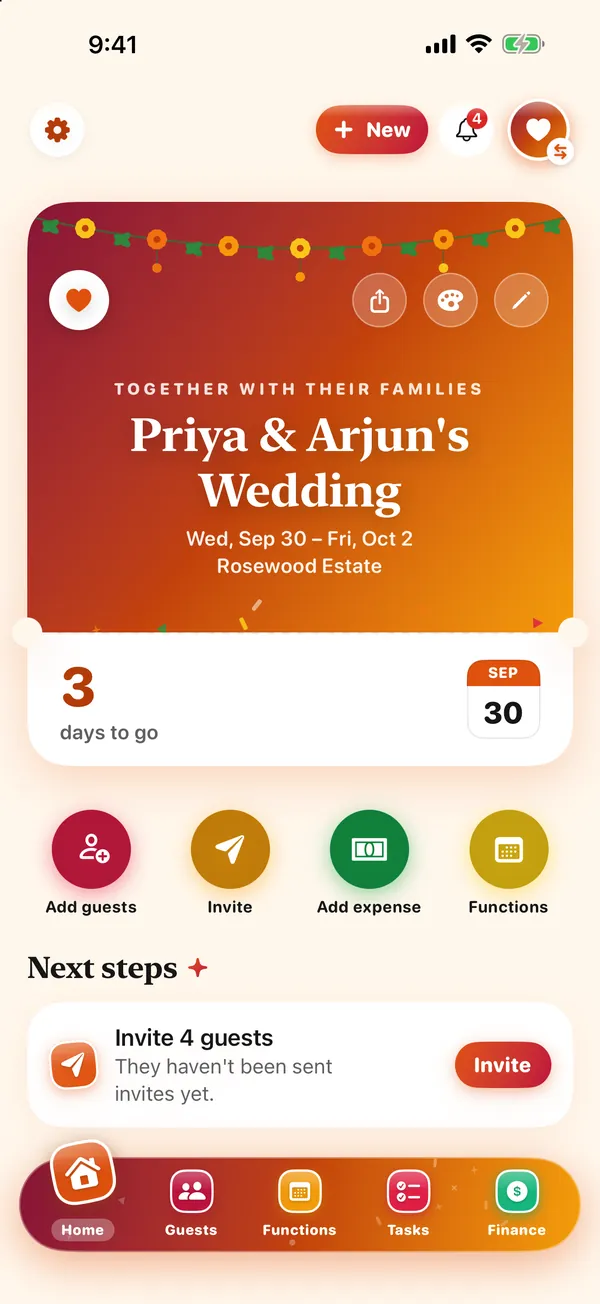
- Tell Gathr what you’re celebrating. A one-minute setup asks for the names, the date, the place and a budget, then lets you pick a look.
- Home shows the days to go. Your event’s Home shows how many days are left beside the invitation card, and always shows the next thing to do.
- Follow a checklist that knows the date. Tasks start from a list made for your kind of event, with due dates counted back from the day.
- On the day, it’s on your Lock Screen. What’s on now and what’s next sit on your Lock Screen.
Gathr is free, with no ads and no charges to you or your guests. You sign in with Apple, Google or email; your guests reply from a link and never need the app. More in how to plan a birthday party.
Common questions
How do I make a countdown on my iPhone?
For minutes or hours, use Clock → Timers; it counts down on the Lock Screen. For days until a date, ask Siri or use a date calculator, and add the date to Calendar so it shows in your widgets.
Does iPhone have a countdown widget?
Not one that shows the days left to a date. A running Clock timer shows on the Lock Screen, and the Calendar widgets show upcoming events; for a days-left number you need a countdown app.
How do I put a countdown on my iPhone Lock Screen?
Start a timer in the Clock app and it appears on the Lock Screen as a live countdown. For days until a date, add a countdown app’s widget: touch and hold the Lock Screen, tap Customize and add it.
How many days until Christmas?
It depends on today’s date — ask Siri, or open our Date Calculator and tap Christmas for the exact number.
Published · No affiliate links











 MMA.
MMA. Trending
 Bold
Bold Top
Top