Disclosure: Gathr is ours. The advice works with any app, or with pen and paper.
In short
Our pick is Gathr (ours). It’s free, every guest replies from their own link in any browser, and one list holds plus-ones, dietary needs, VIP and vendor tags, a guest limit with a waitlist, and a separate list for each wedding function. For one casual party, try Partiful. For a wedding website and registry, look at Zola, The Knot or Joy. To check a long list in at the door, Guest List Organizer.
- Pick an app where each guest replies from their own link, so you never type replies in by hand.
- Plus-ones, dietary needs and a guest limit matter more than invitation designs.
- A wedding with several functions needs one list with a reply for each function.
At a glance
Seven iPhone apps that keep a guest list: party invites, wedding planners and a door-list app. Gathr is ours, so it’s listed first, and every app, ours included, gets a “Watch out”. Gathr is described as version 5.1, the one on the App Store now; the other apps’ facts come from their App Store listings, checked on 21 October 2026.
| App | Best for | Price model |
|---|---|---|
| Gathr (ours) | Weddings with several functions, and any event you plan with a co-host | Free, no ads |
| Partiful | One casual party where guests like to see who’s going | Free; you can sell paid tickets |
| Zola | Weddings with a website, registry and seating chart | Free tools; paper invitations to order |
| The Knot | Couples still choosing vendors who want everything in one app | Free |
| Joy | Weddings built around a wedding website | Free; print invitations available |
| Evite | Classic invitation designs with RSVP tracking | Free + Premium designs; Evite Pro subscription |
| Guest List Organizer | Checking a long list in at the door | Free + Pro (subscription or one-time) |
What a guest list app should do
Invitation designs get the attention, but you live with the guest list for months. Look for these:
- A personal RSVP link for each guest. Replies attach to the right name, and guests shouldn’t have to download an app or make an account.
- Plus-ones. A number per guest that adds into the headcount, so “Priya + 2” counts as three.
- Dietary needs. Noted against each guest, and included when you send numbers to the caterer.
- A guest limit. One that counts plus-ones, with a waitlist for when it’s full.
- Reminders. A quick way to nudge only the people who haven’t answered.
- Sharing. A co-host who can edit the same list, and a clean way to send it to the venue.
- Privacy. Who can see the list, and whether guests can see each other.
If you only need replies, not a whole planner, our guide to a free RSVP website compares the simplest ways to collect them. For apps that also run the schedule, tasks and budget, see our best event planning apps.
1. Gathr (ours): one guest list for the whole event
Gathr is our free event planner, and the guest list is the heart of it. You add guests by typing names, picking them from your contacts, or pasting a whole list from a note, an email or a group chat: one guest per line, with a phone number or email after a comma if you have one. Gathr shows how many it will add and skips anyone already on the list.
Each guest can have plus-ones, dietary needs, a private note and a tag: guest, VIP or vendor. Set a guest limit and it counts everyone coming, plus-ones included, with a waitlist you move people up from.
Invites go out by text, WhatsApp or email from your own phone, each with the guest’s own link. Guests open it in any browser, tap Going, Maybe or Can’t go, say who they’re bringing and add a note. They don’t need the app or an account. Replies land in your list, and reminding everyone who hasn’t answered takes two taps.
A co-host (your partner, family or planner) can join by link and edit the same list. Events are invitation-only, and only you and your co-hosts see guests’ contact details. When the caterer asks for numbers, you can send the whole list as text, grouped by reply, with party sizes and dietary notes.
Watch out: you need an account to host (Apple, Google or email). Gathr opens your own Messages, Mail or WhatsApp rather than sending invites for you, nothing tells the waitlist when a spot opens, and the list exports as text, not a spreadsheet. There’s no wedding website or registry, it’s English-only, and it needs iOS 17 or later.
See Gathr · Gathr on the App Store
The other guest list apps
2. Partiful
Partiful makes a free event page for a party and shares it as a link. Its listing says guests don’t need the app, and one link works on Apple and non-Apple phones alike. The guest-list basics are there: you can limit spots and let Partiful run the waitlist, add a questionnaire for dietary restrictions, re-use guest lists from past events and text-blast updates to everyone. It can also sell tickets and check guests in by scanning QR codes.
Watch out: guests can see who else is going and comment on the page, and Partiful also has a public Explore page of events. Check the RSVP settings before you share a private list. Its listing doesn’t mention separate guest lists for different parts of one event.
3. Zola
Zola is a free wedding planner whose guest list sits next to a wedding website, registry, budget tracker and seating chart. Its listing describes a free RSVP tracker, a Contact Collector to gather guests’ addresses in one go, and seating “for all your wedding events” that pulls names straight from the guest list and exports a PDF.
Watch out: it’s built for weddings, alongside a registry and a paper shop, so it’s more than you need for a birthday or a club night.
4. The Knot
The Knot’s free wedding app has a guest list that tracks responses, meal preferences and contact details, updated in real time. Around it are a vendor marketplace, registry, wedding website, seating chart and budget tools.
Watch out: the guest list is one tool among many in an app that is also a vendor marketplace and registry, and it needs iOS 18 or later.
5. Joy
Joy builds the guest list, RSVPs, invitations and registry around your wedding website. Its listing mentions tracking RSVPs as they come in, print and digital save the dates and invitations, personalized schedules so guests know where to be and when, and travel and accommodation help for out-of-town guests.
Watch out: everything centres on the wedding website, so it suits a wedding rather than a party, and the guest list is one part of a bigger product.
6. Evite
Evite is the classic invitation maker: free and Premium designs, invites by text or email, and free RSVP tracking, with plus-ones on the reply. You can import guests from your contacts, re-use past guest lists for recurring events, and see when each guest viewed the invitation.
Watch out: the ad-free experience for guests comes with Premium invitations, and it’s the Evite Pro subscription that adds unlimited ad-free invitations, up to 2,500 guests per event and attendance tracking.
7. Guest List Organizer
Guest List Organizer is a guest list app first, not an invitation app. You import guests from Contacts or past events, track RSVPs, arrivals and additional guests, store table numbers, notes and custom fields, and check people in at the door from an iPhone or iPad. Lists sync through iCloud, even between different Apple accounts, and it makes 11 kinds of PDF report.
Watch out: Pro is a monthly or yearly subscription or a one-time Lifetime purchase, and the listing doesn’t say which features need it. It doesn’t describe an RSVP link guests answer themselves, so expect to enter replies as they come in.
Guest List Organizer on the App Store
One list for several wedding functions
A wedding often isn’t one event. A Punjabi or Indian wedding can run from the mehndi and sangeet to the ceremony and reception over several days (see Punjabi wedding functions in order), and each one has a different guest list: close family at everything, colleagues at the reception only.
Keep one master list and mark which functions each guest is invited to. With a separate sheet for every night, one changed phone number has to be fixed on every sheet.
In Gathr, every function has its own guest list and its own replies, and the Guests tab switches between the whole event and one function’s list. In a browser, a guest answers the function their link is for; a guest who uses the app can answer every function in one sheet, or tap “Going to all”.
With any other app, check how it collects replies for each function before you add your whole list. Our wedding guest list guide covers who to invite to what.
VIPs and vendors on the same list
A guest list is rarely just guests. The photographer, DJ and caterer need meals and seats, and some guests (grandparents, the wedding party, the chief guest at a launch) need a little more care.
Tag them instead of keeping a second list. In Gathr every guest can be marked guest, VIP or vendor, and the tag shows on their row.
If “VIP list” means a door list for a club night or a launch, privacy matters most. Gathr events are invitation-only, with no public feed or directory, and guests never see each other’s phone numbers or emails. For the door, Gathr can issue free tickets to everyone who’s going and keep a door list on your phone, where you check people in by name as they arrive.
For a large professional event with arrival reports afterwards, a dedicated door app like Guest List Organizer fits better.
Spreadsheet or app?
A spreadsheet is free, flexible and fine for a list you only need to count. It gets hard when replies arrive by text, WhatsApp and phone and someone has to type them in, or when two people edit different copies.
An app earns its place when guests answer for themselves: replies attach to the right name, plus-ones add up on their own, and you can see at a glance who hasn’t answered.
- Keep the spreadsheet if you’re collecting replies yourself anyway, or you need your own columns and formulas.
- Use an app if guests should reply from a link, you’re planning with someone else, or you have several functions to track.
Either way, make replying easy. Our RSVP text templates cover the invite, the reminder and the last call.
How to set up a guest list in Gathr
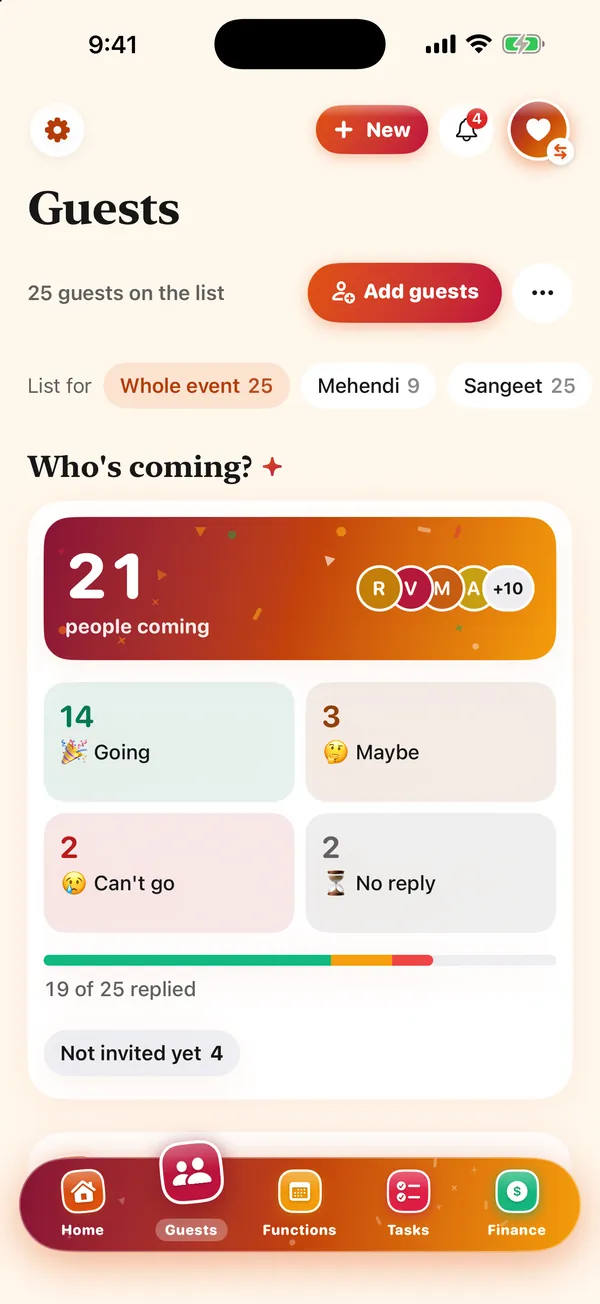
- Create the event. Tell Gathr what you’re celebrating, the names, the date and the place. A wedding comes with its functions already laid out.
- Add your guests. Type names, pick from your contacts, or paste a whole list: one per line, with a phone number or email after a comma if you have it. Anyone already on the list is skipped.
- Fill in the details. Plus-ones, dietary needs, a note, and a tag: guest, VIP or vendor. Set a guest limit if the venue has one.
- Send the links. By text, WhatsApp or email from your own phone. Each guest answers from their own link in any browser, replies land in your list, and reminding the quiet ones takes two taps.
Gathr is free, with no ads and nothing to buy, for iPhone and iPad on iOS 17 or later. You sign in to host; your guests never need the app or an account.
Common questions
What is the best guest list app?
For most people, a free app where each guest replies from their own link. Gathr (ours) is our pick for weddings and events with several parts, Partiful suits one casual party, and Zola, The Knot and Joy suit couples who also want a wedding website and registry.
Is there a free guest list app?
Yes. Gathr, Partiful, Zola, The Knot and Joy are free to use, per their App Store listings, and Evite and Guest List Organizer are free with paid upgrades. Gathr has no ads and nothing to buy.
Is there a VIP list app?
Most guest list apps let you mark VIPs. In Gathr every guest can be tagged guest, VIP or vendor, and events are invitation-only. For checking a long list in at the door, a dedicated app like Guest List Organizer is built for it.
How do I organize a wedding guest list?
Start from the headcount your budget and venue allow, list both families’ guests, decide on plus-ones and children, then mark which functions each guest is invited to. Our wedding guest list guide walks through it step by step.
Do guests need the app to RSVP?
Not with Gathr. Each guest opens their own link in any browser and taps Going, Maybe or Can’t go, with plus-ones and a note. Partiful’s listing also says guests don’t need its app.
Published · No affiliate links










 MMA.socialUFC fan ratings
 Trending
 Bold
Bold Top
Top