Disclosure: Clinch is ours. The advice works with any app, or with pen and paper.
In short
Keep one list where every lead has five things: who they are, how to reach them, what they want, the price, and the date you’ll next contact them. Check it every morning and call the late ones first. A spreadsheet is fine for a few dozen people; past that, a simple app that reminds you on the day does the remembering for you.
- Every lead needs a next date, or it goes quiet.
- One list, checked every morning — late calls first.
- Keep the ones who didn’t buy; they’re next month’s sales.
What to write down for every customer
- Name and how to reach them — phone, WhatsApp or email.
- What they want — the model, the house, the policy, the package.
- The price, and what you’ll earn if it closes.
- Where it stands — new, talking, or ready to buy.
- The next date — when you’ll call, and why.
That’s enough. Notes are nice, but those five things turn a name into a sale. A lead with no next date isn’t being tracked — it’s just being stored.
Keep it to three simple stages
You don’t need ten stages and a manager’s report. For one person who sells, three are plenty: New (first contact), Talking (they’re interested and you’re trading questions and prices) and Ready to buy (it’s down to the paperwork). Move each lead along as it changes and you can see at a glance where this month’s sales will come from.
A five-minute morning routine
- Open your list and sort it by next date.
- Call the late ones first — yesterday’s missed call is today’s priority.
- Then today’s calls, in order.
- After each call, write the next date before you do anything else.
- Glance at birthdays and delivery dates coming up; a two-line message costs nothing.
If you build only one habit, make it step four. The day you skip it is the day a customer goes quiet. What to actually say is in how to follow up with customers.
Notebook, spreadsheet or app?
A notebook is quick but can’t remind you. A spreadsheet in Excel or Google Sheets is free and flexible, and fine for a few dozen leads — but it only works when you open it, and it’s awkward on a phone in a car park. Big team CRMs can do everything, but they’re built for managers, with logins and a monthly fee per person.
For one salesperson, the best way to keep track of clients is whatever you’ll actually update straight after a call. For most people that means something on the phone that reminds them on the day.
Don’t throw away the ones who didn’t buy
Write down why — price, timing, bought elsewhere — and pick a date to try again. People who said “not now” already know you and what you sell. More in how to win back lost customers.
Keep track of every customer with Clinch
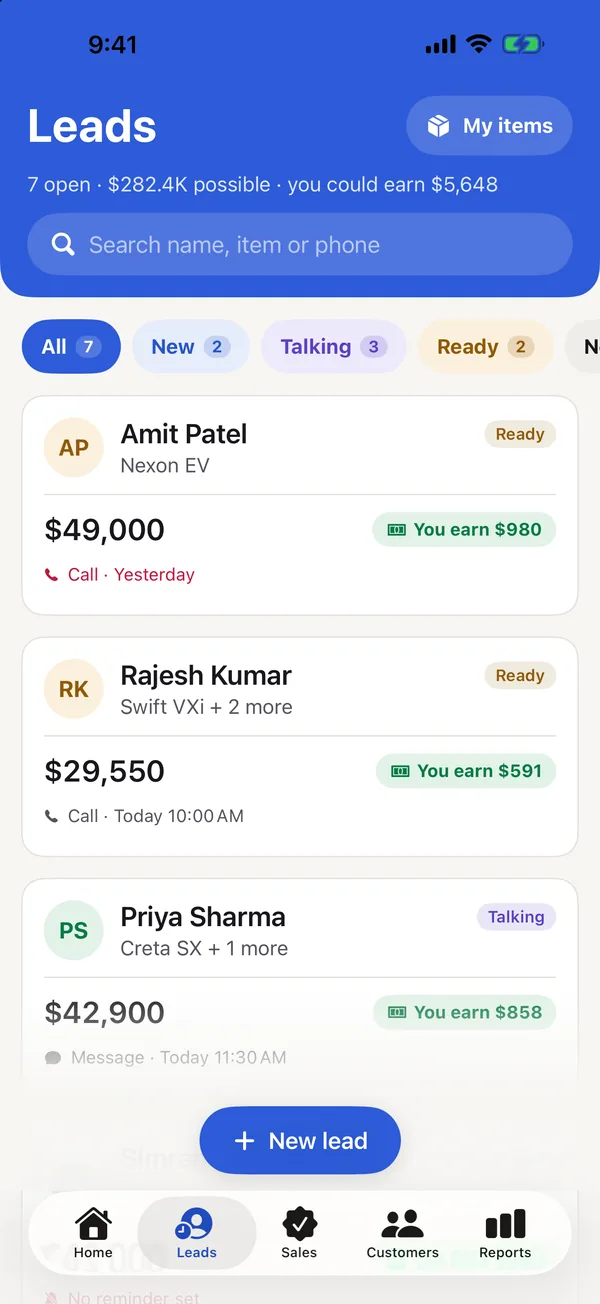
- Add a lead. The customer’s name, what they want and the price. Add each item and the total adds itself up, with what you’ll earn.
- Pick a call date. Today, tomorrow, in 3 days or next week. Late calls rise to the top, and when you tick a call done Clinch asks “when next?”.
- Find anyone fast. Search by name, item or phone, and add customers from your contacts several at once — with their birthdays.
- Check your Home Screen. The widget shows who to call today, late calls too, and opens the lead you tap.
Clinch is free, with no account, no ads and no AI. Everything stays on your phone, and you can export it all as a spreadsheet whenever you like.
Common questions
What is the best way to keep track of customers?
One list where every customer has a name, contact details, what they want, the price and a next contact date — checked every morning. If you sell on the move, an app that reminds you on the day works best.
How do I keep track of clients in Excel?
One row per lead, with columns for name, phone, what they want, price, stage and next date. Sort by next date each morning. It works as long as you remember to open it.
Is there a free lead tracker app?
Yes. Clinch is a free lead tracker for iPhone with call reminders and what you’ll earn on every lead — no account and no subscription.
How do I keep track of client birthdays?
Save each birthday with the customer and set a yearly reminder. Clinch brings birthdays in from your contacts and reminds you on the morning.
Published · No affiliate links











 MMA.
MMA. Trending
 Bold
Bold Top
Top