Disclosure: Kalend is ours. The advice works with any app, or with pen and paper.
In short
Add each shift as an event with its real start and end time, then make it repeat: weekly on the days you work, or every few days for a rotating pattern. In Apple Calendar, Repeat → Custom → Daily, every 8 days covers a 4-on, 4-off rota. Kalend shows a night shift once, on the day it starts, and lets you duplicate a shift and change only the date.
- Real start and end times, every time.
- Repeat by your cycle length, not by the week.
- Give work its own colour so the rota reads at a glance.
Add a shift in Apple Calendar
- Open Calendar and tap +.
- Name it by type: Early, Late or Nights.
- Set Starts and Ends to the real times. For a night shift, the end is the next morning.
- Tap Repeat: Every Week if you work the same days each week, or Custom to pick the days.
- Add an Alert for when you need to leave, then tap Add.
Make a separate calendar for work first: tap Calendars at the bottom, then Add Calendar. Shifts get their own colour, and you can hide them in one tap.
How to add a rotating shift pattern
The iPhone calendar has no “shift pattern” button, but Repeat → Custom can do most rotas. The trick is to repeat by the length of your cycle — how many days pass before the pattern starts again.
- 4 on, 4 off: an 8-day cycle.
- 2 days, 2 nights, 4 off: also 8 days.
- A two-week rota: 14 days.
Add each working day of the first cycle once, and set each one to Repeat → Custom → Daily → every 8 days (or 14, or whatever your cycle is). Then check the next two cycles against your real rota before you trust it.
Night shifts that cross midnight
An overnight shift sits on two dates, so a week of nights can look like twice as many shifts. Still enter the real end time the next morning — it’s what tells you, and anyone who checks your calendar, that you’re busy until then.
Block your sleep too. A “Sleep” event the morning after a night shift stops you booking the dentist at 10 am.
Keep the rota readable
- One colour for work, and short names: Early, Late, Nights.
- Put the site, ward or station in the event’s location or notes.
- When one shift swaps, change only that event — iPhone asks whether to save for this event only or for future events.
- Add your days off as well if you plan around them; it makes the week easier to plan in one go.
How to do it in Kalend
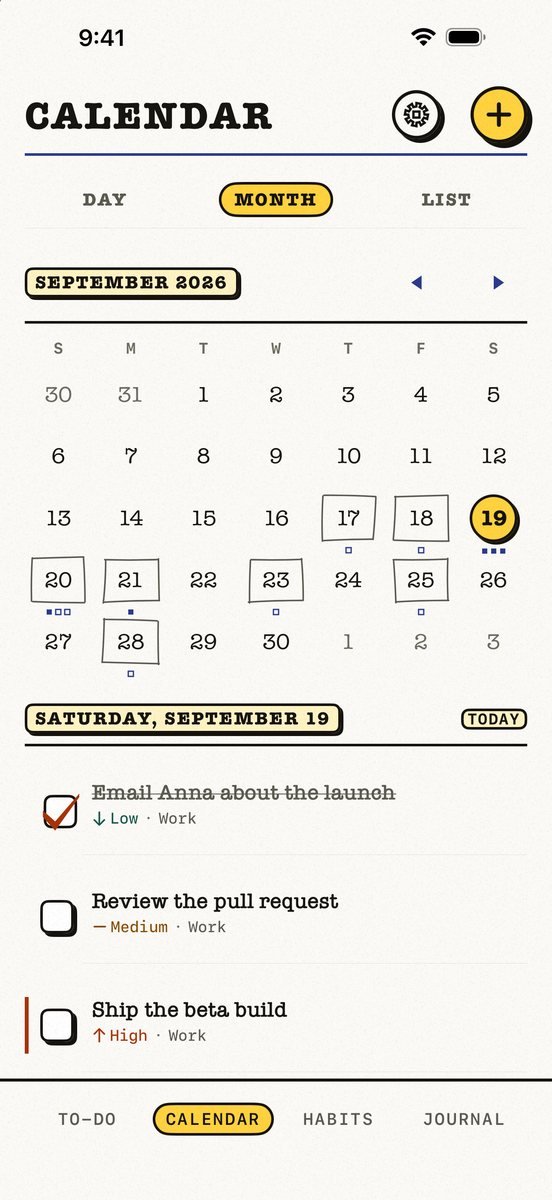
- Add the shift on the Calendar tab. Tap + for an appointment of Kalend’s own, with a colour, a reminder and a repeat. It needs no calendar permission.
- Repeat it on the days you work. Repeat on several days, like Mon, Wed and Fri, and skip one date without touching the rest.
- Duplicate it when the rota changes. Copy a shift or a class and change only the date.
- See nights the way you live them. From Kalend 2.5, a night shift shows once, on the day it starts, with its start and end time. In Day view it carries into the next morning, so you can see you’re busy.
Kalend is free, with no subscription, no ads and no account. You can show your iPhone’s own calendars beside your shifts, and export a PDF of your week or month.
Common questions
How do I add my work schedule to my iPhone calendar?
Add each shift as an event with its real start and end time, set it to repeat on the days you work, and keep shifts in their own Work calendar so they have their own colour.
Can I add a shift pattern to iPhone calendar?
There is no shift-pattern button, but Repeat → Custom → Daily lets an event repeat every few days. Add each working day of one cycle and set it to repeat by the cycle length, such as every 8 days for 4 on, 4 off.
How do I put a night shift in my calendar?
Start the event on the evening it begins and end it the next morning at the real time. Kalend shows it once, on the day it starts.
Is there a free shift work calendar app for iPhone?
Kalend is free, with no subscription and no ads. It adds repeating appointments, duplicates a shift to a new date, and shows night shifts once on the day they start.
Published · No affiliate links









 MMA.socialUFC fan ratings
 TrendingPunjabiPunjabi music charts
 BoldOpinionAnonymous hot takes