Disclosure: Kalend is ours, and it is listed first. It gets the same four fields as every other app, including its drawbacks.
Short answer
Our pick is Kalend — it is free with no paid tier and puts tasks next to your calendar, habits and a journal. If you want the closest copy of how Things feels, TickTick and Microsoft To Do are the free apps to try first.
Things 3 is one of the best-loved task apps ever made, and its App Store listing is honest about the catch: it is a paid download, and the Mac, iPad and Vision Pro versions are sold separately. Sync through Things Cloud is free once you own it, but there is no free way in.
So this guide asks one question of every app: can you plan a real week in it without paying? That rules out apps that only open up after a trial, and it keeps a note of what each free tier holds back.
Switch to Kalend if
- You want everything on your iPhone for free, not one purchase per device
- You want a calendar and your tasks on the same screen
- You also track habits or keep a journal
Stay with Things 3 if
- You already own Things on every device and it works for you
- You live in Things’ Areas and Projects on a Mac
- Its design is the reason you get things done
At a glance
| App | Best for | Pricing |
|---|---|---|
| Kalend (ours) | People who want tasks, a calendar, habits and a journal in one free app, kept in their own iCloud | Free. No paid tier, no subscription and no ads; the only purchase is an optional tip |
| Things 3 | People who want the most carefully designed task app on Apple devices and are happy to pay for it once per device | Paid download on iPhone; Mac, iPad and Vision Pro sold separately |
| TickTick | People who want Things-style lists plus a calendar view, habits and a Pomodoro timer in one app | Free tier plus a Premium subscription |
| Microsoft To Do | People who want a clean, completely free list app with a daily “My Day” plan | Free |
| Todoist | People who want the same task list on every platform, including Android, Windows and the web | Free tier plus a paid Pro plan |
| OmniFocus 4 | Power users who want the deepest project, tag and perspective system on Apple devices | Two-week free trial, then a paid licence or subscription |
| Apple Reminders | Anyone who wants lists, dates and shared shopping lists at no cost, already on their iPhone | Included with Apple devices at no extra cost |
The apps in detail
Kalend
Ours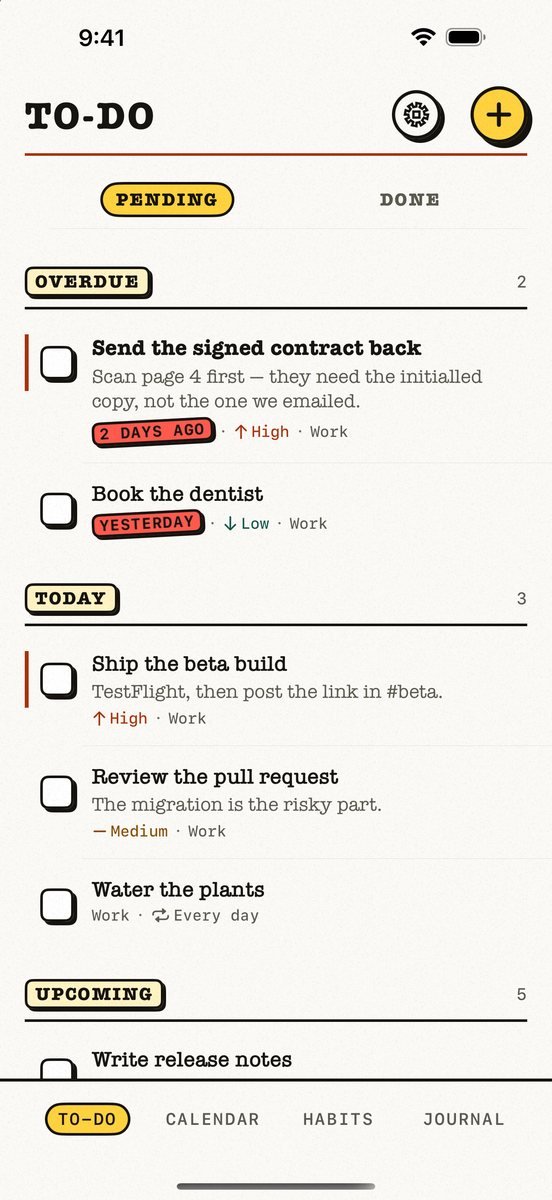
- Best for
- People who want tasks, a calendar, habits and a journal in one free app, kept in their own iCloud
- Highlights
- Tasks, calendar, habits and a journal in one app
- Your calendar events next to today’s tasks, with an overdue section
- Syncs through your own iCloud — no account, no server of ours
- Works offline
- Pricing
- Free. No paid tier, no subscription and no ads; the only purchase is an optional tip
- Watch out
- Apple-only: no Android app and no web version, and it needs iOS 18 or later. It syncs through your personal iCloud, so there is no sharing — you cannot assign a task or share a list with anyone.
Things 3
- Best for
- People who want the most carefully designed task app on Apple devices and are happy to pay for it once per device
- Highlights
- Projects, Areas, headings and checklists — the structure Things is famous for
- A full Apple Watch app for glancing at Today and dictating to-dos
- Free sync between your devices through Things Cloud
- Pricing
- Paid download on iPhone; Mac, iPad and Vision Pro sold separately
- Watch out
- There is no free version on iPhone, no Android app and no web app, and each Apple platform is a separate purchase.
TickTick
- Best for
- People who want Things-style lists plus a calendar view, habits and a Pomodoro timer in one app
- Highlights
- Flexible recurring tasks, checklists, tags and multiple reminders
- Calendar views and calendar integration next to your lists
- Shared lists for collaboration and task capture by email
- Pricing
- Free tier plus a Premium subscription
- Watch out
- The listing keeps its most advanced features in Premium, and it needs a TickTick account to sync.
Microsoft To Do
- Best for
- People who want a clean, completely free list app with a daily “My Day” plan
- Highlights
- My Day with suggestions pulled from across your lists
- Shared lists with family and friends
- Flagged Outlook emails turn into tasks
- Pricing
- Free
- Watch out
- You need a Microsoft account, and there is no calendar view or habit tracking — it is a list app first and last.
Todoist
- Best for
- People who want the same task list on every platform, including Android, Windows and the web
- Highlights
- Syncs instantly across iPhone, iPad, Apple Watch, Mac and every browser
- Natural capture by voice, Siri and the share sheet
- Works for personal lists and for teams
- Pricing
- Free tier plus a paid Pro plan
- Watch out
- Calendar layout, reminders and bigger projects are where the free tier runs out, and everything lives in a Todoist account.
OmniFocus 4
- Best for
- Power users who want the deepest project, tag and perspective system on Apple devices
- Highlights
- One unified interface across Mac, iPhone, iPad, Apple Watch and Vision Pro
- Projects, tags, dates and custom perspectives
- Free end-to-end encrypted sync from Omni
- Pricing
- Two-week free trial, then a paid licence or subscription
- Watch out
- It is not free past the trial, and it is far more to learn than Things.
Apple Reminders
- Best for
- Anyone who wants lists, dates and shared shopping lists at no cost, already on their iPhone
- Highlights
- Built into iPhone, iPad, Mac and Apple Watch
- Smart lists, tags, sections and shared lists
- Syncs through iCloud with no extra account
- Pricing
- Included with Apple devices at no extra cost
- Watch out
- There is no planning view that mixes your calendar with your tasks, and no habits or journal.
Where the free apps still fall short of Things
Things’ real trick is restraint: it does very little, beautifully. Most free alternatives win on price by doing more — calendars, habits, timers — and the price is clutter. If the calm is what you liked, try an app for a week before you move a hundred tasks into it.
The other difference is where your list lives. Things keeps it in Things Cloud; TickTick, Todoist and Microsoft To Do keep it in an account with them; Apple Reminders and Kalend sync through your own iCloud with no new account at all.
Common questions
Is there a free version of Things 3?
No. Things 3 is a paid download on iPhone, and the Mac, iPad and Vision Pro versions are sold separately. There is a free trial for the Mac version only.
What is the best free alternative to Things 3?
For a free app with no paid tier, Kalend — tasks, calendar, habits and a journal in one, synced through your own iCloud. For the closest look and feel, TickTick or Microsoft To Do.
Can I move my tasks out of Things?
Things can share and export lists, but most apps have no direct Things importer, so plan to copy active projects across by hand and leave the archive where it is.
App Store listings checked on 27 September 2026. Prices change — each entry describes how an app is paid for rather than a number that goes stale.
Published · No affiliate links









 MMA.socialUFC fan ratings
 TrendingPunjabiPunjabi music charts
 BoldOpinionAnonymous hot takes