Disclosure: Kalend is ours, and it is listed first. It gets the same four fields as every other app, including its drawbacks.
Short answer
Our pick is Kalend — tasks and your calendar side by side, plus habits and a journal, with no paid tier. For plain shared lists, Microsoft To Do is free on every platform.
Any.do sells itself as the “perfect combo of a task list, calendar, planner and reminders”, and it is. Its listing also carries a long list of subscription plans — the planner side is where most people meet them.
This guide looks for the same combination — tasks next to your day — without the subscription.
Switch to Kalend if
- You mostly use Any.do’s calendar and daily plan
- You don’t share lists with a team
- You want nothing in another account
Stay with Any.do if
- You assign tasks to family or co-workers
- You need Android and the web
- You use its WhatsApp or location reminders
At a glance
| App | Best for | Pricing |
|---|---|---|
| Kalend (ours) | People who want tasks, a calendar, habits and a journal in one free app, kept in their own iCloud | Free. No paid tier, no subscription and no ads; the only purchase is an optional tip |
| Any.do | People who want tasks, a calendar and reminders together, shared with others | Free tier plus Premium subscription plans |
| TickTick | People who want lists, a calendar view and habits on every platform | Free tier plus a Premium subscription |
| Microsoft To Do | People who want free shared lists and a simple daily plan | Free |
| Todoist | People who need the same list on every device and browser | Free tier plus a paid Pro plan |
| Apple Reminders | People who want free lists and shared shopping lists on Apple devices | Included with Apple devices at no extra cost |
The apps in detail
Kalend
Ours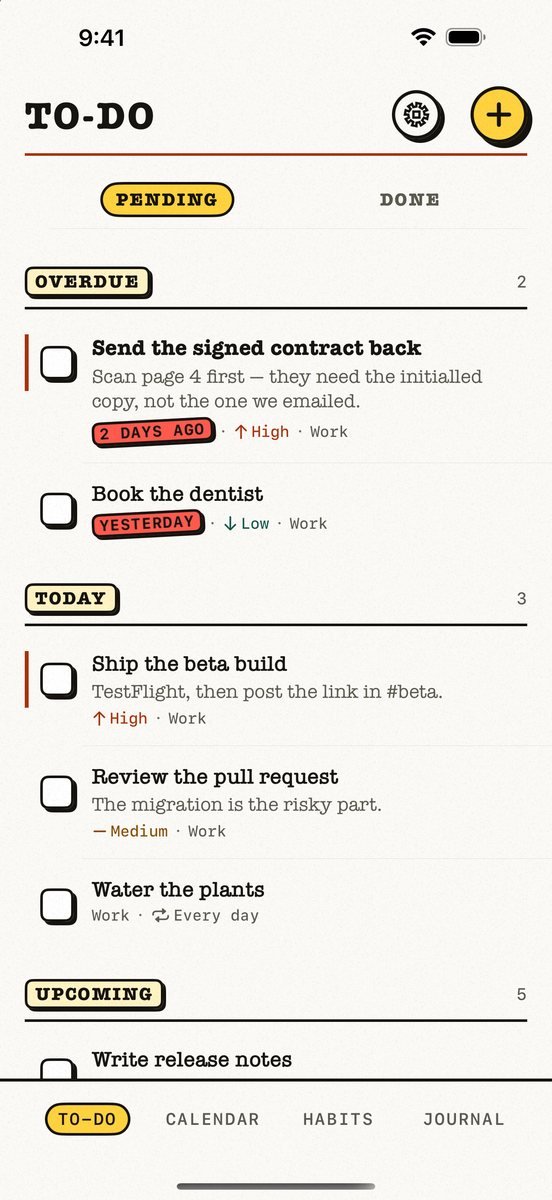
- Best for
- People who want tasks, a calendar, habits and a journal in one free app, kept in their own iCloud
- Highlights
- Tasks, calendar, habits and a journal in one app
- Your calendar events next to today’s tasks, with an overdue section
- Syncs through your own iCloud — no account, no server of ours
- Works offline
- Pricing
- Free. No paid tier, no subscription and no ads; the only purchase is an optional tip
- Watch out
- Apple-only: no Android app and no web version, and it needs iOS 18 or later. It syncs through your personal iCloud, so there is no sharing — you cannot assign a task or share a list with anyone.
Any.do
- Best for
- People who want tasks, a calendar and reminders together, shared with others
- Highlights
- To-do list, calendar, planner and reminders in one app
- Location-based and recurring reminders
- Shared lists and assigned tasks
- Pricing
- Free tier plus Premium subscription plans
- Watch out
- The planning features people download it for sit largely in Premium, and it needs an account.
TickTick
- Best for
- People who want lists, a calendar view and habits on every platform
- Highlights
- Calendar views next to your lists
- Habits and a focus timer
- Syncs everywhere, with shared lists
- Pricing
- Free tier plus a Premium subscription
- Watch out
- Much of the calendar is Premium.
Microsoft To Do
- Best for
- People who want free shared lists and a simple daily plan
- Highlights
- My Day with suggestions
- Shared lists with family
- Outlook emails become tasks
- Pricing
- Free
- Watch out
- No calendar view and no habits.
Todoist
- Best for
- People who need the same list on every device and browser
- Highlights
- Instant sync everywhere
- Voice and natural-language capture
- Works for teams
- Pricing
- Free tier plus a paid Pro plan
- Watch out
- Calendar layout and reminders are where free runs out.
Apple Reminders
- Best for
- People who want free lists and shared shopping lists on Apple devices
- Highlights
- Built into every Apple device
- Smart lists, tags and sections
- iCloud sync, no extra account
- Pricing
- Included with Apple devices at no extra cost
- Watch out
- No planner view mixing tasks with your calendar.
Planner or list?
Any.do’s promise is that your list and your calendar are one thing. Most free apps give you one or the other: Reminders and Microsoft To Do are lists; Apple Calendar is a calendar.
Kalend puts both on the same page — the calendar tab shows your events beside today’s tasks — and syncs through your own iCloud.
Common questions
Is Any.do free?
Any.do has a free tier; its listing offers several subscription plans for the full planner features.
What is a free alternative to Any.do with a calendar?
Kalend shows your calendar events next to your tasks, free with no paid tier. TickTick has a calendar too, partly in Premium.
Which Any.do alternative is best for families?
Microsoft To Do and Apple Reminders both share lists free.
App Store listings checked on 27 September 2026. Prices change — each entry describes how an app is paid for rather than a number that goes stale.
Published · No affiliate links







 MMA.socialUFC fan ratings
 TrendingPunjabiPunjabi music charts
 BoldOpinionAnonymous hot takes
 brolic.ioGym leaderboards