Disclosure: Brolic is ours. The advice works with any app, or with pen and paper.
In short
Progressive overload means doing a little more over time — one more rep, a small weight jump, or an extra set — so your body has a reason to keep adapting. Pick a rep range, add reps until you hit the top of it on every set, then add the smallest weight jump and start again at the bottom. Log every set so you always know what “a little more” is.
- A little more than last time — not a lot more.
- Reps first, then weight.
- You can’t overload what you didn’t write down.
What progressive overload means
Your muscles adapt to what you ask of them. Lift the same weight for the same reps every week and, after a while, there’s nothing new to adapt to. Progressive overload simply means asking for slightly more over time.
The simplest method: double progression
Pick a rep range, such as 6–10, and a weight you can lift for 6 with good form.
- Each session, try to add a rep to some of your sets.
- When you reach 10 on every set, add the smallest jump — usually 5 lbs (2.5 kg) for upper-body lifts, 5–10 lbs for lower-body lifts.
- Drop back to around 6 reps with the new weight and climb again.
A progressive overload example on bench press
- Week 1: 135 lbs — 8, 7, 6
- Week 2: 135 lbs — 9, 8, 7
- Week 3: 135 lbs — 10, 9, 8
- Week 4: 135 lbs — 10, 10, 10
- Week 5: 140 lbs — 8, 7, 7
Small steps, every week. Need to load the bar? See how many plates is 225.
How to do progressive overload without adding weight
At home, or with fixed dumbbells, you can still progress:
- More reps with the same weight.
- More sets across the week.
- Slower lowering — three seconds down instead of one.
- Shorter rest between sets.
- A harder version — feet-elevated push-ups, single-leg squats.
- A fuller range — deeper squats, a pause on the chest.
When it stops working
Nobody adds weight for ever. When your reps stall for two or three weeks, check sleep and food first, then take a lighter week and come back. If it keeps happening, see how to break a strength plateau.
Track progressive overload with Brolic
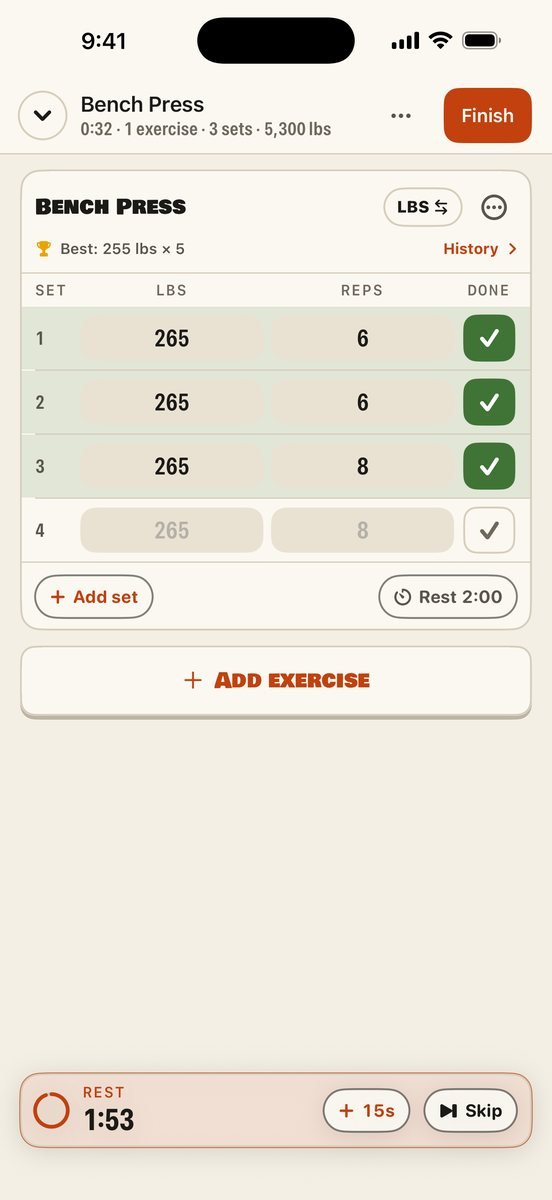
- Start the lift. The next set shows your last numbers in grey. Tick it to repeat them, or type one more rep or a little more weight.
- See what to beat. Your best on that lift is right there, and a new record is stamped the moment you finish.
- Rest on time. The rest timer starts on its own, floats while you scroll, and can tell you when rest is over, even with the phone locked.
- Read the week back. The weekly report shows total weight lifted against last week, sets per muscle group and your records.
Brolic is free, with no subscription, no in-app purchases, no ads and no AI.
Common questions
What is progressive overload?
Gradually asking more of your muscles over time — more reps, more weight or more sets — so they keep adapting.
How fast should I increase weight?
Add the smallest jump only when you hit the top of your rep range on every set. Beginners may do that every week or two; it slows down with experience.
Can you do progressive overload without increasing weight?
Yes — add reps or sets, lower more slowly, shorten rest, or move to a harder variation.
What is a good progressive overload tracker?
Any log that shows last time’s sets while you lift. Brolic shows your last numbers in grey on the next set, for free.
Published · No affiliate links











 MMA.
MMA. Trending
 Bold
Bold Top
Top