Disclosure: Kalend is ours, and it is listed first. It gets the same four fields as every other app, including its drawbacks.
Short answer
Our pick is Kalend — tasks, your calendar, habits and a journal in one free iPhone app. It does not schedule your day for you; you do. If you want time blocking with Google and Outlook calendars, try Akiflow or Structured.
Motion promises that AI will arrange your tasks around your meetings and keep rearranging as the day slips. For a team with a packed calendar that can be worth paying for. Its listing is also clear about two things: Motion needs a subscription, and it “is best used on a computer” — the iPhone app is a companion.
If you are one person who just wants to see what is due today next to what is on the calendar, you can get that on your phone without the subscription. Here are six ways.
Switch to Kalend if
- You are planning one person’s day, not a team’s
- You want a planner that fully works on the phone
- The subscription costs more than the time it saves you
Stay with Motion if
- You want your tasks scheduled for you automatically
- Your week is wall-to-wall meetings that keep moving
- Your team already runs its projects in Motion
At a glance
| App | Best for | Pricing |
|---|---|---|
| Kalend (ours) | People who want tasks, a calendar, habits and a journal in one free app, kept in their own iCloud | Free. No paid tier, no subscription and no ads; the only purchase is an optional tip |
| Motion | Busy professionals and teams who want AI to arrange their tasks and meetings for them | Needs a Motion subscription, with a free trial |
| Akiflow | People who time-block their work and want tasks and meetings in one schedule | Free download; the listing gives no plan prices |
| Sunsama | People who plan each working day at a desk and want that plan in their pocket | Free download; a companion to Sunsama’s desktop app |
| Structured | People who think in time blocks and want their whole day on one visual timeline | Free timeline; Structured Pro (monthly, annual or lifetime) for more |
| TickTick | People who want lists, a calendar view, habits and a focus timer on every platform | Free tier plus a Premium subscription |
| Apple Calendar | People who want a free, simple day and week view already on their iPhone | Included with Apple devices at no extra cost |
The apps in detail
Kalend
Ours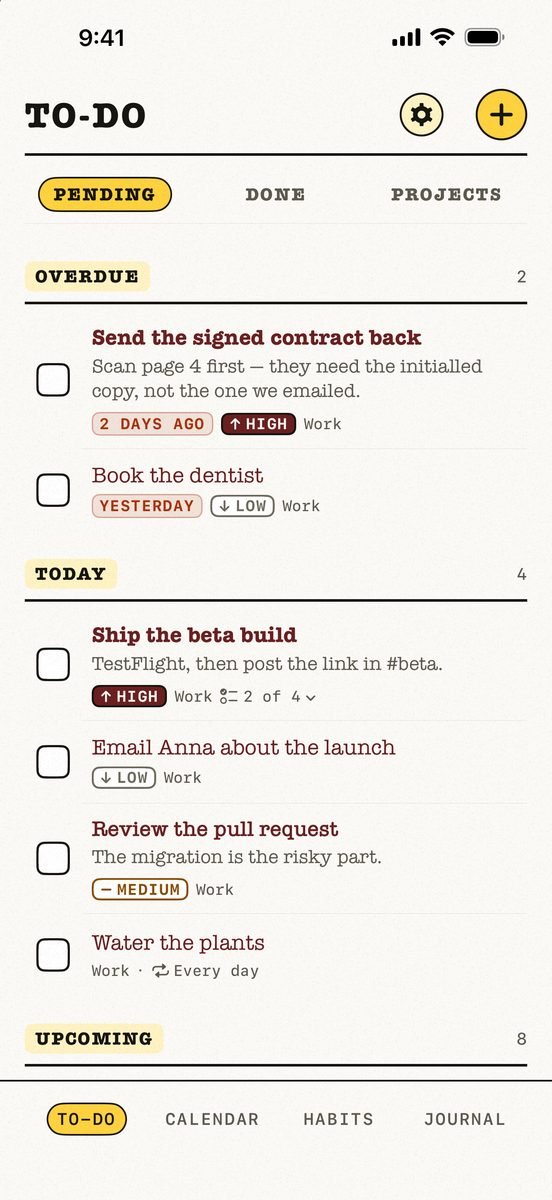
- Best for
- People who want tasks, a calendar, habits and a journal in one free app, kept in their own iCloud
- Highlights
- Tasks, calendar, habits and a journal in one app
- Your calendar events next to today’s tasks, with an overdue section
- Syncs through your own iCloud — no account, no server of ours
- Works offline
- Pricing
- Free. No paid tier, no subscription and no ads; the only purchase is an optional tip
- Watch out
- Apple-only: no Android app and no web version, and it needs iOS 18 or later. It syncs through your personal iCloud, so there is no sharing — you cannot assign a task or share a list with anyone.
Motion
- Best for
- Busy professionals and teams who want AI to arrange their tasks and meetings for them
- Highlights
- Automatically plans your day around your meetings
- Schedules meetings and manages team projects
- Add tasks with Siri
- Pricing
- Needs a Motion subscription, with a free trial
- Watch out
- Its listing says Motion “is best used on a computer” and that the mobile app is a companion, not a standalone app.
Akiflow
- Best for
- People who time-block their work and want tasks and meetings in one schedule
- Highlights
- One to-do list you drag onto the calendar to block time
- Syncs with Google Calendar and Outlook
- iPhone, Apple Watch, web and desktop
- Pricing
- Free download; the listing gives no plan prices
- Watch out
- It is built for a working day full of meetings, it needs an Akiflow account, and the listing does not say what it costs.
Sunsama
- Best for
- People who plan each working day at a desk and want that plan in their pocket
- Highlights
- Review the day you planned and stay on it
- Add a task on the go and drop it onto your calendar
- Synced with Google Calendar and Outlook Calendar
- Pricing
- Free download; a companion to Sunsama’s desktop app
- Watch out
- Its own listing says the iPhone app is a companion “not a standalone replacement” — you must plan your first day on the desktop app before it works.
Structured
- Best for
- People who think in time blocks and want their whole day on one visual timeline
- Highlights
- A drag-and-drop timeline of the day
- An inbox for ideas you will sort later
- Syncs across iPhone, iPad, Apple Watch and Mac
- Pricing
- Free timeline; Structured Pro (monthly, annual or lifetime) for more
- Watch out
- The listing puts calendar import, recurring tasks and its AI in Pro — the first things most planners need.
TickTick
- Best for
- People who want lists, a calendar view, habits and a focus timer on every platform
- Highlights
- Flexible recurring tasks, checklists and multiple reminders
- Calendar views and a habit tracker built in
- Syncs across all your devices, with shared lists
- Pricing
- Free tier plus a Premium subscription
- Watch out
- The most advanced features — including much of the calendar — are Premium, and your data lives in a TickTick account.
Apple Calendar
- Best for
- People who want a free, simple day and week view already on their iPhone
- Highlights
- Day, week and month views with alerts
- Works with iCloud, Google and Outlook accounts
- Shared calendars
- Pricing
- Included with Apple devices at no extra cost
- Watch out
- Events only — no tasks beside them, no habits and no planning.
The honest trade-off
Nothing free on this list plans your day for you. Motion’s whole pitch is the automatic scheduling, and that is what the subscription pays for. Kalend, Structured and TickTick show you the day clearly and leave the choices to you.
For plenty of people that is the better deal. An automatic schedule is only useful if you trust it; a clear list of today’s tasks beside today’s events is useful straight away.
Common questions
Is the Motion app free?
No. Motion’s App Store listing says it requires a Motion subscription, with a free trial to start.
Does Motion work on iPhone only?
Its listing says Motion is best used on a computer and that the mobile app is a companion to the web and desktop app, not a standalone app.
What is a free alternative to Motion?
Kalend is free and puts tasks, your calendar, habits and a journal in one iPhone app. It does not auto-schedule — you place things yourself.
App Store listings checked on 12 November 2026. Prices change — each entry describes how an app is paid for rather than a number that goes stale.







 MMA.
 Trending
 Bold
 Top