Disclosure: Kalend is ours, and it is listed first. It gets the same four fields as every other app, including its drawbacks.
Short answer
Our pick is Kalend — tasks beside your calendar, plus habits and a journal, free and with no Google account. If you want to stay cross-platform, Microsoft To Do is the free step up.
Google Tasks does one thing: a list of to-dos tied to your Google account, with a neat trick of turning an email into a task inside Gmail. It is free, quick and fine — until you want repeating routines, a sense of your whole day, or anything that feels like a planner.
On iPhone especially it can feel like a side door into Gmail. These six apps give you more to work with.
Switch to Kalend if
- You want a planner, not just a list
- You want habits and tasks in one place
- You’d rather your to-dos weren’t in a Google account
Stay with Google Tasks if
- You make tasks from emails in Gmail all day
- You want tasks to show inside Google Calendar on the web
- A short plain list is all you need
At a glance
| App | Best for | Pricing |
|---|---|---|
| Kalend (ours) | People who want tasks, a calendar, habits and a journal in one free app, kept in their own iCloud | Free. No paid tier, no subscription and no ads; the only purchase is an optional tip |
| Google Tasks | People who live in Gmail and Google Calendar and want their to-dos there too | Free |
| Microsoft To Do | People who want a clean, completely free list app with a daily “My Day” plan | Free |
| Todoist | People who need the same list on every platform, including Android and the web | Free tier plus a paid Pro plan |
| TickTick | People who want lists, a calendar view, habits and a focus timer on every platform | Free tier plus a Premium subscription |
| Apple Reminders | People who want dated lists and shared shopping lists at no cost, already on their iPhone | Included with Apple devices at no extra cost |
| Any.do | People who want a to-do list, calendar and reminders together, shared with family | Free tier plus a Premium subscription |
The apps in detail
Kalend
Ours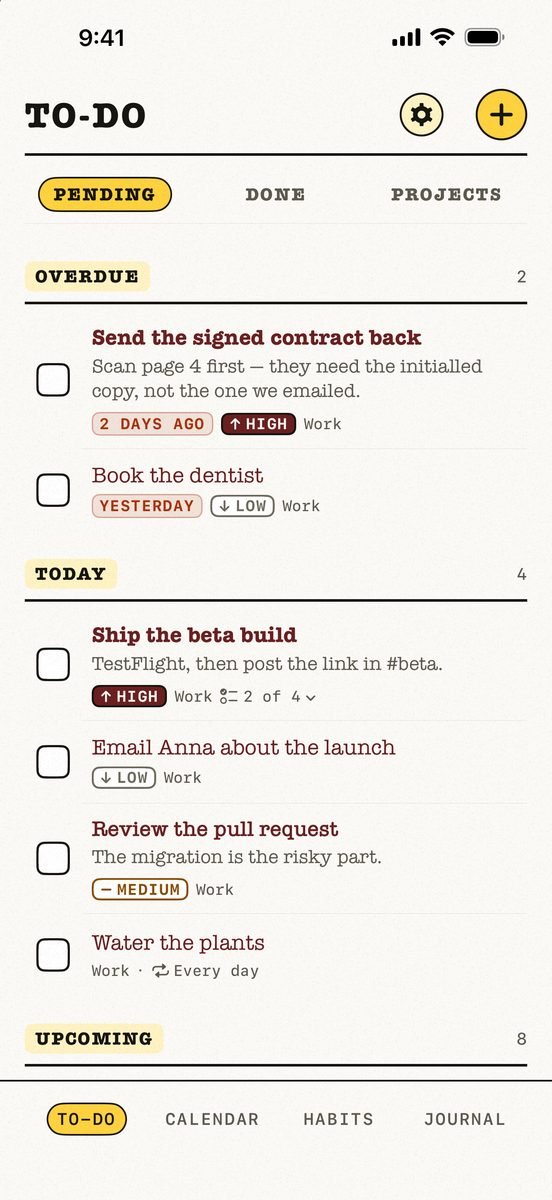
- Best for
- People who want tasks, a calendar, habits and a journal in one free app, kept in their own iCloud
- Highlights
- Tasks, calendar, habits and a journal in one app
- Your calendar events next to today’s tasks, with an overdue section
- Syncs through your own iCloud — no account, no server of ours
- Works offline
- Pricing
- Free. No paid tier, no subscription and no ads; the only purchase is an optional tip
- Watch out
- Apple-only: no Android app and no web version, and it needs iOS 18 or later. It syncs through your personal iCloud, so there is no sharing — you cannot assign a task or share a list with anyone.
Google Tasks
- Best for
- People who live in Gmail and Google Calendar and want their to-dos there too
- Highlights
- Turn an email into a task from inside Gmail
- Subtasks, details and due dates with notifications
- Syncs across your devices through your Google account
- Pricing
- Free
- Watch out
- It is a plain list — no habits, no journal and no planner of its own — and it needs a Google account.
Microsoft To Do
- Best for
- People who want a clean, completely free list app with a daily “My Day” plan
- Highlights
- My Day with suggestions pulled from across your lists
- Shared lists with family and friends
- Flagged Outlook emails turn into tasks
- Pricing
- Free
- Watch out
- You need a Microsoft account, and there is no calendar view or habit tracking — it is a list app first and last.
Todoist
- Best for
- People who need the same list on every platform, including Android and the web
- Highlights
- Instant sync across iPhone, Apple Watch, Mac and browsers
- Natural language and voice capture
- Scales from personal lists to teams
- Pricing
- Free tier plus a paid Pro plan
- Watch out
- Calendar layout and larger project limits sit in Pro, there is no habit tracker, and everything lives in a Todoist account.
TickTick
- Best for
- People who want lists, a calendar view, habits and a focus timer on every platform
- Highlights
- Flexible recurring tasks, checklists and multiple reminders
- Calendar views and a habit tracker built in
- Syncs across all your devices, with shared lists
- Pricing
- Free tier plus a Premium subscription
- Watch out
- The most advanced features — including much of the calendar — are Premium, and your data lives in a TickTick account.
Apple Reminders
- Best for
- People who want dated lists and shared shopping lists at no cost, already on their iPhone
- Highlights
- Built into iPhone, iPad, Mac and Apple Watch
- Smart lists, tags, sections and shared lists
- Syncs through iCloud with no extra account
- Pricing
- Included with Apple devices at no extra cost
- Watch out
- No planning view that mixes your calendar with your tasks, and no habits or journal.
Any.do
- Best for
- People who want a to-do list, calendar and reminders together, shared with family
- Highlights
- Tasks, calendar and reminders in one app
- Location-based and recurring reminders
- Shared lists and assigned tasks
- Pricing
- Free tier plus a Premium subscription
- Watch out
- The planning features people download it for sit largely in Premium, and it needs an Any.do account.
The honest trade-off
The Gmail link is the one thing nothing else here does as smoothly. If half your tasks start life as an email in Gmail on a computer, Google Tasks earns its place.
If they start in your head while you are out, the phone app matters more than the inbox. Kalend still shows your Google calendar — add the Google account to your iPhone’s calendars and its events appear next to your tasks.
Common questions
Is Google Tasks free on iPhone?
Yes. Google Tasks is a free app; it needs a Google account.
Can I see my Google Calendar in another to-do app?
Yes. Add your Google account to the iPhone’s calendars and apps such as Kalend show those events beside your tasks.
What is better than Google Tasks on iPhone?
Kalend for a free planner with tasks, calendar and habits. Microsoft To Do or Todoist if you need the list on other platforms.
App Store listings checked on 12 November 2026. Prices change — each entry describes how an app is paid for rather than a number that goes stale.




 MMA.
 Trending
 Bold
 Top