Disclosure: Jotter is ours, and it is listed first. It gets the same four fields as every other app, including its drawbacks.
Short answer
Our pick is Jotter — typed notes, Apple Pencil handwriting on lined, grid or dotted paper, scans and voice notes, free with iCloud sync. If you fill whole notebooks and mark up PDFs, Goodnotes is the closer match.
Notability made its name with one great trick: record a lecture while you write, then tap a word to hear what was being said at that moment. It is still excellent at that. What pushes people away is the plan — the free version is limited, and iCloud sync, auto-backup and the AI tools sit in the upgrade.
If you mostly take everyday notes with a bit of handwriting, you may not need a study tool at all. Here is what else is out there, and where each one draws its line.
Switch to Jotter if
- Your notes are short — lists, ideas, a sketch
- You want sync without paying for it
- You don’t record lectures or annotate PDFs
Stay with Notability if
- Audio synced to your handwriting is how you study
- You annotate slides and PDFs every day
- You already own the one-time Classic plan
At a glance
| App | Best for | Pricing |
|---|---|---|
| Jotter (ours) | Opening the app and typing — with checklists, handwriting, scans and voice notes in the same note | Free, no subscription — an optional tip unlocks nothing |
| Notability | Students who record lectures while they write | Free; subscription or one-time Classic plan |
| Goodnotes | Students and professionals who fill notebooks and annotate PDFs | Free version with a notebook limit; paid plans for unlimited |
| Noteshelf 3 | People who want realistic pens and custom notebooks | Free tier plus Premium |
| Apple Notes | People who only use Apple devices and want free notes with no setup | Included with Apple devices at no extra cost |
| Apple Freeform | People who think on an endless canvas | Included with Apple devices at no extra cost |
| Microsoft OneNote | People who want free-form notebooks that open on Windows, the web and their phone | Free; some features need a Microsoft 365 subscription |
The apps in detail
Jotter
Ours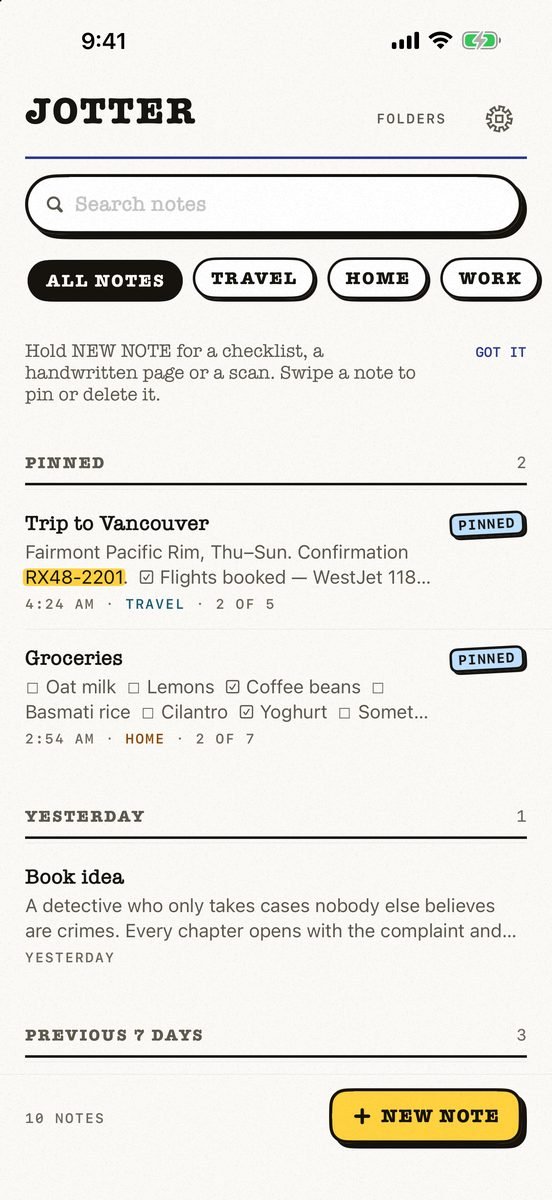
- Best for
- Opening the app and typing — with checklists, handwriting, scans and voice notes in the same note
- Highlights
- No title, no folder, no save button — the first line names the note
- Checklists, Apple Pencil handwriting, scans and voice notes
- Search reads handwriting and text in photos, on the device
- Syncs through your own iCloud; exports as Markdown
- Pricing
- Free, no subscription — an optional tip unlocks nothing
- Watch out
- iPhone, iPad and Apple Watch, on iOS 18 or later: no Mac app yet, no Android or web version, and no shared notes.
Notability
- Best for
- Students who record lectures while they write
- Highlights
- Audio synced to the moment you write
- iPad, iPhone, Mac and the web
- A one-time Classic plan, per the listing
- Pricing
- Free; subscription or one-time Classic plan
- Watch out
- Auto-backup, iCloud sync and the AI tools are in the upgrade.
Goodnotes
- Best for
- Students and professionals who fill notebooks and annotate PDFs
- Highlights
- Handwritten notebooks with templates
- AI transcription, summaries and meeting notes
- iCloud sync across iPad, iPhone and Mac
- Pricing
- Free version with a notebook limit; paid plans for unlimited
- Watch out
- The free version holds only a few notebooks.
Noteshelf 3
- Best for
- People who want realistic pens and custom notebooks
- Highlights
- Realistic pens, highlighters and covers
- PDF markup and audio
- iCloud sync across iPad, iPhone and Mac
- Pricing
- Free tier plus Premium
- Watch out
- Unlimited notebooks and handwriting recognition are Premium.
Apple Notes
- Best for
- People who only use Apple devices and want free notes with no setup
- Highlights
- Folders, tags, checklists, tables and document scanning
- Handwriting and sketches with Apple Pencil
- iCloud sync with no extra account
- Pricing
- Included with Apple devices at no extra cost
- Watch out
- Apple-only apart from a basic iCloud.com page, and getting notes out in bulk is awkward.
Apple Freeform
- Best for
- People who think on an endless canvas
- Highlights
- Infinite whiteboard with pen, shapes and images
- Share a board to collaborate
- iCloud sync
- Pricing
- Included with Apple devices at no extra cost
- Watch out
- A whiteboard, not a notebook — no pages, no lecture audio.
Microsoft OneNote
- Best for
- People who want free-form notebooks that open on Windows, the web and their phone
- Highlights
- Notebooks with digital ink and typed notes
- Voice transcription and document scanning
- Syncs across your devices, with shared notebooks
- Pricing
- Free; some features need a Microsoft 365 subscription
- Watch out
- It needs a Microsoft account, it is heavy for a quick note, and the current App Store listing requires iOS 26.
The honest trade-off
Be clear about what Jotter is not. It is not a PDF annotator and it does not tie a recording to your pen strokes. If those two things are your school day, stay with Notability or move to Goodnotes.
What it does is make ordinary notes quick: open, write or type, close. Handwriting, a scan and a voice note can sit in the same note, search reads your handwriting on the device, and it all syncs through your own iCloud for free.
Common questions
Is Notability free?
Notability is free to download with limits. Its listing offers a subscription or a one-time Classic plan, and features such as iCloud sync and auto-backup are part of the upgrade.
What is the best free Notability alternative?
Jotter or Apple Notes for everyday handwriting and typed notes with free iCloud sync. Goodnotes’ free version if you need notebooks and PDF markup, within its notebook limit.
Is there a free handwriting app for iPad with sync?
Yes. Jotter and Apple Notes both sync handwriting through iCloud at no cost.
App Store listings checked on 12 November 2026. Prices change — each entry describes how an app is paid for rather than a number that goes stale.





 MMA.
 Trending
 Bold
 Top