Disclosure: Jotter is ours, and it is listed first. It gets the same four fields as every other app, including its drawbacks.
Short answer
Our pick is Jotter — quick notes, checklists, handwriting, scans and voice notes that sync through your own iCloud, with no account. If you need the same notes on Android or Windows, Simplenote is free everywhere.
Google Keep is the sticky-note wall of the internet: open it, type, pick a colour, done. Shared shopping lists that tick off live are genuinely great. People look for something else for two reasons — they want their notes out of a Google account, or they have moved to an iPhone and Keep feels like a visitor there.
The apps below keep what is good about Keep — speed, lists, no fuss — and differ mainly on where your notes are stored and who can read them.
Switch to Jotter if
- You’ve moved to iPhone and want notes that feel at home
- You’d rather your notes weren’t in a Google account
- You want handwriting or scans in the same note
Stay with Google Keep if
- You share lists with someone on Android
- You rely on reminders that fire at a place
- You open your notes in a browser at work
At a glance
| App | Best for | Pricing |
|---|---|---|
| Jotter (ours) | Opening the app and typing — with checklists, handwriting, scans and voice notes in the same note | Free, no subscription — an optional tip unlocks nothing |
| Google Keep | People who want colourful sticky notes and shared lists on every device they own | Free |
| Apple Notes | People who only use Apple devices and want free notes with no setup | Included with Apple devices at no extra cost |
| Simplenote | People who want plain, fast notes that sync free to every platform | Free |
| Microsoft OneNote | People who want free-form notebooks that open on Windows, the web and their phone | Free; some features need a Microsoft 365 subscription |
| UpNote | People who want a pretty notebook app with a lock for private notes | Free tier plus a Premium subscription |
| Standard Notes | People who want notes nobody else can read — not even the company that syncs them | Free, with optional paid subscriptions |
The apps in detail
Jotter
Ours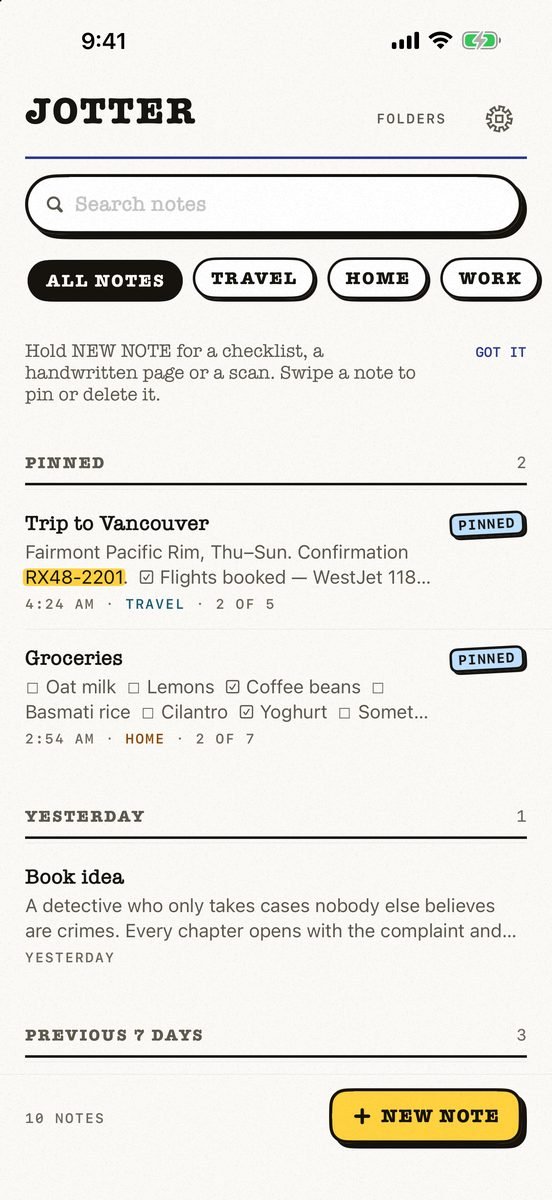
- Best for
- Opening the app and typing — with checklists, handwriting, scans and voice notes in the same note
- Highlights
- No title, no folder, no save button — the first line names the note
- Checklists, Apple Pencil handwriting, scans and voice notes
- Search reads handwriting and text in photos, on the device
- Syncs through your own iCloud; exports as Markdown
- Pricing
- Free, no subscription — an optional tip unlocks nothing
- Watch out
- iPhone, iPad and Apple Watch, on iOS 18 or later: no Mac app yet, no Android or web version, and no shared notes.
Google Keep
- Best for
- People who want colourful sticky notes and shared lists on every device they own
- Highlights
- Notes, lists, photos and audio with labels and colours
- Reminders by time or place
- Share a list and watch items get ticked off live
- Pricing
- Free
- Watch out
- Everything lives in your Google account, and it is built for short notes — long writing and handwriting are not its strength.
Apple Notes
- Best for
- People who only use Apple devices and want free notes with no setup
- Highlights
- Folders, tags, checklists, tables and document scanning
- Handwriting and sketches with Apple Pencil
- iCloud sync with no extra account
- Pricing
- Included with Apple devices at no extra cost
- Watch out
- Apple-only apart from a basic iCloud.com page, and getting notes out in bulk is awkward.
Simplenote
- Best for
- People who want plain, fast notes that sync free to every platform
- Highlights
- Syncs across any computer, phone or tablet for free
- Tags, pins and instant search
- Share notes or publish one to the web
- Pricing
- Free
- Watch out
- Plain text only — no images, scans or handwriting, and you log in with an email or WordPress.com account.
Microsoft OneNote
- Best for
- People who want free-form notebooks that open on Windows, the web and their phone
- Highlights
- Notebooks with digital ink and typed notes
- Voice transcription and document scanning
- Syncs across your devices, with shared notebooks
- Pricing
- Free; some features need a Microsoft 365 subscription
- Watch out
- It needs a Microsoft account, it is heavy for a quick note, and the current App Store listing requires iOS 26.
UpNote
- Best for
- People who want a pretty notebook app with a lock for private notes
- Highlights
- Notebooks, tags and a clean editor with themes
- Face ID lock for private notes and journals
- Syncs across devices and works offline
- Pricing
- Free tier plus a Premium subscription
- Watch out
- The full feature set is behind Premium.
Standard Notes
- Best for
- People who want notes nobody else can read — not even the company that syncs them
- Highlights
- End-to-end encrypted notes
- Free sync across iPhone, iPad, Mac and the web
- Simple by design: it does one job
- Pricing
- Free, with optional paid subscriptions
- Watch out
- Plain and text-first on the free plan — no handwriting or scans — and it needs an account.
The honest trade-off
Two Keep features are hard to replace. Shared lists across iPhone and Android — Jotter has no shared notes at all, and Apple Notes only shares with other Apple users. And notes on any browser: Jotter has no web or Android version.
If neither matters to you, an Apple-only notes app is simply faster on an iPhone. And if privacy is the reason you are leaving, look at where each app syncs: your own iCloud (Jotter, Apple Notes), an encrypted service (Standard Notes), or another company’s account.
Common questions
Is Google Keep free on iPhone?
Yes. Google Keep is a free app on iPhone; your notes sync through your Google account.
What is the best Google Keep alternative on iPhone?
Jotter or Apple Notes if you only use Apple devices; Simplenote if you also need Android, Windows or the web.
Can I move my Google Keep notes to another app?
Google lets you export Keep notes through Google Takeout. For a small number of notes, copying them across by hand is usually quicker.
App Store listings checked on 12 November 2026. Prices change — each entry describes how an app is paid for rather than a number that goes stale.







 MMA.
 Trending
 Bold
 Top