Disclosure: Neighbr is ours. The advice works with any app, or with pen and paper.
In short
People nearby always need small jobs done: shovelling, yard work, dog walks, moving a couch, setting up a router. Pick three you’re good at, set a fair price, do a great first job, and ask for a review. Neighbr shows you requests nearby so you can offer in one tap.
- Pick jobs you can do well today.
- Price by the job, not the hour.
- Reviews turn one job into regulars.
15 odd jobs neighbours pay for
- Shovelling driveways and sidewalks
- Lawn mowing and leaf raking
- Weeding and garden clean-ups
- Dog walking and pet sitting
- Watering plants while people travel
- Moving furniture up or down stairs
- Assembling flat-pack furniture
- Taking bins out and back
- Car jump-starts and tire checks
- Setting up Wi-Fi, TVs and phones
- Groceries and pharmacy runs
- Cleaning out a garage
- Washing windows or cars
- Tutoring and homework help
- Helping at a yard sale
How to price it
Price by the job: “$30 to shovel the driveway and walk”. Clear prices get quick yeses. For the first few jobs, price a little low and over-deliver.
Turn one job into regulars
Show up on time, do a bit more than asked, and ask for a review. A neighbour who’s happy with a shovelled driveway will ask you to rake the leaves in the fall.
How to find jobs with Neighbr
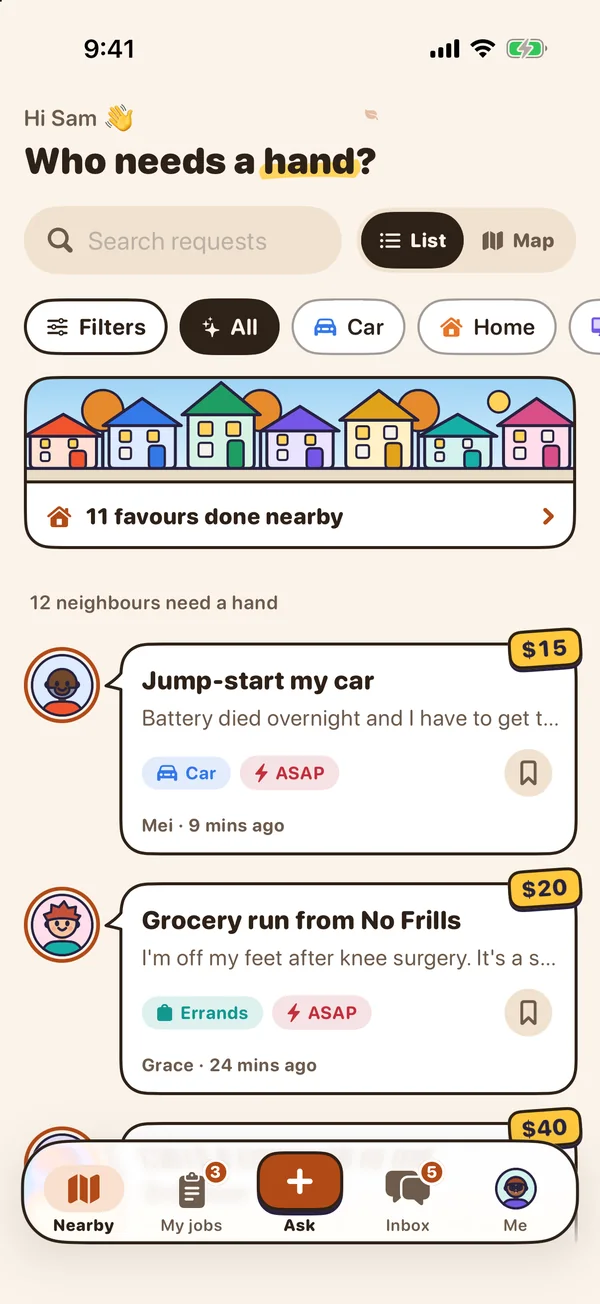
- Browse nearby requests. A simple list, or a map that shows faces from afar and prices up close.
- Filter to what suits you. By distance, timing and price; save requests for later.
- Offer in one tap. At the asking price or your own, with a quick note. Nothing is set until they pick you.
- Build your reputation. Two-way reviews, a count of how often you’ve helped, and a Top rated badge earned from great reviews.
Neighbr is free with no fees or commissions — you keep what you agree, paid directly.
Common questions
How can I make money in my neighbourhood?
Offer small jobs neighbours need — snow, yards, pets, moving, tech help — at a clear price per job.
What odd jobs pay well?
Jobs that need strength, tools or skills: moving furniture, assembly, yard clean-ups, tech set-up.
How do I find people who need help nearby?
Neighbr shows requests from people nearby; you offer, and they pick.
Does Neighbr take a cut?
No — there are no fees or commissions, and it never handles money.
Published · No affiliate links










 MMA.socialUFC fan ratings
 Trending
 Bold
Bold Top
Top