Disclosure: ScrollCop is ours. The advice works with any app, or with pen and paper.
In short
On your own iPhone or iPad with iOS 27, go to Settings → Screen Time → Passcode & Management → Change Screen Time Passcode, tap it again, confirm with Face ID or your device passcode and, if asked, sign in with the Apple Account you used to set up the Screen Time passcode. Then enter a new one. For a child, a parent resets it from their own device, not the child’s.
- Your own device: Settings → Screen Time → Passcode & Management → Change Screen Time Passcode, then your Apple Account.
- A child’s device: reset it from the parent’s iPhone, under Family (iOS 27) or Screen Time → your child (iOS 26).
- Stuck? You must use the same Apple Account that set the passcode, which may not be the one on the phone.
First: which passcode did you forget?
The Screen Time passcode is not the code you use to unlock your iPhone. It’s a separate four-digit code that guards Screen Time settings, limits and restrictions. Apple’s fix depends on whose device it is and which iOS version it runs, so check Settings → General → About first. Apple moved the menus in iOS 27: the passcode now lives under Passcode & Management, and children are managed from Settings → Family.
Reset your own Screen Time passcode (iPhone or iPad, iOS 27)
- Open Settings and tap Screen Time.
- Tap Passcode & Management.
- Tap Change Screen Time Passcode, then tap Change Screen Time Passcode again.
- Confirm with Face ID or the passcode you use to unlock the device. If asked, enter the Apple Account email and password you used when you set up the Screen Time passcode.
- Enter a new Screen Time passcode and enter it again to confirm.
The same steps work on iPad with iPadOS 27. If Share Across Devices is on, Apple says the new passcode updates on your other devices too.
Reset it on iOS 26
On iOS 26 the path is Settings → Screen Time → Change Screen Time Passcode, then Change Screen Time Passcode again. Changing it normally asks for the current code. If you forgot it, the way back is Screen Time Passcode Recovery: Apple says that if you set it up, you can use your Apple Account to reset the passcode. When the passcode screen appears, take the option for a forgotten passcode and sign in with that Apple Account.
Recovery only works with the same Apple Account you entered when you first set it up. Apple’s advice is not to skip it when you create a passcode.
Forgot the Screen Time passcode for your child’s iPhone or iPad
If your child is in your Family Sharing group, Apple says the organizer or a parent/guardian resets it on their own device, not the child’s.
iOS 27:
- On your iPhone or iPad, open Settings, tap Family, then your child’s name.
- Tap Passcode & Management. (No such option? Set up parental controls and a Screen Time passcode for them first.)
- Tap Change Screen Time Passcode, then tap it again.
- Follow Apple’s prompts, then enter a new passcode twice.
iOS 26: Settings → Screen Time, pick your child from your Family Sharing group, tap Manage Screen Time → Change Screen Time Passcode, then Change Screen Time Passcode again. Apple’s iOS 26 guide says that for a family member you enter the passcode for your own iPhone, not the old Screen Time code, then set a new four-digit one.
Child’s name missing under Family? Apple says to check that you and your child are each signed in with your own Apple Account and that their account is in your Family Sharing group. Tip from Apple: if your child learned the code, change it, and pick one they won’t guess — no birthdays, phone numbers or 1234.
Forgot the Screen Time passcode on a Mac
In the Mac User Guide for macOS 27: open System Settings → Screen Time, click Passcode & Management, then Change Passcode. Instead of the current four-digit code, you can verify your identity with your Mac password or Touch ID, then set a new code. Turning off Lock Screen Time Settings on the same screen works the same way. For a child on a Mac, Apple’s family steps start at System Settings → Family → your child’s name → Passcode & Management.
If you can’t reset it
- Wrong Apple Account. Apple says you must use the same Apple Account email and password that set up the Screen Time passcode. That may not be the account signed in on the phone: in a family it could be a parent’s or even the child’s.
- No Family entry. Each person needs their own Apple Account, and the child’s account must be in the Family Sharing group.
- Devices out of date. Apple asks you to update every device in the family before changing Screen Time, so settings sync.
- Still stuck? Apple’s article has a “Get suggestions” link that leads to Apple Support. Apple’s own article only describes the Apple Account route, so be wary of any tool or site that promises another way in.
So it doesn’t happen again
- Turn on Screen Time Passcode Recovery right after you create a passcode.
- Keep the code somewhere safe. Apple’s Mac guide suggests a locked note.
- If the passcode is only there to stop yourself from tapping “Ignore Limit”, you may not need one you can lose. See how to set time limits on apps on iPhone and how to block apps on iPhone at certain times.
Where these steps come from
Checked on 31 October 2026 against Apple Support, If you forgot your Screen Time passcode (iOS 27 and iPadOS 27, published 27 October 2026); Apple’s iPhone User Guide, Create, manage, and keep track of a Screen Time passcode (iOS 26) and Create, change, or remove a Screen Time passcode (iOS 27); Apple Devices for Kids and Families, Set, change, and manage a Screen Time passcode on your child’s device; and the Mac User Guide, Set, change, or remove a Screen Time passcode on Mac. Menu names change with updates; Apple’s guides have a version picker at the top.
A block with no passcode to forget: ScrollCop
- Pick the apps. Tap a tile, or “Choose from your phone” to open Apple’s Screen Time picker for apps and websites.
- Pick how long, or when. Thirty minutes, an evening, a whole day — or a schedule like Bedtime that runs every day, even with ScrollCop closed.
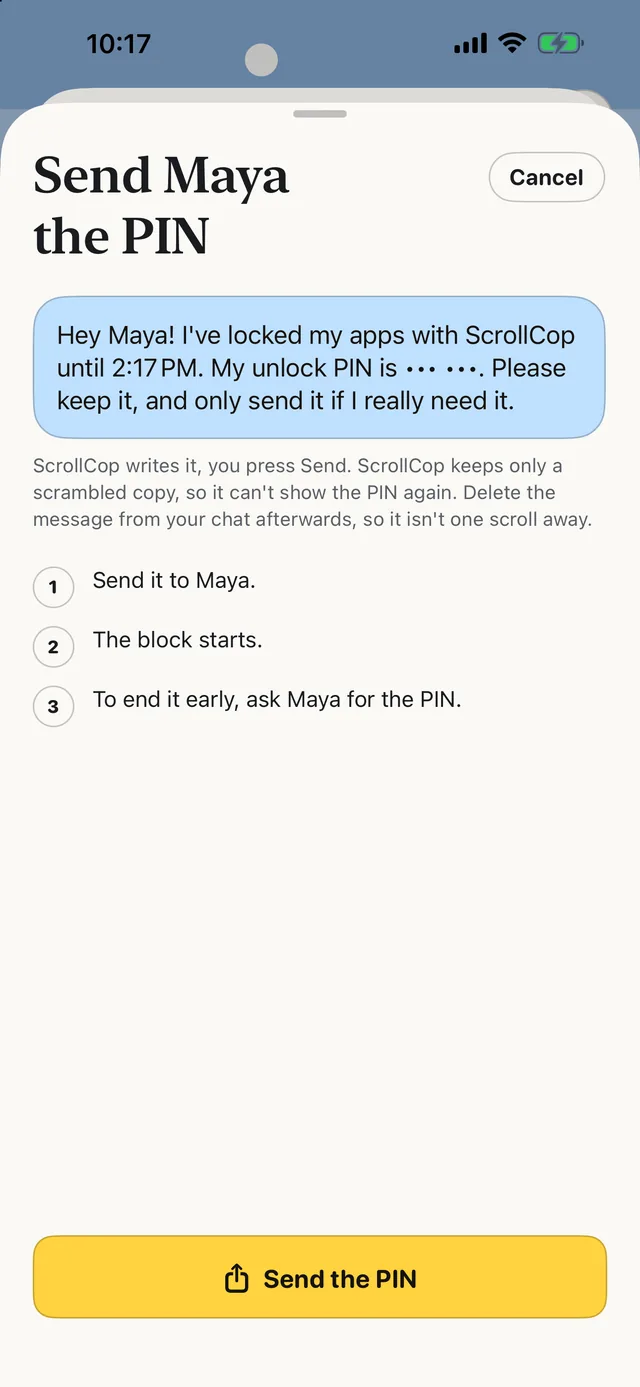
- Pick who can end it early. Nobody is the default, so it simply opens when time’s up. Or a friend gets a one-time PIN by text, and only that PIN ends it.
- Lost touch with your friend? The emergency unlock waits an hour, four hours or a day, then opens. There’s no four-digit code of yours to remember or reset.
ScrollCop 3.2 is free on the App Store, with no account, no subscription and no ads; the blocks are held by iOS, not by the app. It doesn’t replace Apple’s parental controls for a child’s device: it’s built for blocking your own apps.
Common questions
What do I do if I forgot my Screen Time passcode?
On iOS 27, go to Settings → Screen Time → Passcode & Management → Change Screen Time Passcode, tap it again, confirm with Face ID or your device passcode, and enter the Apple Account you used to set up the Screen Time passcode if asked. Then set a new one.
How do I reset my Screen Time passcode on iPhone or iPad if I forgot it?
Use Screen Time Passcode Recovery with your Apple Account. On iOS 26 it’s under Settings → Screen Time → Change Screen Time Passcode; on iOS 27 and iPadOS 27, Settings → Screen Time → Passcode & Management.
I forgot the Screen Time passcode for my child’s iPhone. What now?
Reset it from your own device, not your child’s. On iOS 27: Settings → Family → your child → Passcode & Management → Change Screen Time Passcode. On iOS 26: Settings → Screen Time → your child → Manage Screen Time → Change Screen Time Passcode, then enter your own iPhone’s passcode.
Forgot Screen Time passcode on Mac?
In System Settings → Screen Time → Passcode & Management → Change Passcode, you can verify with your Mac password or Touch ID instead of the old code (macOS 27).
Why can’t I reset my Screen Time passcode?
Apple says you must use the same Apple Account that set up the Screen Time passcode. It may be different from the account signed in on the device, such as a family member’s or your child’s.
Is ScrollCop free?
Yes — free, with no subscription, no in-app purchases and no ads.
Published · No affiliate links











 MMA.
MMA. Trending
 Bold
Bold Top
Top