Disclosure: ScrollCop is ours. The advice works with any app, or with pen and paper.
In short
A dumbphone removes the temptation completely but also your maps, camera and banking — and many people end up carrying two phones. A physical blocker adds a device to keep track of. Blocking the feeds on the iPhone you already own is free and keeps the tools, as long as the block has no easy off switch.
- Dumbphone: strongest, but you lose the tools.
- Physical blocker: strong, but it’s one more thing to carry.
- iPhone blocker: free, keeps the tools — needs a real lock.
Option 1: a dumbphone
Feature phones and minimalist phones like the Light Phone make scrolling impossible. That’s the whole appeal. The cost: no or limited maps, weaker cameras, no banking or boarding-pass apps, and group chats that don’t work well. Many people keep the old iPhone in a drawer for “just one thing”, and the drawer becomes the loophole.
Option 2: a physical blocker
Devices like Brick lock chosen apps until you tap your phone on the device again, so ending a block means walking to it. It’s a clever way to add friction, but it’s one more thing to buy, carry and not lose.
Option 3: your iPhone, blocked properly
Screen Time apps can make chosen apps disappear and show a shield with no Ignore button. You keep maps, camera, banking and messages; only the feeds go. The weak point is the off switch — so choose one that you can’t reach in the moment: nobody, a friend, or a wait.
Which one people stick with
The option you’ll still be using in a month is the one that removes the feeds without making the rest of your life harder. For most people that’s the phone they already have, with the feeds locked away at the hours they lose.
Make your iPhone the dumbphone, with ScrollCop
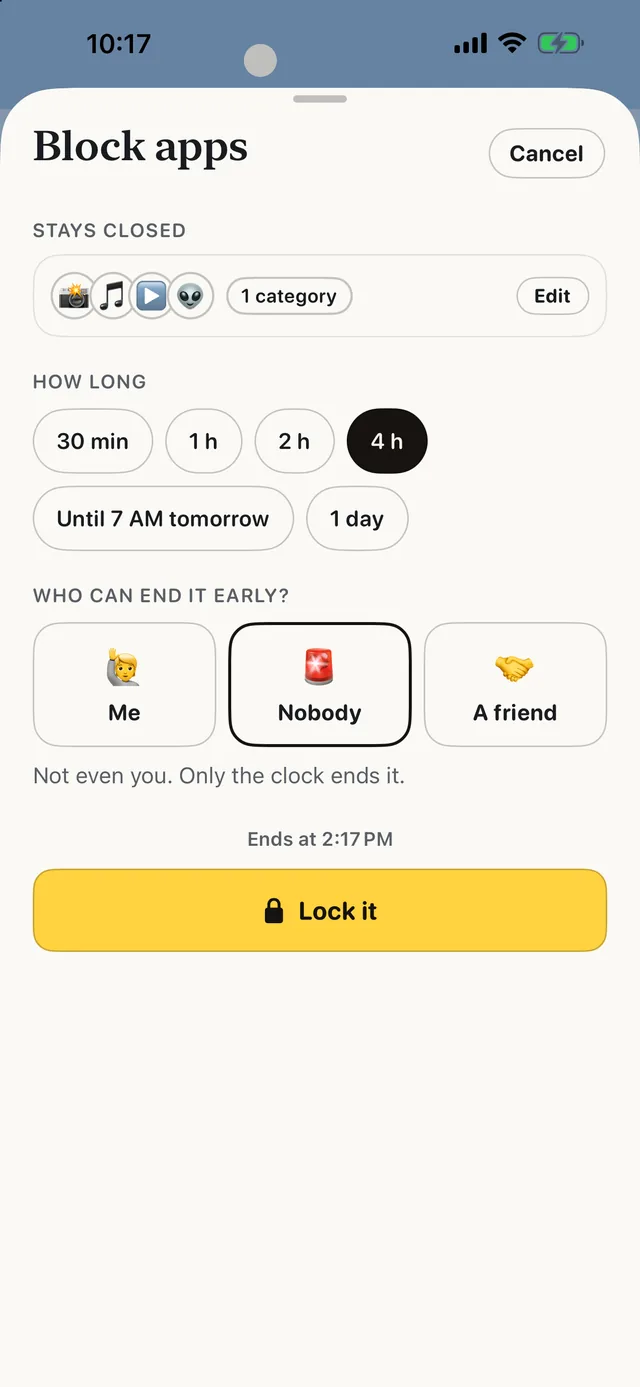
- Block the feeds, keep the tools. Pick the apps and websites; calls, messages, maps and banking stay open.
- Choose who can end it early. Nobody by default, or Me, or a friend with a one-time PIN — the same friction as walking to a device, without the device.
- Run it on a schedule. Every evening, every morning, or all weekend, automatically.
- No hardware, no subscription. ScrollCop is free and has no account.
Since ScrollCop 3.0, every block and schedule starts as “Nobody can end it early”, with Me or A friend one tap away.
Common questions
Is a dumbphone worth it?
If you can live without maps, a good camera and banking apps, it removes temptation completely. Many people find blocking the feeds on their iPhone easier to stick with.
What is the Brick phone blocker?
A small device that locks chosen apps until you tap your phone on it again.
Can an iPhone work like a dumbphone?
Yes — block the feed apps with a Screen Time blocker, keep one Home Screen of tools, and turn on grayscale.
Is there a free alternative to a dumbphone?
ScrollCop is free and turns off the feeds on the iPhone you already have.
Published · No affiliate links










 MMA.socialUFC fan ratings
 Trending
 Bold
Bold Top
Top