Disclosure: ScrollCop is ours. The advice works with any app, or with pen and paper.
In short
Choose a blocker where you decide, before the block starts, that nobody can end it early — not even you. On iPhone that means an app built on Apple’s Screen Time, a block with no “end early” button, protection against changing the clock, and the app itself unable to be deleted while the block runs. ScrollCop does all four, free.
- The off switch is the problem — remove it before the urge.
- Nobody, or a friend with the code, are the only real locks.
- Check for the clock trick and the delete trick.
Why most app blockers fail
Apple’s own App Limits come with “Ignore Limit”. Many blockers offer a “just 5 more minutes” or a pause. Others can be beaten by deleting the blocker, changing the time, or switching Screen Time permission off.
Every one of those doors gets used, because the person deciding at 11 pm is not the person who set the block at 3 pm.
What “can’t turn off” really needs
- No end-early button — the block opens when time’s up, and not before.
- The clock trick doesn’t work — changing the date or time doesn’t end it.
- You can add apps but not remove them while it runs.
- The blocker can’t be deleted while a block is on.
- Held by iOS, not by the app — closing the blocker doesn’t open your apps.
Nobody, or a friend
There are two honest ways to lock a block. Nobody: it opens when time’s up, full stop. A friend: only a code they hold can end it early, so you have to ask a real person — and most of the time you won’t.
Start short. A strict two-hour block you finish teaches you more than a 24-hour block you regret.
Be honest about emergencies
Calls, messages and maps should stay open — block the feeds, not the phone. If you choose a friend, pick someone who’ll answer at night, and choose an emergency wait you can live with.
Set up a block you can’t turn off
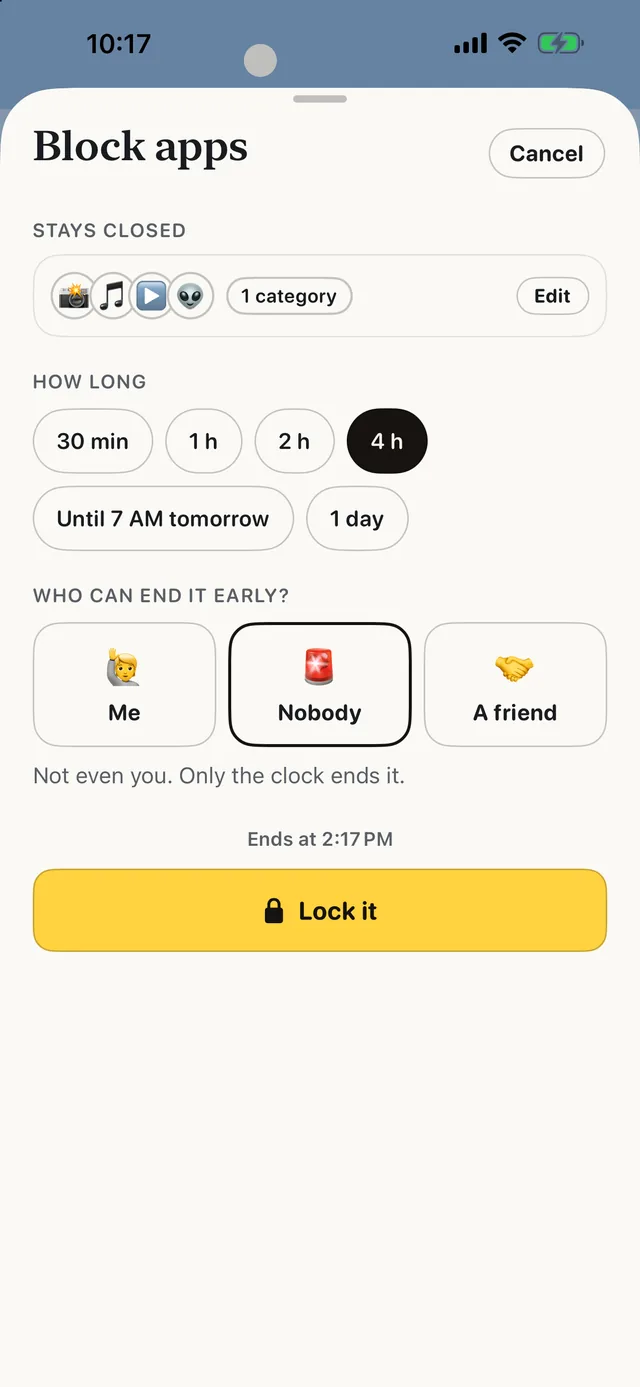
- Tap the apps that eat your time. Instagram, TikTok, YouTube, Reddit, X — or any app, whole categories and websites.
- Pick how long. 30 minutes to a day, or until 7 AM tomorrow.
- Leave “Who can end it early?” on Nobody. Since ScrollCop 3.0 it’s the default. Or pick A friend and ScrollCop texts them a one-time PIN.
- Tap Lock it. Changing the date or time won’t end it, you can add apps but not remove them, and ScrollCop can’t be deleted while it runs.
The clock and delete protections are in ScrollCop 2.4, on the App Store now; Nobody-by-default arrives with 3.0. Free, no account, no ads.
Common questions
Is there an app blocker you can’t turn off?
Yes. ScrollCop lets you choose “Nobody can end it early” — not even you. The block opens when time’s up, holds if you change the clock, and ScrollCop can’t be deleted while it runs.
Can you bypass Screen Time app limits?
Apple’s App Limits have an “Ignore Limit” button when you set them for yourself. A blocker with a Nobody or friend lock removes that option.
What if there’s an emergency?
Calls and messages aren’t blocked. With a friend lock you can ask them for the code, and you choose an emergency wait of an hour, four hours or a day.
Is ScrollCop free?
Yes — free, with no subscription, no in-app purchases and no account.
Published · No affiliate links











 MMA.
MMA. Trending
 Bold
Bold Top
Top