Disclosure: Kalend is ours, and it is listed first. It gets the same four fields as every other app, including its drawbacks.
Short answer
Our pick is Kalend — tasks beside your calendar, plus habits and a journal, free with no Microsoft account. If you need your list on Windows and Android as well, Todoist is the closest swap.
Microsoft To Do is one of the few good task apps that is completely free. My Day is a lovely idea, shared lists work, and flagged Outlook emails show up as tasks. The reason people go looking is what it leaves out: there is no calendar view, so your tasks and your day never appear in the same place.
If you have outgrown plain lists — or simply do not want a Microsoft account on your phone — these six apps are the realistic next steps.
Switch to Kalend if
- You want to see tasks and calendar events together
- You don’t use Outlook or Windows
- You want habits and tasks in the same app
Stay with Microsoft To Do if
- Your work runs on Outlook and Microsoft 365
- You share lists with people on Windows or Android
- Plain free lists are all you need
At a glance
| App | Best for | Pricing |
|---|---|---|
| Kalend (ours) | People who want tasks, a calendar, habits and a journal in one free app, kept in their own iCloud | Free. No paid tier, no subscription and no ads; the only purchase is an optional tip |
| Microsoft To Do | People who want a clean, completely free list app with a daily “My Day” plan | Free |
| Todoist | People who need the same list on every platform, including Android and the web | Free tier plus a paid Pro plan |
| TickTick | People who want lists, a calendar view, habits and a focus timer on every platform | Free tier plus a Premium subscription |
| Things 3 | People who want the most carefully designed task app on Apple devices and are happy to pay once | Paid download on iPhone; Mac and iPad sold separately |
| Apple Reminders | People who want dated lists and shared shopping lists at no cost, already on their iPhone | Included with Apple devices at no extra cost |
| Google Tasks | People who live in Gmail and Google Calendar and want their to-dos there too | Free |
The apps in detail
Kalend
Ours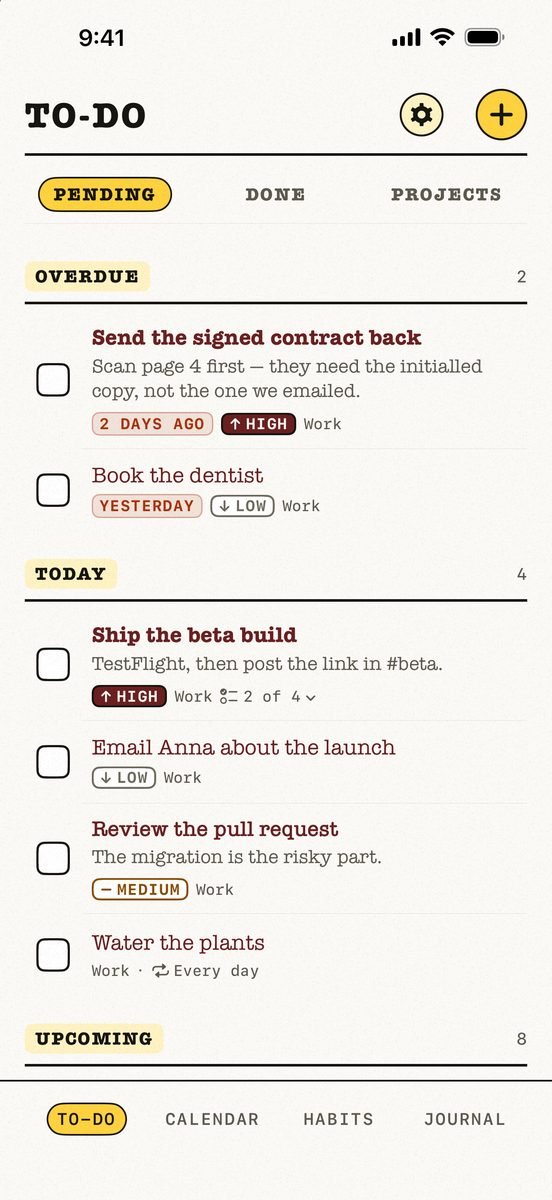
- Best for
- People who want tasks, a calendar, habits and a journal in one free app, kept in their own iCloud
- Highlights
- Tasks, calendar, habits and a journal in one app
- Your calendar events next to today’s tasks, with an overdue section
- Syncs through your own iCloud — no account, no server of ours
- Works offline
- Pricing
- Free. No paid tier, no subscription and no ads; the only purchase is an optional tip
- Watch out
- Apple-only: no Android app and no web version, and it needs iOS 18 or later. It syncs through your personal iCloud, so there is no sharing — you cannot assign a task or share a list with anyone.
Microsoft To Do
- Best for
- People who want a clean, completely free list app with a daily “My Day” plan
- Highlights
- My Day with suggestions pulled from across your lists
- Shared lists with family and friends
- Flagged Outlook emails turn into tasks
- Pricing
- Free
- Watch out
- You need a Microsoft account, and there is no calendar view or habit tracking — it is a list app first and last.
Todoist
- Best for
- People who need the same list on every platform, including Android and the web
- Highlights
- Instant sync across iPhone, Apple Watch, Mac and browsers
- Natural language and voice capture
- Scales from personal lists to teams
- Pricing
- Free tier plus a paid Pro plan
- Watch out
- Calendar layout and larger project limits sit in Pro, there is no habit tracker, and everything lives in a Todoist account.
TickTick
- Best for
- People who want lists, a calendar view, habits and a focus timer on every platform
- Highlights
- Flexible recurring tasks, checklists and multiple reminders
- Calendar views and a habit tracker built in
- Syncs across all your devices, with shared lists
- Pricing
- Free tier plus a Premium subscription
- Watch out
- The most advanced features — including much of the calendar — are Premium, and your data lives in a TickTick account.
Things 3
- Best for
- People who want the most carefully designed task app on Apple devices and are happy to pay once
- Highlights
- Projects, Areas, headings and checklists
- A full Apple Watch app
- Free sync between your devices through Things Cloud
- Pricing
- Paid download on iPhone; Mac and iPad sold separately
- Watch out
- No free version on iPhone, no Android or web app, and each Apple platform is a separate purchase.
Apple Reminders
- Best for
- People who want dated lists and shared shopping lists at no cost, already on their iPhone
- Highlights
- Built into iPhone, iPad, Mac and Apple Watch
- Smart lists, tags, sections and shared lists
- Syncs through iCloud with no extra account
- Pricing
- Included with Apple devices at no extra cost
- Watch out
- No planning view that mixes your calendar with your tasks, and no habits or journal.
Google Tasks
- Best for
- People who live in Gmail and Google Calendar and want their to-dos there too
- Highlights
- Turn an email into a task from inside Gmail
- Subtasks, details and due dates with notifications
- Syncs across your devices through your Google account
- Pricing
- Free
- Watch out
- It is a plain list — no habits, no journal and no planner of its own — and it needs a Google account.
The honest trade-off
Microsoft To Do is free everywhere — iPhone, Android, Windows, the web — and that is hard to beat. Every alternative gives up something: Todoist and TickTick keep the platforms but charge for the calendar, Things charges up front, and Kalend is free but Apple-only with no shared lists.
So decide by where you need the list. If the answer is “only my iPhone and iPad”, you can have the calendar, habits and journal too, at no cost.
Common questions
Is Microsoft To Do completely free?
Yes. Microsoft To Do is free; you sign in with a Microsoft account.
Does Microsoft To Do have a calendar view?
No. It has lists, due dates and My Day, but no calendar view of your tasks in the iPhone app.
What is the best Microsoft To Do alternative on iPhone?
Kalend if you want tasks next to your calendar and habits for free. Todoist if you need the same list on Windows, Android and the web.
App Store listings checked on 12 November 2026. Prices change — each entry describes how an app is paid for rather than a number that goes stale.





 MMA.
 Trending
 Bold
 Top