Disclosure: Kalend is ours. The advice works with any app, or with pen and paper.
In short
In the Reminders app, add a reminder, tap the ⓘ button, turn on Date and Time, then set Repeat to Daily. Or ask Siri: “Remind me to take my vitamins every day at 8 am.” In Kalend you can also write the reminder text yourself, and get to-do reminders at the time or up to a day before.
- Reminders → ⓘ → Date and Time → Repeat → Daily.
- Time it for when you can act, not when you remember.
- Write the reminder as the action.
Way 1: the Reminders app
- Open Reminders and tap New Reminder.
- Type what to do, then tap the ⓘ button next to it.
- Turn on Date and Time, and pick the time.
- Tap Repeat and choose Daily — or Weekdays, Weekends or Custom.
- Tap Done.
On iOS 17 or later, Early Reminder in the same screen gives you a heads-up before the time.
Way 2: ask Siri
Say “Remind me to water the plants every day at 6 pm.” Siri makes a repeating reminder in the Reminders app. It’s the fastest way when your hands are full — and the moment you think of it is the moment you’re most likely to set it.
Way 3: a calendar event with an alert
For things that take up time — a class, a walk, a medication schedule you want to see in your day — add a calendar event, set Repeat to Every Day and add an Alert. Reminders are better for things you tick off; calendar events are better for things that fill an hour.
If it must wake you or you can’t miss it, a repeating alarm in the Clock app is the loudest option: set the alarm, tap Repeat and pick every day.
Daily reminders you won’t ignore
- Time it for when you can act. A 7 am reminder to take pills that live in the kitchen only works if you’re in the kitchen at 7.
- Write the action, not the topic. “Take vitamins — they’re by the kettle” beats “Vitamins”.
- Keep the list short. Ten daily pings become background noise.
- Snoozed it every day this week? Move the time instead.
If reminders aren’t arriving, check Settings → Notifications → Reminders and whether a Focus is silencing them. For daily habits rather than one-off jobs, a habit tracker often works better than a reminder alone.
How to do it in Kalend
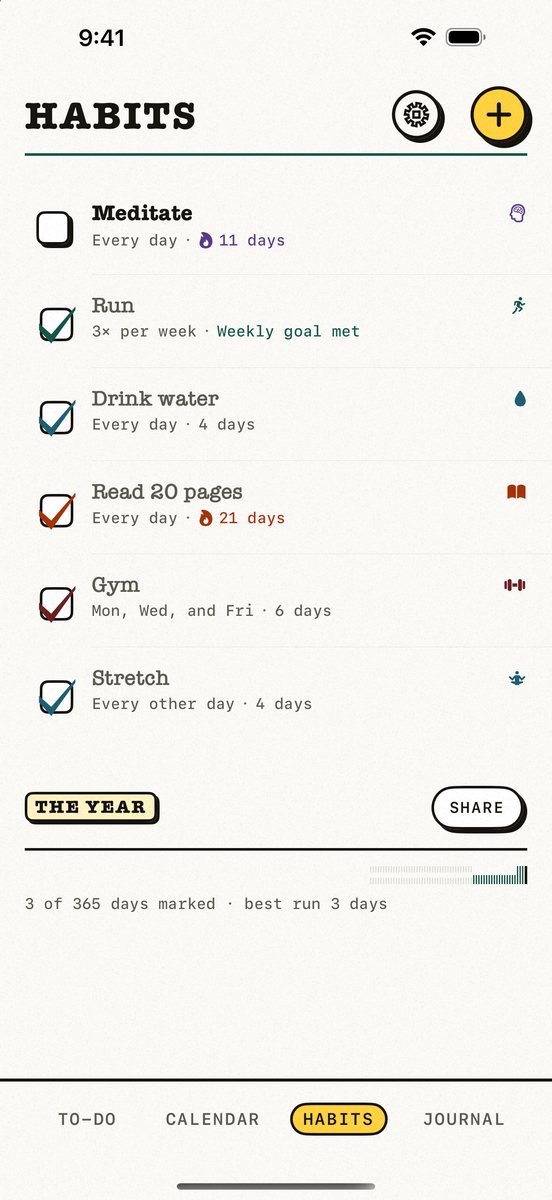
- Give the to-do, appointment or habit a time. A habit can run every day, on chosen weekdays, a few times a week or every few days.
- Write the reminder in your own words. From Kalend 2.5, set your own notification text for any to-do, appointment or habit. Leave it empty and Kalend writes a friendly one.
- Choose when it arrives. From Kalend 2.5, get a to-do reminder at the time, or 5 minutes to a day before.
- Deal with it from the notification. Done and Snooze are right in the notification, and reminders for things you’ve already done stay quiet.
Kalend is free, with no subscription and no ads. Already use Apple Reminders? Kalend brings them in with one tap, and there’s an optional morning summary of what your day holds.
Common questions
How do I set a reminder on my iPhone for every day?
Open Reminders, add a reminder, tap ⓘ, turn on Date and Time, then set Repeat to Daily. Or ask Siri to remind you every day at a set time.
Can you set a daily reminder on iPhone without the Reminders app?
Yes. Use a calendar event that repeats every day with an alert, a repeating alarm in the Clock app, or a planner app such as Kalend.
Why are my iPhone reminders not going off?
Check Settings → Notifications → Reminders, check whether a Focus is on, and make sure the reminder has both a date and a time.
Can I change what a reminder notification says?
In Apple Reminders the notification shows the reminder’s title, so write the title as the action. From Kalend 2.5 you can write your own notification text for any to-do, appointment or habit.
Published · No affiliate links









 MMA.socialUFC fan ratings
 TrendingPunjabiPunjabi music charts
 BoldOpinionAnonymous hot takes