Disclosure: ScrollCop is ours. The advice works with any app, or with pen and paper.
In short
Make the phone slower to open, duller to look at and quieter: grayscale, fewer Home Screen apps, notifications only from people, and no phone in the bedroom. Then remove the easy way back into the feeds — a block you can’t skip matters more than any setting.
- Friction beats willpower.
- Colour, badges and sounds are the hooks — switch them off.
- Block the two or three apps that eat the hours.
The 10 settings
- Grayscale — Settings → Accessibility → Display & Text Size → Color Filters.
- One Home Screen — untick the other pages; social apps live in the App Library.
- No badges — Settings → Notifications → [app] → Badges off.
- Notifications only from people, and a Scheduled Summary for the rest.
- Lock Screen as a count — Notifications → Display As → Count.
- Raise to Wake off — Display & Brightness.
- Log out of social apps so each visit needs a password.
- Move social apps into a folder on the last page.
- A Sleep Focus that silences everything but favourites at night.
- Charge the phone outside the bedroom, with a cheap alarm clock.
Why these work
Every one adds a second of friction or removes a cue. Habits run on cues: a red badge, a buzz, a colourful icon on the first screen. Take away the cue and the automatic reach gets weaker.
The one thing settings can’t do
Every setting above can be undone in five seconds by the same thumb that wants to scroll. That’s why people turn grayscale back off by the second night.
The fix is to put one decision out of reach of that thumb: a block that doesn’t have an Ignore button, and that you — or a friend — decided on before the urge.
Make it stick with ScrollCop
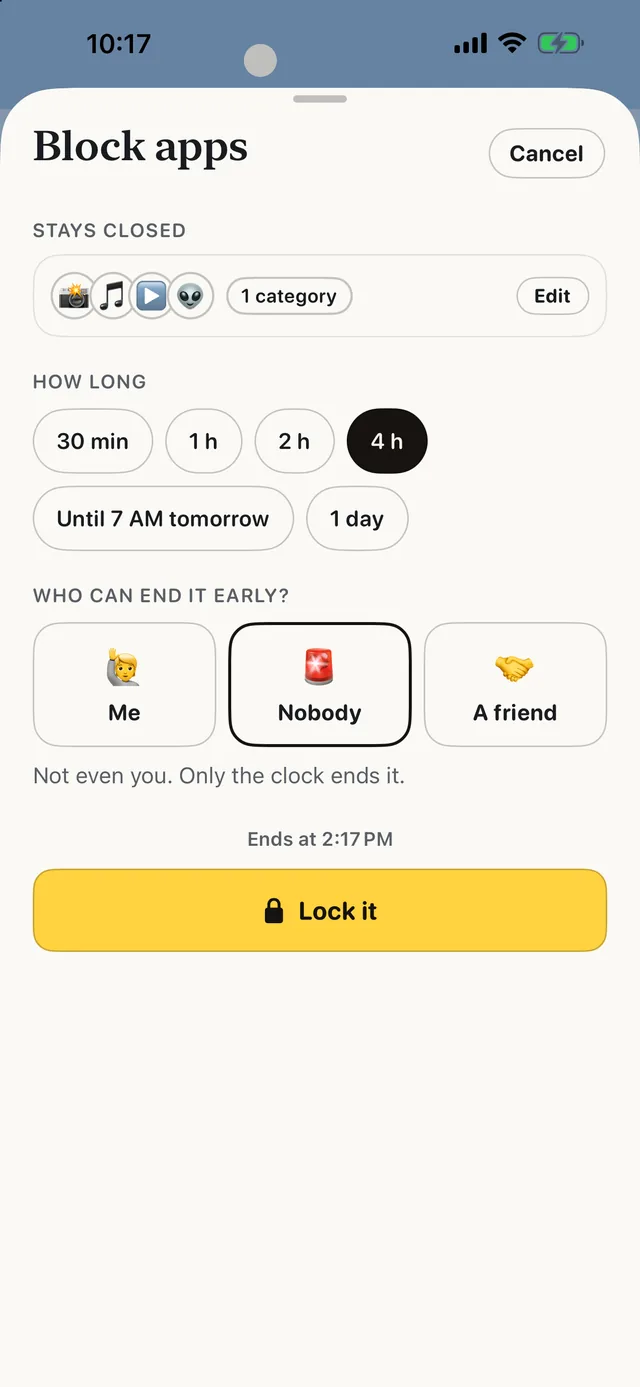
- Pick the two or three apps that eat your hours. Big app tiles, or any app, category or website from your phone.
- Pick how long, or a daily schedule. Bedtime, Mornings, Work hours, Study time — each with its own apps.
- Decide who can end it early — now, not at 11 pm. Nobody by default, or Me, or a friend with a one-time PIN.
- When the pull hits, tap SOS. It asks what you actually need and gives you something better to do for five minutes.
Since ScrollCop 3.0, every block and schedule starts as “Nobody can end it early”, with Me or A friend one tap away. Free, no account, nothing leaves your phone.
Common questions
What settings make your phone less addictive?
Grayscale, one Home Screen, no badges, notifications only from people, Lock Screen as a count, Raise to Wake off, and a Sleep Focus.
Does grayscale really help?
It makes colourful feeds less appealing for many people; it works best combined with fewer notifications and a real block.
How do I make my phone boring?
Grayscale, a Home Screen of tools only, and the feed apps blocked during the hours you lose.
Is ScrollCop free?
Yes — no subscription, no in-app purchases, no ads.
Published · No affiliate links










 MMA.socialUFC fan ratings
 TrendingPunjabiPunjabi music charts
 BoldOpinionAnonymous hot takes
 TopRankedAppsApp rankings