Disclosure: ScrollCop is ours. The advice works with any app, or with pen and paper.
In short
Keep calls, messages, maps, music and your bank; remove everything else from the Home Screen; turn off almost every notification; switch to grayscale; and block the feeds with an app built on Screen Time so there’s no “Ignore” button. It costs nothing and you keep the camera and maps a real dumb phone would take away.
- One Home Screen with only tools.
- Notifications only from people.
- The feeds blocked — not just hidden.
Why not just buy a dumb phone?
Dumbphones work because they make scrolling impossible. But you also lose maps, a good camera, banking, boarding passes and group chats. Many people who switch buy a second device and end up carrying both.
An iPhone can behave like a dumb phone for the parts that hurt you and stay smart for the parts you need.
Step 1: one Home Screen, only tools
- Press and hold the Home Screen, tap the page dots at the bottom and untick every page but one.
- On that page keep only tools: Phone, Messages, Maps, Camera, Music, your bank, a notes app.
- Drag everything else off with Remove App → Remove from Home Screen. It stays in the App Library if you need it.
Leave the dock nearly empty. Fewer icons, fewer impulses.
Step 2: notifications from people, not apps
Open Settings → Notifications and turn off everything that isn’t a person: shopping, news, games, social apps. Keep Phone, Messages and the chats you actually use. Put the rest in a Scheduled Summary once a day.
Step 3: make the screen boring
Turn on grayscale: Settings → Accessibility → Display & Text Size → Color Filters → Grayscale. Feeds are designed in colour; without it, they’re far less interesting. Set the Accessibility Shortcut to Color Filters so a triple-click of the side button switches it back for photos.
Step 4: block the feeds for real
Deleting Instagram lasts until the next bored evening. Screen Time limits come with “Ignore Limit”. What works is a block with no escape hatch: the app disappears and a Screen Time shield appears if you open it from a link.
Block the feeds all day to be a true dumb phone, or only at the hours you lose — evenings and first thing in the morning.
Step 5: a lock screen with nothing to read
Remove widgets from the Lock Screen, set notifications to show as a count (Settings → Notifications → Display As → Count), and turn off Raise to Wake in Display & Brightness. The phone stops calling you over.
How to block the feeds with ScrollCop
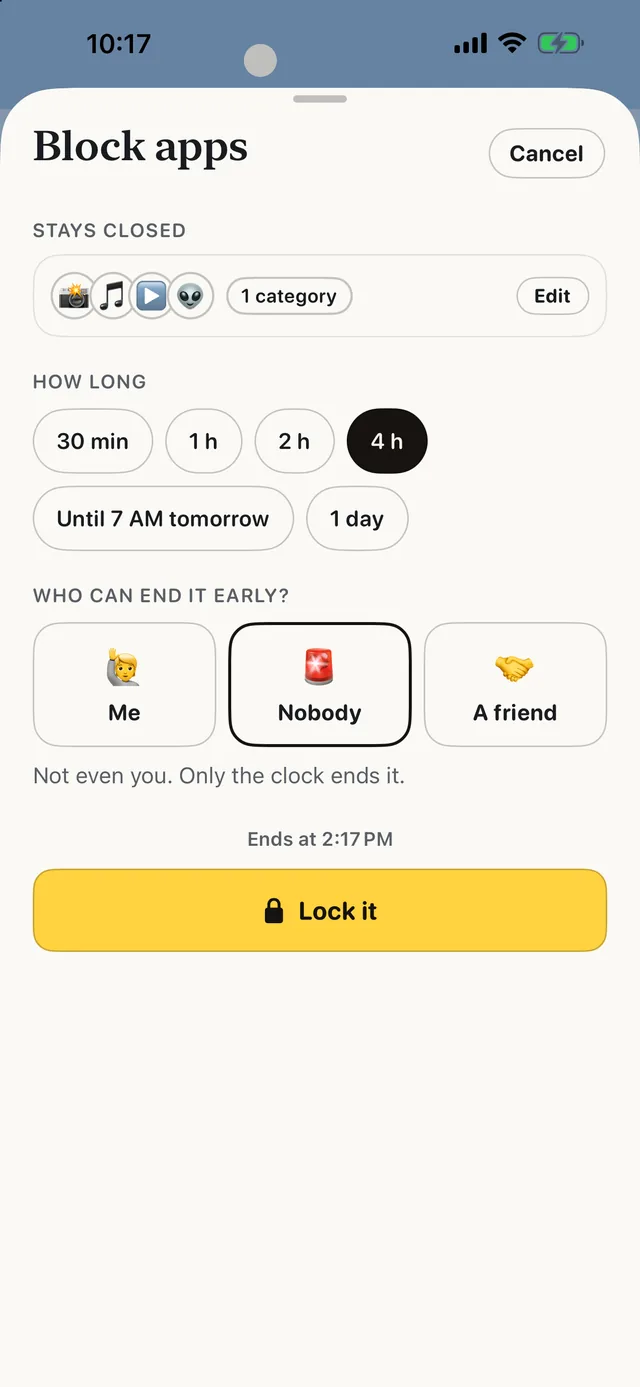
- Tap the apps that make it a smartphone. Instagram, TikTok, YouTube, Reddit, X — or “Choose from your phone” for any app, whole categories and websites.
- Pick how long. An evening, until 7 AM, a whole day, or “until unlocked” for a true dumb-phone week.
- Choose who can end it early. Nobody by default (it opens when time’s up), or Me, or a friend with a one-time PIN ScrollCop texts them.
- Or make it daily. Schedules block their own apps every day, even with ScrollCop closed — Mornings and Bedtime are quick starts.
Since ScrollCop 3.0, every block and schedule starts as “Nobody can end it early”, with Me or A friend one tap away. ScrollCop is free, with no account and no subscription, and blocks are held by iOS, not by the app.
Common questions
Can you make an iPhone a dumb phone for free?
Yes: one Home Screen of tools, notifications only from people, grayscale, and the feed apps blocked with a free Screen Time app like ScrollCop.
Will I lose my apps?
No. Apps removed from the Home Screen stay in the App Library, and blocked apps come back when the block ends.
Is a dumb phone better than a blocked iPhone?
A dumb phone makes scrolling impossible but takes away maps, camera and banking. A blocked iPhone keeps the tools and removes only the feeds.
Can I still use WhatsApp and Maps?
Yes — you choose exactly which apps stay open.
Published · No affiliate links










 MMA.socialUFC fan ratings
 Trending
 Bold
Bold Top
Top