Disclosure: Kalend is ours. The advice works with any app, or with pen and paper.
In short
In Google Docs press Ctrl+Shift+C (⌘+Shift+C on a Mac); in Word, look at the status bar along the bottom; in Pages, choose View → Show Word Count. Apple Notes has no word count, so copy the text and paste it into a free word counter.
- Google Docs: Tools → Word count, or Ctrl/⌘ + Shift + C.
- Word: it’s in the status bar. Pages: View → Show Word Count.
- Notes on iPhone or Mac: copy the text into a word counter.
How to check word count in Google Docs
On a computer: choose Tools → Word count, or press Ctrl+Shift+C on Windows or ⌘+Shift+C on a Mac. You get pages, words, characters, and characters without spaces.Tick Display word count while typing to keep a live counter in the bottom-left corner. Select a paragraph first and it counts just that part — handy when the title and references don’t count towards your limit.
In the Google Docs app on iPhone or Android: tap the ⋮ or … menu at the top and choose Word count.How to check word count in Microsoft Word
On a computer: the word count sits in the status bar along the bottom of the window. Click it for pages, words, characters (with and without spaces), paragraphs and lines. If it isn’t there, right-click the status bar and tick Word Count, or use Review → Word Count. In the Word app on iPhone or iPad: open the editing ribbon, switch it to Review and tap Word Count.How to check word count in Pages
On a Mac: choose View → Show Word Count. The count appears at the bottom of the page, and you can switch it to characters, paragraphs or pages. Select some text to count just that. On iPhone or iPad: tap the More (…) or View options button at the top of the screen — the name depends on your version — and turn on Word Count.How to check word count in the Notes app on iPhone or Mac
Apple Notes doesn’t show a word count, on iPhone, iPad or Mac. There are three ways round it:
- Paste it into a word counter. In the note, tap in the text, tap again and choose Select All, then Copy. Open our free Word Counter and paste: you get words, characters with and without spaces, sentences, paragraphs and reading time, updating live as you edit.
- Paste it into Pages. Pages is free on iPhone, iPad and Mac and has a proper counter (above).
- Make a shortcut. In Shortcuts, build a shortcut that takes text from the Share Sheet, add a Count action set to Words, and finish with Show Result. Then select text in Notes, tap Share and run it.
On a Mac, ⌘A then ⌘C copies a whole note in one go.
Counting characters for a post, a bio or a text
For posts and captions, characters matter more than words. The Word Counter has a Does it fit? table that checks your text against an X post (280), one SMS (160), an Instagram caption (2,200), a YouTube title (100), a Google page title (60) and a meta description (160).
Why two counters give different numbers
Every tool decides slightly differently what a word is. Hyphenated words, dashes with spaces around them, numbers, web addresses and emoji can each count as one word, two or none. A few words’ difference between Google Docs, Word and a website is normal.
If you’re writing to a limit for school or work, use the counter your teacher or editor uses, and check whether the title, headings, footnotes and references count.
Writing every day? Kalend’s journal counts the words
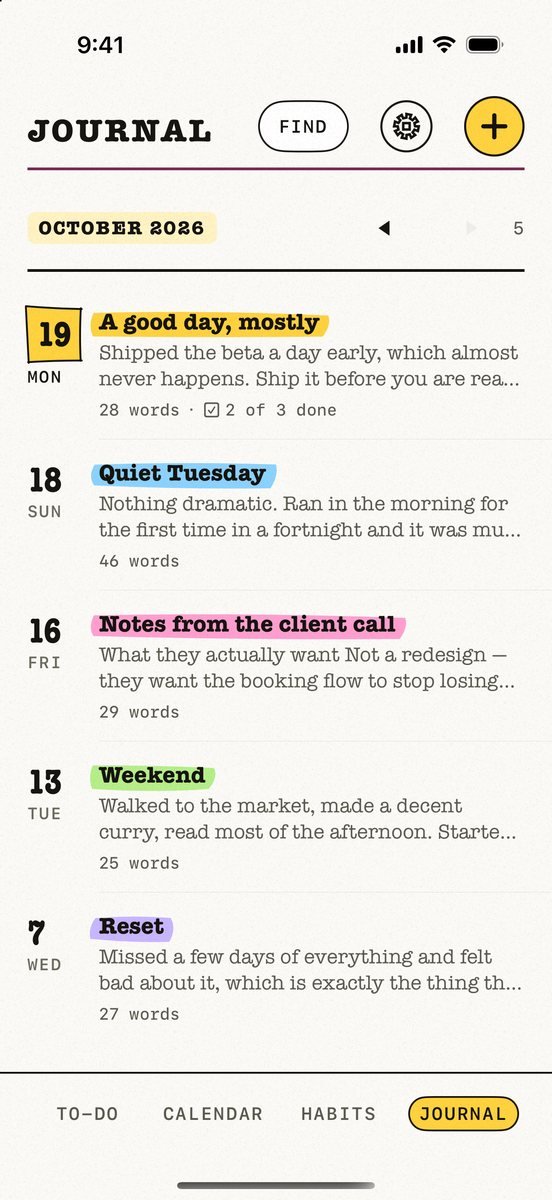
- Open the Journal tab and tap +. Write a private entry with headings, lists and checkboxes.
- See the count on every entry. Entries are listed newest first, each with its date, title, opening line and word count.
- Read it back like a book. Your journal sits beside your to-dos, calendar and habits in the same app.
- Make writing a habit. Track “Write 500 words” as a habit. A grace day absorbs one miss, so one off day never breaks the streak.
Kalend is free, with no account, no subscription and no ads, and your journal syncs only through your own iCloud. More in how to keep a journal on iPhone.
Common questions
How do I check the word count in Google Docs?
Choose Tools → Word count, or press Ctrl+Shift+C on Windows or ⌘+Shift+C on a Mac. Tick Display word count while typing to keep a live count on screen.
Can you see the word count in the Notes app?
No. Apple Notes has no word count on iPhone, iPad or Mac. Select all the text, copy it and paste it into a word counter or into Pages.
How do I check word count in Word on my phone?
In the Word app, open the editing ribbon, switch it to the Review tab and tap Word Count.
Does word count include spaces?
Word counts don’t, but character counts can. Most counters, including Google Docs, Word and ours, show characters both with and without spaces.
Published · No affiliate links











 MMA.
MMA. Trending
 Bold
Bold Top
Top