Disclosure: Kalend is ours, and it is listed first. It gets the same four fields as every other app, including its drawbacks.
Short answer
Our pick is Kalend — your appointments, tasks and habits in one free app that syncs through your own iCloud. The simplest swap is Apple Calendar, already on your iPhone.
Google Calendar is excellent, and it adds flight and restaurant bookings from Gmail on its own. That same feature is why some people want out: your whole schedule lives in your Google account.
This guide compares iPhone calendars on the question that matters most here — where do your events actually live?
Switch to Kalend if
- You’d rather your schedule wasn’t in Google
- You want tasks next to your events
- You only use Apple devices
Stay with Google Calendar if
- Your work runs on Google Workspace
- You love Gmail adding bookings for you
- You need Android and the web
At a glance
| App | Best for | Pricing |
|---|---|---|
| Kalend (ours) | People who want tasks, a calendar, habits and a journal in one free app, kept in their own iCloud | Free. No paid tier, no subscription and no ads; the only purchase is an optional tip |
| Google Calendar | People who live in Gmail and use Android or the web | Free |
| Apple Calendar | Apple users who want a free built-in calendar | Included with Apple devices at no extra cost |
| TickTick | People who want a calendar attached to a to-do app | Free tier plus Premium |
| Any.do | People who want a calendar, tasks and reminders together | Free tier plus Premium plans |
| Microsoft To Do | Microsoft 365 users who want tasks next to Outlook | Free |
The apps in detail
Kalend
Ours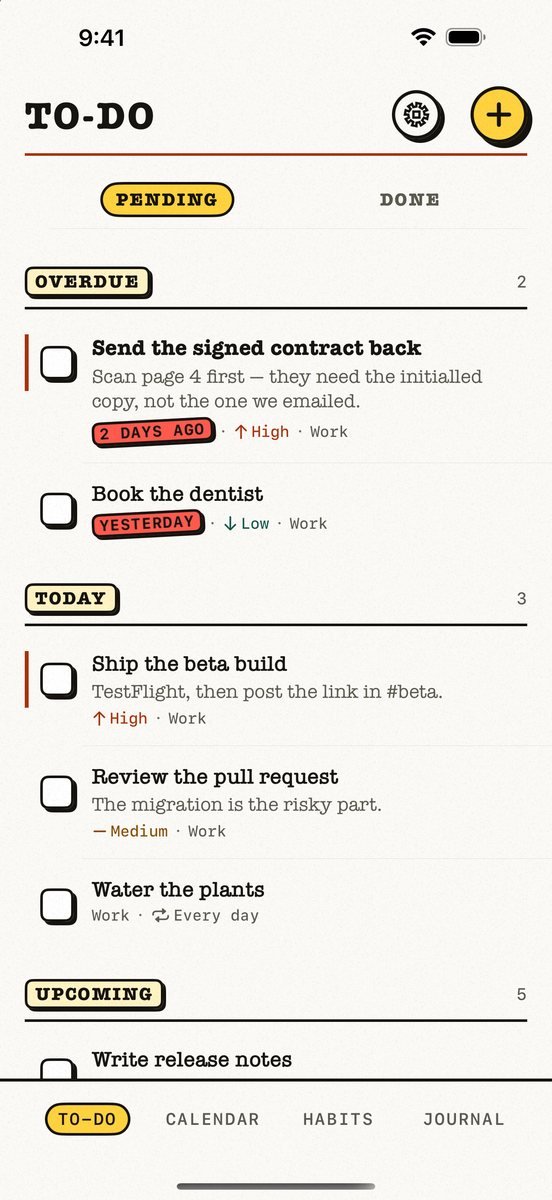
- Best for
- People who want tasks, a calendar, habits and a journal in one free app, kept in their own iCloud
- Highlights
- Tasks, calendar, habits and a journal in one app
- Your calendar events next to today’s tasks, with an overdue section
- Syncs through your own iCloud — no account, no server of ours
- Works offline
- Pricing
- Free. No paid tier, no subscription and no ads; the only purchase is an optional tip
- Watch out
- Apple-only: no Android app and no web version, and it needs iOS 18 or later. It syncs through your personal iCloud, so there is no sharing — you cannot assign a task or share a list with anyone.
Google Calendar
- Best for
- People who live in Gmail and use Android or the web
- Highlights
- Events added from Gmail automatically
- Multiple calendars and views
- Apple Watch complications
- Pricing
- Free
- Watch out
- Your schedule lives in your Google account.
Apple Calendar
- Best for
- Apple users who want a free built-in calendar
- Highlights
- iCloud calendars with no extra account
- Works with Google and Outlook accounts too
- Shared calendars
- Pricing
- Included with Apple devices at no extra cost
- Watch out
- No tasks beside events.
TickTick
- Best for
- People who want a calendar attached to a to-do app
- Highlights
- Calendar views with tasks
- Subscribes to other calendars
- Cross-platform
- Pricing
- Free tier plus Premium
- Watch out
- The good calendar views are Premium.
Any.do
- Best for
- People who want a calendar, tasks and reminders together
- Highlights
- Calendar, tasks and reminders
- Shared lists
- Location reminders
- Pricing
- Free tier plus Premium plans
- Watch out
- Premium for the planner features.
Microsoft To Do
- Best for
- Microsoft 365 users who want tasks next to Outlook
- Highlights
- My Day plan
- Outlook integration
- Shared lists
- Pricing
- Free
- Watch out
- Not a calendar at all.
Where do your events live?
Moving calendars is mostly about accounts. Apple Calendar can show your Google calendar while you move off it, so nothing disappears on day one.
Kalend keeps its own appointments and tasks in your iCloud, and shows your phone’s other calendars beside them if you switch that on — events stay in their own accounts and are never copied out.
Common questions
What is the most private calendar app for iPhone?
Apple Calendar with iCloud, or Kalend, which keeps appointments in your own iCloud with no account of ours.
Can I keep seeing my Google events while I switch?
Yes — add your Google account in iPhone Settings and Apple Calendar and Kalend will show it.
Is there a calendar with tasks built in?
Kalend shows tasks and events together, free.
App Store listings checked on 27 September 2026. Prices change — each entry describes how an app is paid for rather than a number that goes stale.
Published · No affiliate links



 MMA.socialUFC fan ratings
 TrendingPunjabiPunjabi music charts
 BoldOpinionAnonymous hot takes
 brolic.ioGym leaderboards