Disclosure: ScrollCop is ours, and it is listed first. It gets the same four fields as every other app, including its drawbacks.
Short answer
Our pick is ScrollCop — it blocks the apps themselves on a schedule, and a friend can hold the key so you can’t let yourself back in. Free. If you just want the tree for free, try Flora.
Forest is a lovely idea that has helped millions of people: plant a tree, stay off your phone, and the tree grows. Leave early and it withers. For a study session it works beautifully.
The limit is that Forest is a timer you choose to start. On the evenings you most need it — tired, bored, phone already in hand — you do not plant the tree. If that sounds familiar, you need something that blocks the apps whether or not you feel like focusing. Here are seven options, from gentle to strict.
Switch to ScrollCop if
- You forget, or decline, to start the timer
- Your problem is all-day scrolling, not one study hour
- You want the apps actually blocked, not just watched
Stay with Forest if
- You need a simple timer for study sessions
- Growing the forest motivates you
- You plant with friends or classmates
At a glance
| App | Best for | Pricing |
|---|---|---|
| ScrollCop (ours) | People who keep tapping through their own limits and want a friend to hold the key | Free, with no subscription; tips are optional |
| Forest | People who focus better when a little tree is counting on them | Free download; Forest Plus subscription for more |
| Flora | People who want the tree idea free, with friends keeping them honest | Free; optional paid real-tree services |
| Focus Friend | Students who would rather not make a cute bean sad | Free download; the listing gives no plan prices |
| Opal | People who want a polished blocker with schedules, limits and a game layer | Free core app; Opal Pro subscription for more |
| ScreenZen | People who want free friction — a wait before an app opens — rather than a hard lock | Free |
| one sec | People who want a breathing pause before one problem app | Free for one app; one sec pro (annual, monthly or lifetime) for more |
| Apple Screen Time | People who want built-in daily limits at no cost | Included with iOS at no extra cost |
The apps in detail
ScrollCop
Ours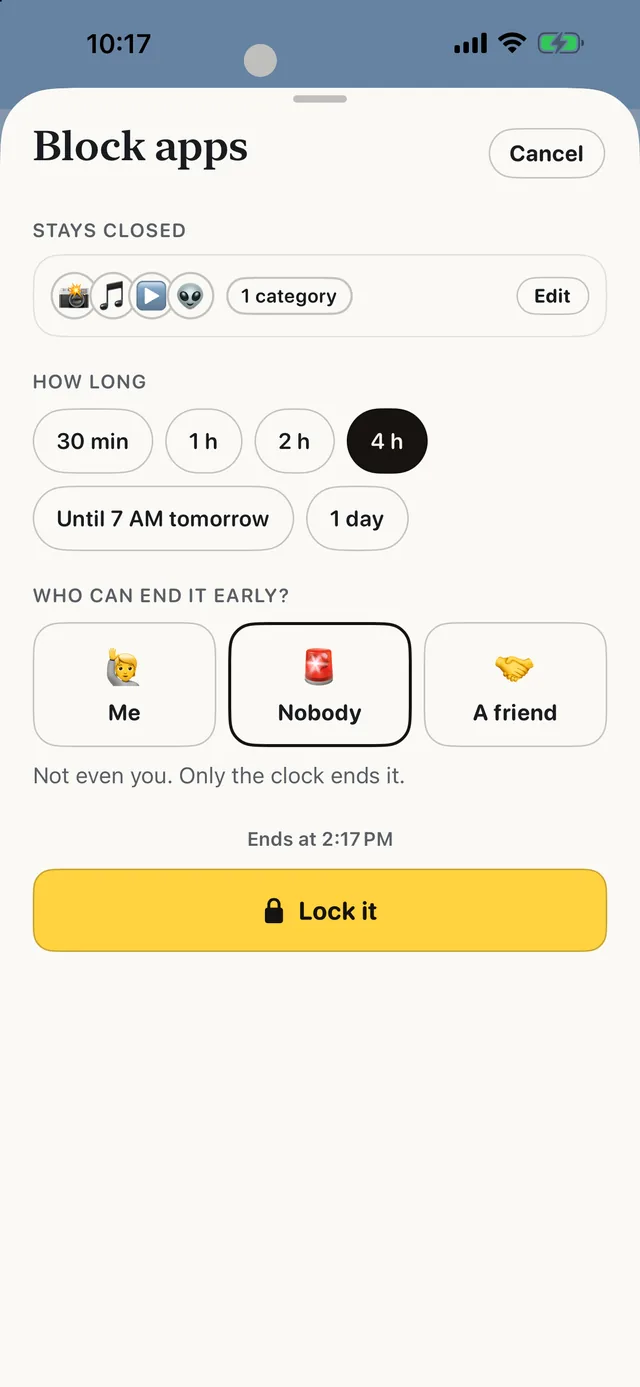
- Best for
- People who keep tapping through their own limits and want a friend to hold the key
- Highlights
- Real blocking built on Apple’s Screen Time
- The friend key: only a friend’s code ends a locked block early
- SOS for the urge, a Boredom Gym, and (from 3.0) 165 things to do instead
- No account, no server, no ads
- Pricing
- Free, with no subscription; tips are optional
- Watch out
- iPhone only, on iOS 18 or later — no Android, no Mac and no browser extension. It blocks whole apps and websites, not parts of them, so it can’t hide just Reels or Shorts.
Forest
- Best for
- People who focus better when a little tree is counting on them
- Highlights
- Stay off your phone and a tree grows; leave early and it withers
- Allow Lists for the apps you still need
- Plant with friends, and fund real trees
- Pricing
- Free download; Forest Plus subscription for more
- Watch out
- It is a focus timer you start yourself, one session at a time — and syncing your forest needs an account.
Flora
- Best for
- People who want the tree idea free, with friends keeping them honest
- Highlights
- A seed grows while you stay off your phone
- Plant together — everyone sees who killed the tree
- To-do lists and habits alongside the timer
- Pricing
- Free; optional paid real-tree services
- Watch out
- Still a timer you have to start. Nothing happens on the days you forget to plant.
Focus Friend
- Best for
- Students who would rather not make a cute bean sad
- Highlights
- A bean character who knits while you focus
- Deep Focus Mode locks distracting apps during a session
- Break timers and a room to decorate
- Pricing
- Free download; the listing gives no plan prices
- Watch out
- It works per session — there is no all-day schedule holding the line when you are not timing yourself.
Opal
- Best for
- People who want a polished blocker with schedules, limits and a game layer
- Highlights
- Scheduled blocks for apps and websites
- Daily app limits that block automatically
- Leaderboards, rewards and mindful block screens
- Pricing
- Free core app; Opal Pro subscription for more
- Watch out
- The strongest blocking modes and extras are Pro.
ScreenZen
- Best for
- People who want free friction — a wait before an app opens — rather than a hard lock
- Highlights
- A delay before a distracting app opens, growing each time
- Interrupts long scrolling sessions
- Per-app goals and day schedules
- Pricing
- Free
- Watch out
- It is friction, not a lock — a determined you can always wait it out.
one sec
- Best for
- People who want a breathing pause before one problem app
- Highlights
- A short pause every time you open a chosen app
- Backed by research collaborations
- A free Safari extension for websites
- Pricing
- Free for one app; one sec pro (annual, monthly or lifetime) for more
- Watch out
- Only one app is free, and a pause is easy to skip when you really want in.
Apple Screen Time
- Best for
- People who want built-in daily limits at no cost
- Highlights
- App limits and Downtime built into iOS
- A passcode can lock the limits
- Reports for every app
- Pricing
- Included with iOS at no extra cost
- Watch out
- “Ignore Limit” is one tap away unless someone else sets the passcode.
The honest trade-off
Forest is fun, and a blocker is not. ScrollCop has no tree, no bean and no forest to show off — it just shuts the door on the apps you picked, on the schedule you set, while calls, messages and maps stay open.
They also work fine together. Keep Forest for the study hour you choose, and let a blocker cover the hours when you would never have pressed start.
Common questions
Is the Forest app free on iPhone?
Forest is a free download on the App Store, with a Forest Plus subscription for extra features.
Does Forest actually block apps?
Forest is mainly a focus timer: a tree grows while you stay away and withers if you leave. A blocker such as ScrollCop stops the apps from opening at all during a block.
What is the best free alternative to Forest?
Flora if you want the same tree idea for free. ScrollCop if you want apps blocked on a schedule with a friend holding the key.
App Store listings checked on 12 November 2026. Prices change — each entry describes how an app is paid for rather than a number that goes stale.








 MMA.
 Trending
 Bold
 Top