Disclosure: VaultFlow is ours. The advice works with any app, or with pen and paper.
In short
Put every bill in one list with its amount, due date and how often it repeats, line the due dates up with your paydays, and get a reminder a few days before each one. Then mark each bill paid as it goes out and check the list once a month for anything new.
- One list, every bill — including the yearly ones.
- Line due dates up with paydays.
- Remind yourself before, mark paid after.
Step 1: list every bill
Go through two or three months of bank and card statements and write down every payment that repeats. For each: the name, the amount, the due date, how often (monthly, every two weeks, yearly) and which account pays it.
- Housing: rent or mortgage, property tax, condo fees.
- Utilities: power, heat, water, internet, phone.
- Insurance: car, home or tenant, life.
- Debt: car loan, student loan, card minimums.
- Subscriptions: streaming, apps, gym, cloud storage.
Step 2: put them on a bill calendar
Sort the list by due date and mark your paydays. You’ll see which bills come out of which paycheque, and where two big ones land in the same week. If a due date is awkward, many companies will move it if you ask.
Our guide to budgeting your paycheque shows how to split bills between paydays.
Step 3: set reminders
A reminder a few days before each bill gives you time to move money if you need to. Autopay helps, but still check — autopay won’t warn you when a price goes up or a card on file expires.
Step 4: mark paid and check monthly
Mark each bill paid when it goes out so you know what’s still to come this month. Once a month, compare the list with your statements: new subscriptions, price increases and bills you can cancel all show up here.
Don’t forget the yearly bills
Property tax, car insurance paid annually and yearly subscriptions are the ones that catch people out. Divide each by 12 and set that aside every month — that’s a sinking fund.
Keep track of bills with VaultFlow
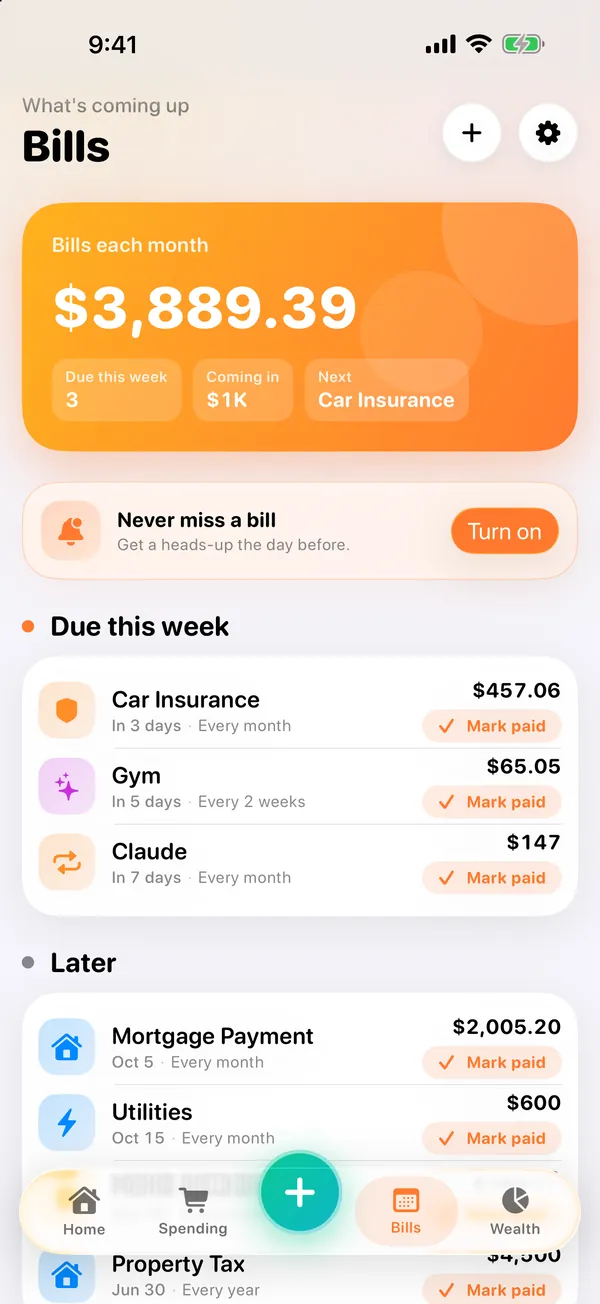
- Add each bill once. Tap +, enter the amount and set it to repeat — every month, every two weeks or every year — and it becomes a bill.
- See what’s coming. From VaultFlow 5.0, Bills shows your bills each month, what’s due this week and what’s later.
- Mark it paid. From VaultFlow 5.0, a paid bill comes off the right account — a mortgage payment pays down the mortgage — with Undo.
- Get a heads-up. From VaultFlow 5.0, a reminder one to three days before a bill is due.
VaultFlow 5.0 is in review with Apple; the version on the App Store now (3.1) already has budgets, recurring bills, goals and net worth. Free, no subscription, no bank login.
Common questions
What is the best way to keep track of bills?
One list of every bill with amount, due date and frequency, lined up with your paydays, with reminders before and a mark-paid after.
How do I keep track of bills on iPhone?
Use a bill tracker app that repeats bills and reminds you before they’re due, such as VaultFlow, or a calendar with recurring events.
How do I keep track of bills that are paid yearly?
Add them to your list with their yearly due date and set aside one-twelfth each month.
Is there a free bill tracker app?
VaultFlow is free with no subscription, and tracks recurring bills alongside your budget and net worth.
Published · No affiliate links










 MMA.socialUFC fan ratings
 TrendingPunjabiPunjabi music charts
 BoldOpinionAnonymous hot takes