Disclosure: SmartFolio is ours. Stock Events is not, and we have no deal with its makers. Both get the same four fields below, including their drawbacks.
Short answer
If you want to know what is coming — dividends, earnings calls, IPOs — Stock Events is built for that. If you want a record of what happened — every buy and sale and what you made — pick SmartFolio.
Stock Events is a portfolio tracker centred on events: a dividend calendar with ex-dividend dates, alerts before earnings calls, and home screen widgets, across 50+ exchanges. Pro adds unlimited watchlists, Excel and Google Sheets connections, a screener, custom assets and calendar sync.
SmartFolio is a ledger. Import your broker’s history and it shows every trade on each stock, the gain on each sale, and the income you’ve been paid.
Pick SmartFolio if
- You want the gain on every sale, lot by lot
- You want your full history imported from your broker
- You don’t want any of it to leave your phone
Pick Stock Events if
- You want alerts before earnings and dividend news
- You want a dividend calendar with ex-dividend dates
- You want home screen widgets
Side by side
| SmartFolio (ours) | Stock Events | |
|---|---|---|
| Price | Free — no subscription, ads or in-app purchases | Free, with a Pro subscription |
| Getting trades in | Import your broker’s export file (guides for 19 brokers) or any CSV or Excel file; convert other statements with your own AI assistant; or add trades by hand | Add holdings; Pro connects Excel and Google Sheets |
| Dividends | Income by month, year and stock, plus the next 12 months estimated | Dividend calendar, ex-dividend dates, yield on cost |
| Events | Plain-language insights on what is moving your portfolio today; no event alerts | Earnings calls, dividend announcements and IPO alerts |
| Crypto | Yes, alongside stocks and ETFs | Yes, with stocks, ETFs, funds, bonds and commodities |
The two apps in detail
SmartFolio
Ours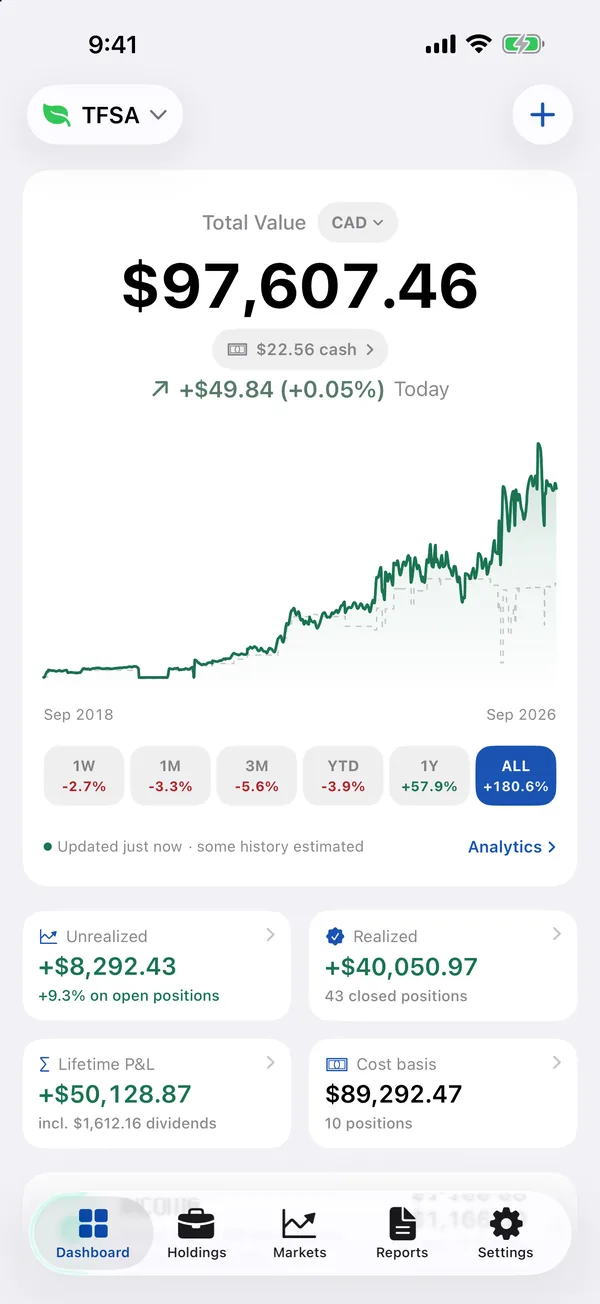
- Best for
- Investors who want stocks, ETFs, dividends and crypto in one private place — imported from their broker’s file, with no login
- Highlights
- Import from 19 brokers — Wealthsimple, Questrade, TD, Fidelity, Schwab, Robinhood and more — or any CSV or Excel file
- Every buy, sale and dividend on each stock, with the gain on every sale (FIFO, lot by lot)
- Dividend and interest income, plus an estimate of the next 12 months
- Free, with no account and no ads; data stays on the device, with CSV export
- Pricing
- Free
- Watch out
- There is no live brokerage sync — to update, you import the file your broker lets you download or add trades yourself. It needs iOS 26.2 or later, and because everything is stored on the device there is no web view.
Stock Events
- Best for
- Dividend investors who want a calendar of what is coming
- Highlights
- Dividend calendar with ex-dividend dates and payout history
- Alerts before earnings calls, dividend announcements and IPOs
- Home screen widgets and price alerts
- Pricing
- Free, with a Pro subscription
- Watch out
- Unlimited watchlists, spreadsheet connections and calendar sync are Pro.
The real difference: what’s next against what happened
Stock Events looks forward. It is best at telling you a payout or an earnings call is coming.
SmartFolio looks back and down. Every buy, sale, dividend and split stays on each stock even after you sell, trades are marked on the chart, and returns are time-weighted so deposits don’t distort them. Plenty of investors run both.
Other options
Want more than two options? Stock Events Alternatives for Portfolio Tracking compares 6 apps.
Every app of this kind we have compared is in the best stock portfolio tracker apps for iPhone.
Common questions
Stock Events free vs Pro: what’s the difference?
The app is free; a Pro subscription adds unlimited watchlists, Excel and Google Sheets connections, a screener, custom assets and calendar sync.
Does SmartFolio have a dividend calendar?
It has an Income report — dividends and interest by month, year and stock — and an estimate of the next 12 months. It does not send event alerts.
Can I import my trades into SmartFolio?
Yes, from 19 brokers’ export files or any CSV or Excel file, with a review screen before anything is saved.
Can I use both?
Yes. Many investors use a calendar app for what is coming and a ledger for what they have earned.
App Store listings checked on 29 September 2026. Prices change — each entry describes how an app is paid for rather than a number that goes stale.
Published · No affiliate links










 MMA.socialUFC fan ratings
 TrendingPunjabiPunjabi music charts
 BoldOpinionAnonymous hot takes
 brolic.ioGym leaderboards