Disclosure: VaultFlow is ours. The advice works with any app, or with pen and paper.
In short
Split your take-home pay: 50% for needs (rent, groceries, bills), 30% for wants (eating out, hobbies), 20% for savings and extra debt payments. On $4,200 a month that’s $2,100 / $1,260 / $840.
- Use take-home pay, not salary.
- Needs are what you’d pay even in a lean month.
- If needs are over 50%, cut wants first.
What counts as what
- Needs (50%): rent or mortgage, utilities, groceries, insurance, transit or car, minimum debt payments.
- Wants (30%): restaurants, takeout, shopping, streaming, travel, hobbies.
- Savings & debt (20%): emergency fund, TFSA/RRSP, extra payments on cards and loans.
When the numbers don’t fit
In expensive cities, rent alone can pass 50%. Then trim wants to keep savings going — 60/20/20 is still a plan. The rule is a starting point, not a test.
50/30/20 budget calculator
Use pay after tax and deductions. Nothing you type leaves this page.
Keep to it with VaultFlow
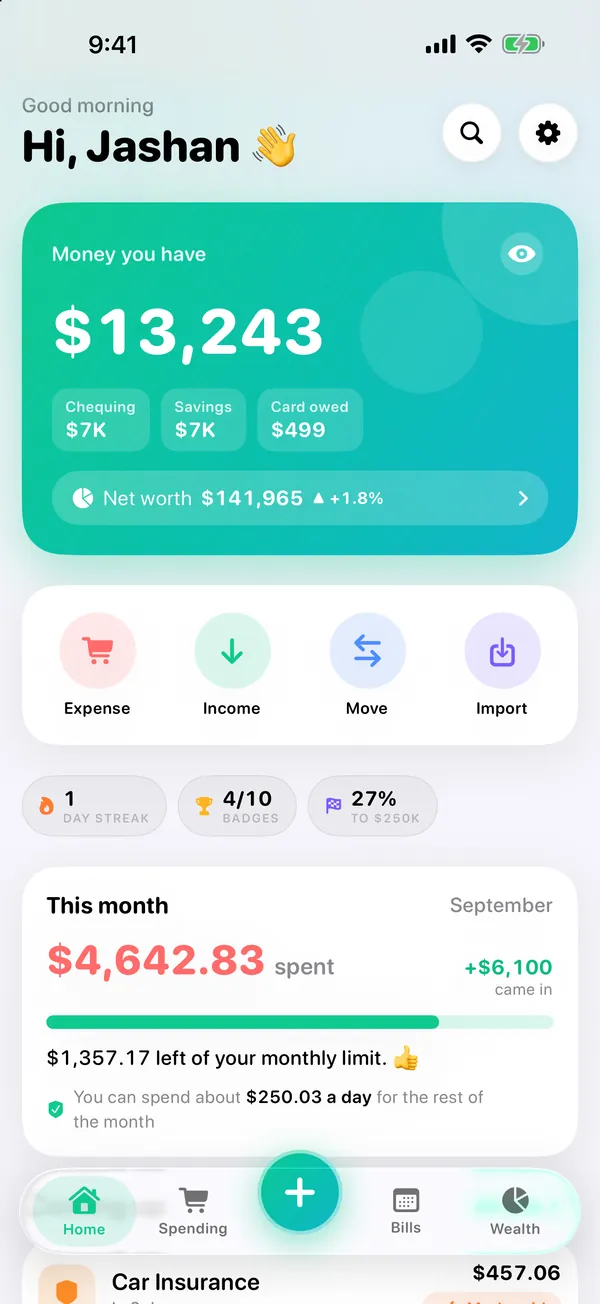
- Give each category a budget. Each category gets its own budget and colour.
- Watch the month on Home. What you’ve spent against your monthly limit, and what’s due next.
- Save toward goals. Goals show progress and how much to save a month.
- See where it went. Tap any category in Reports to see the spending behind it.
VaultFlow is free, with no subscription and no bank login, and your data stays on your device.
Common questions
What is the 50/30/20 rule?
50% of take-home pay for needs, 30% for wants and 20% for savings and debt.
Is 50/30/20 based on gross or net income?
Net — your take-home pay after tax and deductions.
What if my rent is more than 50%?
Cut wants first to protect savings; adjust the split to what’s realistic.
Is there an app for the 50/30/20 budget?
VaultFlow lets you set a budget on each category and track it against a monthly limit, free.
Published · No affiliate links










 MMA.socialUFC fan ratings
 Trending
 Bold
Bold Top
Top