Disclosure: SmartFolio is ours. Sharesight is not, and we have no deal with its makers. Both get the same four fields below, including their drawbacks.
Short answer
If you want the whole tracker on your iPhone, free and with no account, pick SmartFolio. If you already run Sharesight on the web — or your accountant does — keep Sharesight: its iPhone app is a window onto that account.
Sharesight is a web portfolio tracker known for dividend and tax reporting. Its iPhone app mirrors up to 10 Sharesight portfolios, adds a watchlist of 500,000+ securities, and locks with Face ID. The tracking itself happens in your Sharesight account.
SmartFolio is the other way round: the app is the tracker. You bring your history in from your broker’s export file, and every number is worked out on the phone.
Pick SmartFolio if
- You want the tracker on your phone, not on a website
- You don’t want an account anywhere
- You want it free, with no plan limits to upgrade past
Pick Sharesight if
- You already use Sharesight on the web
- Your accountant works from Sharesight
- You want web access from any computer
Side by side
| SmartFolio (ours) | Sharesight | |
|---|---|---|
| Price | Free — no subscription, ads or in-app purchases | Free app; needs a Sharesight account, which has paid plans |
| Account needed | None | A Sharesight account |
| Where your data lives | On your iPhone or iPad only | In your Sharesight account online |
| Getting trades in | Import your broker’s export file (guides for 19 brokers) or any CSV or Excel file; convert other statements with your own AI assistant; or add trades by hand | Set up in Sharesight on the web; the app mirrors it |
| Dividends | Income by month, year and stock, plus the next 12 months estimated | Dividends and returns from your Sharesight portfolios |
| Where you use it | iPhone and iPad (iOS 26.2 or later); no web app | Web, plus the iPhone app |
The two apps in detail
SmartFolio
Ours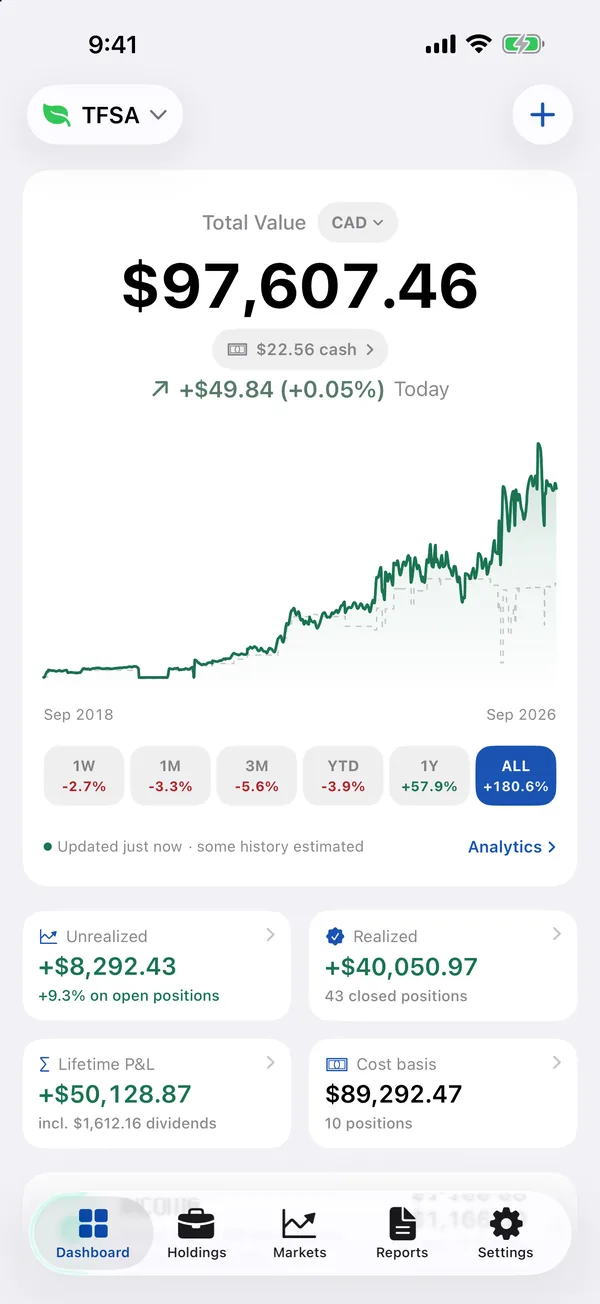
- Best for
- Investors who want stocks, ETFs, dividends and crypto in one private place — imported from their broker’s file, with no login
- Highlights
- Import from 19 brokers — Wealthsimple, Questrade, TD, Fidelity, Schwab, Robinhood and more — or any CSV or Excel file
- Every buy, sale and dividend on each stock, with the gain on every sale (FIFO, lot by lot)
- Dividend and interest income, plus an estimate of the next 12 months
- Free, with no account and no ads; data stays on the device, with CSV export
- Pricing
- Free
- Watch out
- There is no live brokerage sync — to update, you import the file your broker lets you download or add trades yourself. It needs iOS 26.2 or later, and because everything is stored on the device there is no web view.
The real difference: an app, or a window onto a website
With Sharesight, the phone shows you an account that lives on Sharesight’s servers. That is exactly right if you want your portfolio on a computer too, or share it with an accountant.
With SmartFolio, there is nothing behind the app. Your trades, dividends and gains sit on your device, the app works offline with the last known prices, and you can export everything to CSV whenever you like. The trade-off is no web version and no live broker connection.
Other options
Want more than two options? Sharesight Alternatives for iPhone Investors compares 6 apps.
Every app of this kind we have compared is in the best stock portfolio tracker apps for iPhone.
Common questions
Is Sharesight free?
The iPhone app is free to download, but it mirrors a Sharesight account, which has paid plans on the web.
Can SmartFolio import my Sharesight data?
SmartFolio imports any CSV or Excel file and checks every row before saving, so a trade export can be brought in. Its broker guides cover 19 brokers directly.
Which is better for dividends?
Both track dividends. SmartFolio adds an Income report by month, year and stock, and an estimate of the next 12 months from what you hold.
Does SmartFolio have a web version?
No. It runs on iPhone and iPad, and your data stays on the device.
App Store listings checked on 29 September 2026. Prices change — each entry describes how an app is paid for rather than a number that goes stale.
Published · No affiliate links










 MMA.socialUFC fan ratings
 Trending
 Bold
Bold Top
Top