Disclosure: VaultFlow is ours. The advice works with any app, or with pen and paper.
In short
Pick 8 to 12 spending categories, then get every expense into one place — log it as you spend, or import your bank and card statements once a week. Give the big categories a monthly budget and check once a month whether you saved and where the money went.
- Fewer categories, tracked every week.
- Import statements instead of typing everything.
- The monthly check is where it pays off.
Step 1: pick a few categories
Too many categories and you’ll give up. Start with around ten: housing, utilities, groceries, dining and drinks, transport, shopping, health, subscriptions, fun and other. You can split one later if it gets too big to understand.
Step 2: get every expense in
There are three ways, and most people mix them:
- Log as you go — a few seconds after each purchase. Best for cash.
- Import statements — download the CSV, OFX or QFX file from your bank’s website once a week.
- Link your bank — automatic, but it means sharing your banking access with a third party.
Don’t forget credit cards: most spending goes on them, so their statements matter as much as your chequing account.
Step 3: track income too
Expenses alone don’t tell you whether you’re okay. Record paycheques and other money in, so you can see what’s left over each month — that number is what actually changes your finances.
Step 4: give categories a budget
Once you’ve tracked a month or two, you’ll know what’s normal. Set a monthly limit on the categories that drift — usually groceries, dining and shopping. If you want a starting split, try the 50/30/20 budget calculator.
Step 5: read the month
Once a month, ask three questions: Did I save anything? Which category was biggest? What surprised me? Ten minutes of that is worth more than perfectly categorised receipts.
Track expenses with VaultFlow
- Log it in seconds. Tap + for money out or in. From VaultFlow 5.0 you can type amounts the way you say them.
- Or import your statement. From VaultFlow 5.0, bring in the CSV, OFX or QFX file your bank’s website gives you; duplicates are skipped.
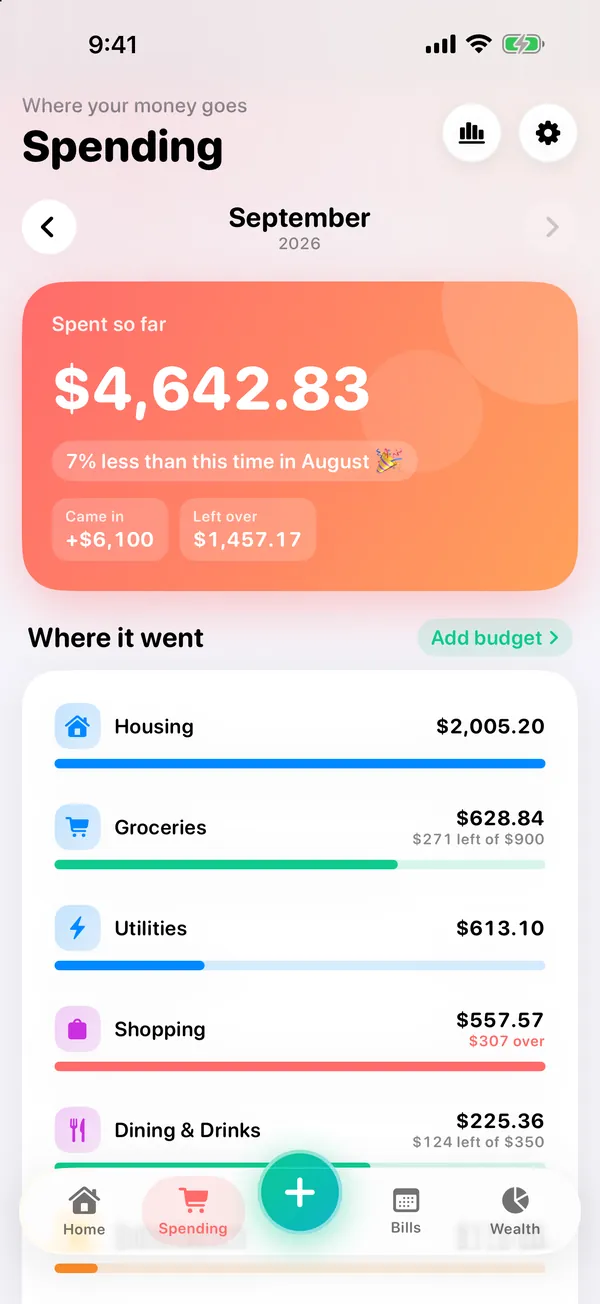
- See where it went. Spending shows the month by category with a budget bar on each. From 5.0, budgets can suggest a limit from your usual spending.
- Read the month. Reports show whether you saved; tap any category to see the spending behind it.
VaultFlow 5.0 is in review with Apple; the version on the App Store now (3.1) already has budgets, recurring bills, goals and net worth. Free, no subscription, no bank login.
Common questions
What is the easiest way to track expenses on iPhone?
Use an app with a few categories, log purchases as you go or import your statements weekly, and check the month once.
Can I track expenses without linking my bank?
Yes. Download your bank’s statement file and import it, or log expenses yourself. VaultFlow never asks for a bank login.
How many budget categories should I have?
Around 8 to 12 is enough for most people; you can split one later.
Is there a free expense tracker app for iPhone?
VaultFlow is free with no subscription, and tracks spending, budgets, bills and net worth.
Published · No affiliate links










 MMA.socialUFC fan ratings
 TrendingPunjabiPunjabi music charts
 BoldOpinionAnonymous hot takes